Microsoft has confirmed that its October Windows Server updates can gradually starve busy on-premises Exchange servers of RPC capacity, breaking Outlook on the web sign-in and leaving mail stuck in queues. The advice is to keep the patch and apply a registry change, which gives operations teams a change to manage on top of a security rollout.
What happened
On 16 October the Exchange Team published a blog post warning that some on-premises Exchange servers had become unstable after the October 2026 Windows updates went on. Later that day, US time, Microsoft added a matching known issue to its Windows release health dashboard. BleepingComputer reported on 19 October that it had been confirmed as a Windows problem, not an Exchange one.
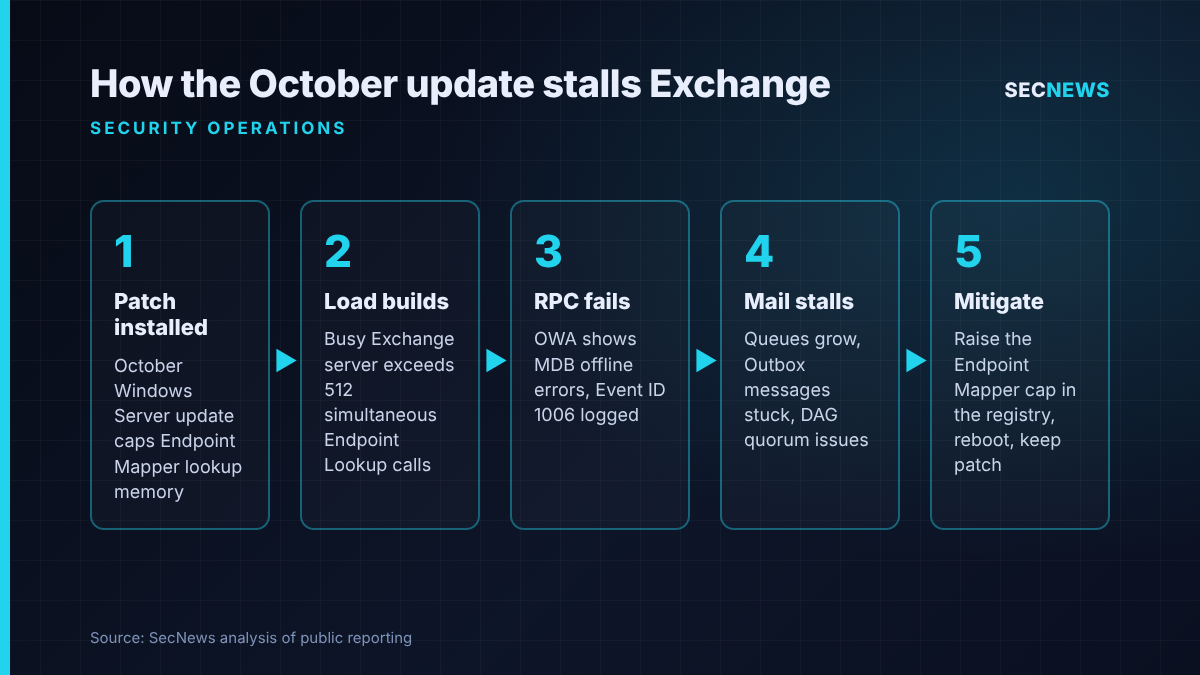
The symptoms build up gradually. Logins to Outlook on the web (OWA) start failing. Messages sit in Outlook Outboxes and are never sent. Transport queues grow during the working day until mail flow nearly stops. Some administrators report database availability group (DAG) members failing to keep quorum and problems reaching mailboxes during replication. A reboot often clears it for a while, so some teams may have spent the past week chasing an intermittent Exchange fault.
The Exchange Team’s post names four Windows updates: KB5126646 for Windows Server 2025, KB5126655 for 2022, KB5126651 for 2019 and KB5126868 for 2016. Exchange 2016, 2019 and Subscription Edition (SE) are all in scope. The October Exchange security updates are not the cause: the trigger is the operating system patch. Some coverage said Server 2019 onwards, but the release health entry also lists Server 2016.
The dashboard marks the issue as mitigated, not fixed. Microsoft says it is still investigating, and Microsoft Support for business can apply an extra mitigation.
The technical picture
The root cause is in the RPC Endpoint Mapper, the Windows service that tells a client which dynamic port an RPC interface is listening on. Exchange leans heavily on RPC between its own components and to the Information Store, so it makes a very large number of endpoint lookups on a busy server.
The October update introduced a default ceiling on the memory Endpoint Mapper uses for those lookups. That works out to 512 simultaneous Endpoint Lookup calls. Microsoft does not explain the cap, though such limits usually guard against resource exhaustion. A typical file or application server is unlikely to notice it. A heavily loaded Exchange server can hit it during the day. Once it does, new RPC connections can fail, which would explain why OWA reports the database as offline (the MapiExceptionMdbOffline error, ec=1142, with Event ID 1006 in the Application log) while the database itself is healthy.
The workaround is a registry value named EpmapSavedContextCap, a DWORD under the Rpc key in HKLM\SOFTWARE\Microsoft. Microsoft suggests setting it to 65536, rebooting and watching whether the symptoms come back, and raising it further if they do. The guidance is to raise the cap, not to remove the update.
Why it matters for UK organisations
On-premises Exchange is still common in UK local government, the NHS, universities, law firms and manufacturers, often because of hybrid identity, data residency concerns or migration fatigue.
The timing makes it worse. In its ESU announcement, updated on 13 October, Microsoft said the October release was the final set of security updates under the Exchange 2016/2019 Extended Security Update programme. From now on only Exchange SE will get fixes. Any UK organisation still on 2016 or 2019 now has a mail platform that will receive no further Exchange fixes, which makes keeping the underlying Windows Server patched all the more important. Rolling this month’s update back to get mail working again would trade a service problem for a security one.
This is the second October Windows Server change to cause authentication or connectivity trouble (we covered the NTLMv1 changes separately). Change advisory boards should expect questions about patch reliability, and some will push for longer deferral windows. On internet-facing Exchange, which attackers have targeted heavily for years, that would be the wrong lesson.
Expert view
In my experience, the patches that hurt most are those whose symptoms build up slowly, not those that fail on reboot. A server that works fine for six hours after patching passes a quick smoke test, goes into production, and starts failing at the busiest point of the next working day. Monitoring tends to report queue length or OWA availability, not “Endpoint Mapper saturated”, so the first responders look at Exchange, then at the network, and only later at the OS update.
The security trade-off is real but manageable. Raising a resource cap that Microsoft has just introduced slightly weakens whatever protection it was meant to add. Applying the workaround only on Exchange servers, at the value Microsoft suggests, keeps that exposure small. Rolling back the whole monthly update removes every fix in it. When we review patch processes, the mature teams are the ones with a written route for a “keep the patch, mitigate the side effect” decision, with an owner, a record in the change log and a date to review it once Microsoft ships a proper fix.
The incident also shows why the SOC and infrastructure teams should share telemetry. Event ID 1006 and growing queues are early warnings. If they appear in the SIEM alongside patch deployment data, the link to the update can be made in minutes, not days.
What to do now
- Do not uninstall the October Windows updates from Exchange servers. Keeping systems patched is a core Cyber Essentials control, and with Exchange 2016/2019 no longer receiving fixes, the operating system patches matter even more.
- Find affected servers. Inventory every Exchange host running Server 2016, 2019, 2022 or 2025 with the October update installed, and check the Application log for Event ID 1006 and OWA errors citing ec=1142.
- Apply the workaround through change control. Set EpmapSavedContextCap as Microsoft describes, scoped to Exchange servers only, reboot one DAG member at a time and confirm quorum before moving on.
- Watch the right metrics. Alert on transport queue length, OWA sign-in failures and Outbox complaints for at least a week after the change. If symptoms return, increase the value in steps and record each change.
- Record the exception. Log the registry change as a temporary deviation with a review date, and remove or adjust it when Microsoft releases a permanent fix.
- Check where you depend on the same component. Other heavy RPC workloads may come close to the cap. Review any servers showing unexplained RPC or DCOM failures since 13 October.
- Revisit your Exchange roadmap. If you still run 2016 or 2019, treat moving to Exchange SE or Exchange Online as a security project with a deadline, not an IT upgrade.
Bottom line
This is an operational fault, not a breach, but how teams respond to it matters for security. The right response is to keep the October patch, apply Microsoft’s targeted registry change through proper change control and watch Exchange closely until a permanent fix arrives. If a mail outage pushes an organisation into rolling back security updates on an out-of-support Exchange server, it has swapped a few hours of disruption for a much larger risk.
Sources
- Microsoft Exchange Team Blog: Exchange servers may become unstable after installation of October 2026 Windows updates
- Microsoft Learn: Windows Server 2025 known issues and notifications
- BleepingComputer: Microsoft: October Windows Server updates break Exchange sign-in, mail flow
- Microsoft Exchange Team Blog: Announcing Period 2 Exchange 2016/2019 Extended Security Update (ESU) program