Arctic Wolf has catalogued more than 400 incidents in which criminals used Microsoft Teams’ external chat to pose as the IT help desk and talk staff into handing over remote control. The technique needs no vulnerability, only a default setting most organisations never revisit, and in some cases it has ended in ransomware.
What happened
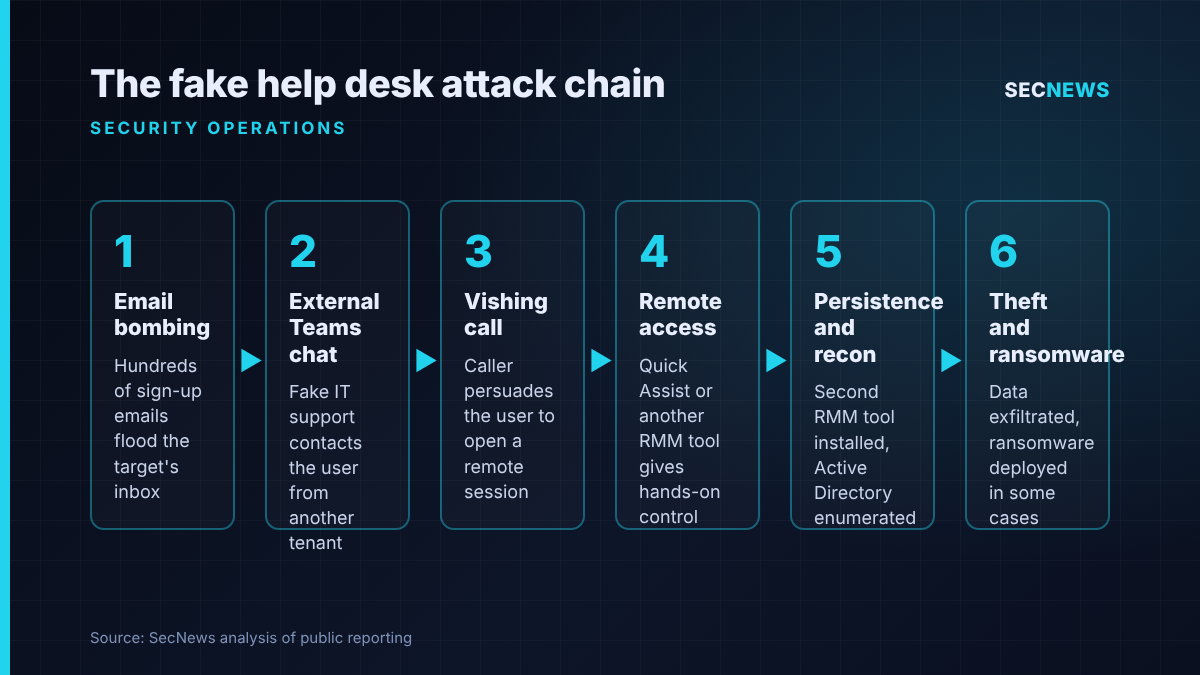
On 26 October 2026, Arctic Wolf Labs published an analysis of more than 400 incidents drawn from its managed detection customer base. Typically it starts with an unsolicited one-to-one Teams chat from an account in another Microsoft 365 tenant, presenting itself as internal IT support. In many cases the chat arrived minutes after the target’s mailbox had been buried under hundreds of newsletter and subscription confirmations, a tactic usually called email bombing. The “help desk” then offered to fix the very flood it had caused.
From there the caller moves to a Teams voice call, persuades the user to open a remote support session, and gets hands-on-keyboard access. According to The Hacker News, follow-on activity included reconnaissance, extra backdoors, a second remote management tool for redundancy, movement towards domain controllers, data theft and, in some cases, ransomware.
Arctic Wolf says the activity aligns with a cluster Sophos tracks as STAC4749. Sophos reported earlier this year that between February and June the group targeted dozens of North American organisations through Teams vishing, and that at least three of those compromises ended with Chaos ransomware.
The technical picture
Teams ships with external access, also known as federation, switched on. Unless an administrator has changed it, any user in any other tenant that also allows federation can search for your staff, message them and call them. Arctic Wolf is clear that this is abuse of a legitimate feature, not a software flaw, describing the approach as one that “exploits trust rather than a software vulnerability”.
The attacker infrastructure is cheap and quick to stand up. Between 30 and 40 per cent of the cases used the free onmicrosoft.com domain that Microsoft assigns to every new tenant, with tenant names built around words such as helpdesk, support, admin or network, sometimes followed by “365” or a number. More recently the operators have moved towards paid domains: of those seen in recent months, about half were .top registrations, around 40 per cent were .com, and a small share used country-code second-level domains such as .com.br.
Display names do most of the social engineering. Arctic Wolf highlights the habit of adding “(Internal)” to the name, even though Teams still marks the sender as external, along with friendly first names, localised wording, the victim’s own company name, and roughly 100 emoji markers in display names, which the researchers suggest may point to AI-generated personas.
Quick Assist was the most common remote tool. It ships with Windows, carries a Microsoft signature and needs nothing more than a six-digit code from the victim. AnyDesk, ScreenConnect, TeamViewer, Atera, Zoho Assist, NetSupport and LogMeIn also appeared. For persistence, operators installed a second commercial product, such as Level, so that removing the first did not evict them.
Two details matter for defenders. First, speed: attackers hit several users within about five minutes, and payload execution followed engagement in under 15 minutes. Second, evasion: operators avoid pasting links into chat, where Safe Links and zero-hour auto purge would inspect them, and instead browse to payloads themselves once they control the screen. In one chain the victim was told to run a PowerShell command that fetched an installer from Azure Blob Storage, which unpacked an encrypted loader and a Python implant that queried Active Directory for every user and computer object and sent the results out.
Why it matters for UK organisations
Teams is the default collaboration platform across much of UK government, the NHS, local authorities, universities and the mid-market. In my experience, very few of those tenants have ever moved away from open federation, because external chat with suppliers and partners “just works” and nobody wants to be the person who broke it.
The technique also exploits a gap in how we train staff. Years of phishing awareness have taught users to distrust email. A message that appears inside Teams, with a plausible name and an urgent problem already visible in their inbox, sidesteps that conditioning. Staff who would never click a link in an unexpected email may happily read out a six-digit code to a friendly voice that claims to be from IT.
The chain also lands on tools many organisations already permit, so the attacker’s key step can look like routine IT activity.
Expert view
This is a detection story as much as a prevention one, and that is what I find most useful about the research. Arctic Wolf says its alerts most often fire on the Teams ChatCreated event, before the user has done anything. That is a rare luxury: a clear, early signal that sits upstream of the human decision.
The catch is that the alert is only valuable if it is correlated and acted on quickly. When we test help desk processes, the weak point is rarely the technology; it is the absence of a verification step that the impersonator cannot complete. A SOC that treats an external chat from a new tenant with an IT-themed name, arriving shortly after a mail flood, as low priority may find a Kerberoasting alert already firing alongside it, as Arctic Wolf observed.
Do not lean on message scanning either. With links kept out of the chat, endpoint and identity telemetry, such as remote tool launches and unusual LDAP enumeration, carry far more weight.
What to do now
- Restrict external access. In the Teams admin centre, switch from allowing all external domains to an allow-list of partners you actually work with. Block chat with unmanaged and consumer Teams accounts, and stop unmanaged users from starting conversations. This maps directly to the Cyber Essentials secure configuration control.
- Block trial tenants. Use the tenant federation setting for trial tenants to refuse contact from them, since attackers favour free and trial tenants.
- Let security manage blocked domains. Enable the option that allows the security team to push Teams domain blocks through the Defender Tenant Allow/Block List, and feed in published indicators.
- Control remote tools. Remove Quick Assist where it is not used or limit it to IT roles, and block unsanctioned RMM products through application control. Alert on any remote tool not deployed by IT (Cyber Essentials: malware protection and user access control).
- Hunt and correlate. Link ChatCreated events from unfamiliar tenants with mail-flood indicators, remote tool execution and directory enumeration on the same user or host.
- Fix the process. Require out-of-band verification, such as a callback to a registered number, before any remote session. Tell staff exactly how real IT contacts them, and make the Teams report function easy to find.
Bottom line
Fake help desk calls over Teams were first documented in Microsoft’s 2024 reporting on Black Basta, yet still work at scale because external access stays open by default. The fix is mostly configuration and process. Close federation down to known partners, treat unsanctioned remote tools as an incident, and make sure the first external chat triggers an alert someone actually reads.