DreamHost has forced email and FTP password resets after an incident it still has not explained, and it has told customers to look for forwarding rules they did not set up. UK small businesses on shared hosting should treat it as a free rehearsal for the day their own provider sends the same email.
What happened
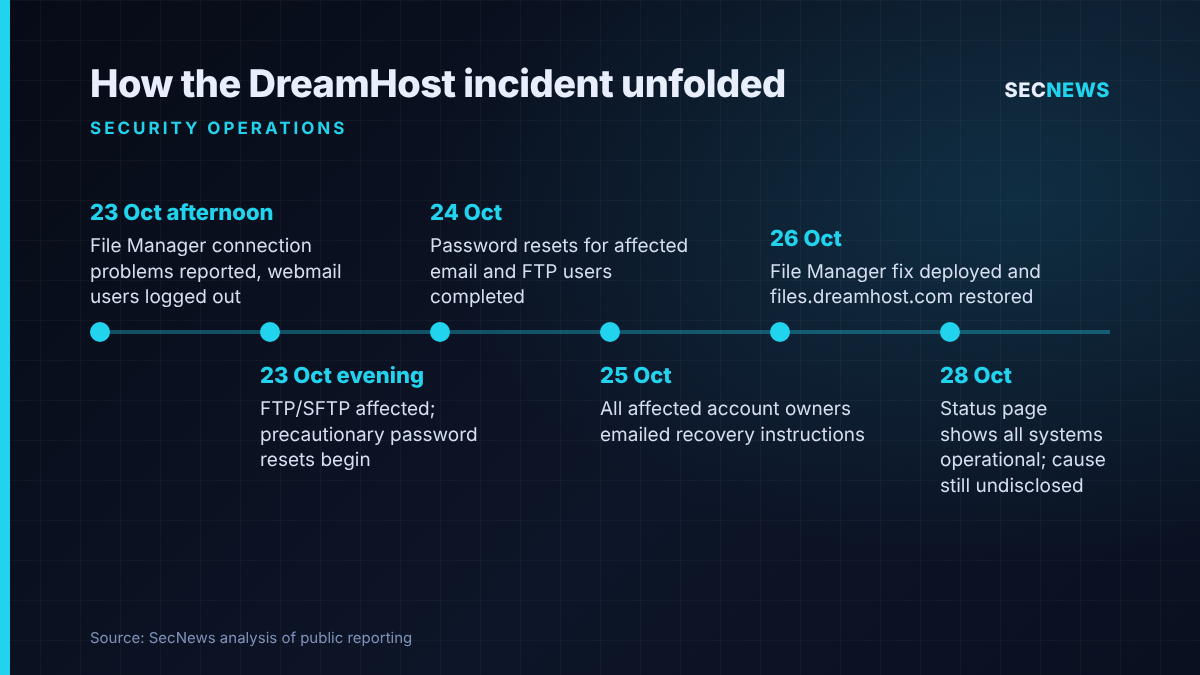
US web host DreamHost first reported a problem on the afternoon of Friday 23 October 2026, when its engineers began investigating connection problems with the File Manager interface. Within hours several services were affected. The File Manager at files.dreamhost.com went offline, and some webmail users found themselves logged out or hit login errors.
By that evening the company had linked the problem to FTP and SFTP access as well and started forcing password changes. In a status update reported by SecurityWeek, DreamHost said: “As a precaution, we are resetting passwords for some email and FTP/SFTP users.” Customers were asked not to change passwords themselves in the meantime, because any change made before the reset finished would be overwritten.
According to Help Net Security, the resets were finished on 24 October, and by the evening of 25 October DreamHost said every affected account owner had been emailed. On Monday 26 October it shipped a fix for the File Manager and restored access while it kept monitoring. When secnews.co.uk checked the DreamHost status page on the morning of 28 October, it showed all systems operational, including email hosting, webmail and the File Manager.
The open questions are more important than the timeline. DreamHost has not said what caused the incident, how many customers were affected, or whether any files or messages were accessed. BleepingComputer says it asked for those details several times and had no reply when it published. DreamHost says it serves more than 400,000 customers across over 100 countries and at least 1.5 million hosted sites and applications.
The detail
Three details in DreamHost’s notices to account owners stand out.
First, account owners were told to check every mailbox for forwarding rules and remove any destination they did not recognise. BleepingComputer noted that the advice suggests some mailboxes may have been exposed, although DreamHost has not confirmed this. Owners were also told that anyone who had reused the old password elsewhere should change it there too.
Second, the reset lands on the account owner, not the end user. DreamHost told owners it has no way of reaching individual mailbox or FTP users, so those people may be unaware until the owner tells them. Staff stayed locked out until whoever holds the DreamHost login set new passwords and passed them on.
Third, the way it was communicated caused friction of its own. Customers posting on Reddit complained that the reset emails explained little and arrived late. One long-time customer quoted by BleepingComputer said it was “very frustrating that user community has to guess”. DreamHost added a warning to each update that it will never email customers asking for their password, which is sensible when a real reset notice and a phishing lure look so alike.
Why it matters for UK organisations
Many UK micro-businesses, charities, parish councils and small agencies run their website, email and file transfer from a single shared hosting account, often with a US provider picked years ago for price. In those organisations the “account owner” is often a founder, an office manager or a web designer who left long ago.
There is a regulatory clock too. Under UK GDPR, a customer whose mailboxes hold personal data is normally the controller, and the host is a processor. If you conclude that a personal data breach has probably happened, the 72-hour window for telling the Information Commissioner’s Office runs from when you became aware of it, not from when your provider finishes investigating. A vague notice from a supplier is no reason to put off your own assessment.
Forwarding rules are also a familiar route to invoice fraud. A rule that quietly copies mail outside lets someone watch supplier conversations and time a request to change bank details. In a business email compromise, the forwarding rule is often the first sign anyone notices, and it can still be running after the password has been changed.
Expert view
In my experience, a precautionary mass reset is a reasonable containment step but rarely the end of the story. A reset stops someone logging in with a password they may have seen. It does nothing about persistence they set up while they had access: forwarding rules, extra mailboxes, FTP accounts, changed files in a web root or a dropped script waiting to be called.
When we review small organisations after an incident like this, the technical work is usually the easy part. What slows things down is not knowing who holds the hosting login, where the recovery email address goes, which staff use which mailbox, and whether the website files have been backed up anywhere outside the hosting account. None of that depends on DreamHost’s root cause.
I would also be cautious about filling the information gap with guesses. Until DreamHost publishes a cause, treat the incident as a possible credential exposure for email and FTP, and verify your own estate.
What to do now
- Find your account owner. Confirm who holds the primary login for every hosting, domain and email account, that their recovery email and phone number are current, and that a second named person can act if they are unavailable. This maps to Cyber Essentials user access control.
- Check every mailbox for rules. Look for forwarding, redirect and auto-delete rules, at both the hosting control panel level and in each mail client. Remove anything you cannot explain.
- Set new, unique passwords and turn on MFA. Give each mailbox and FTP account its own strong password from a password manager. Change any reused passwords elsewhere, and enable multi-factor authentication on the hosting control panel and anywhere else it is offered.
- Retire plain FTP. Use SFTP only, remove FTP users you no longer need, and restrict access by IP address where your host allows it. This fits the Cyber Essentials secure configuration control.
- Check your website files. Compare the web root against a known good backup, look for recently modified or unfamiliar files, and confirm that a copy of your site and database is kept outside the hosting account.
- Make a decision on reporting and record it. If personal data in mailboxes or files may have been accessed, assess the risk against the ICO’s breach reporting criteria within 72 hours, and note your reasoning even if you decide not to report.
- Warn staff about lookalike emails. Real reset notices invite fake ones. Tell staff that nobody will ask them for a password by email and that reset links should be checked through the provider’s own portal.
Bottom line
DreamHost’s services are back up, but the explanation is still missing. Whatever caused it, the lesson for UK small organisations on shared hosting is the same: know who controls the account, look for the persistence a reset leaves behind, and make your own data protection decision instead of waiting for the provider’s.