Apple’s 27.2 release cycle fixes 286 vulnerabilities across iPhone, iPad, Mac and its other platforms, and it also sends a patch for an exploited CoreGraphics zero-day to iPhones too old to run iOS 27. If your organisation manages Apple devices, set new minimum OS versions now and track down the older handsets that are easy to forget.
What happened
On 26 October 2026 Apple pushed out a coordinated set of security updates: iOS and iPadOS 27.2, macOS Golden Gate 27.2, tvOS 27.2, watchOS 27.2, visionOS 27.2 and Safari 27.2. Older branches got iOS 26.7.2, macOS Tahoe 26.7.2, macOS Sequoia 15.8.2 and iOS 18.7.11. SecurityWeek counts 286 distinct vulnerabilities fixed across the newest releases. Apple’s advisory for macOS Golden Gate 27.2 alone lists 263 CVE entries, and the iOS and iPadOS 27.2 advisory lists 163, so the two overlap heavily.
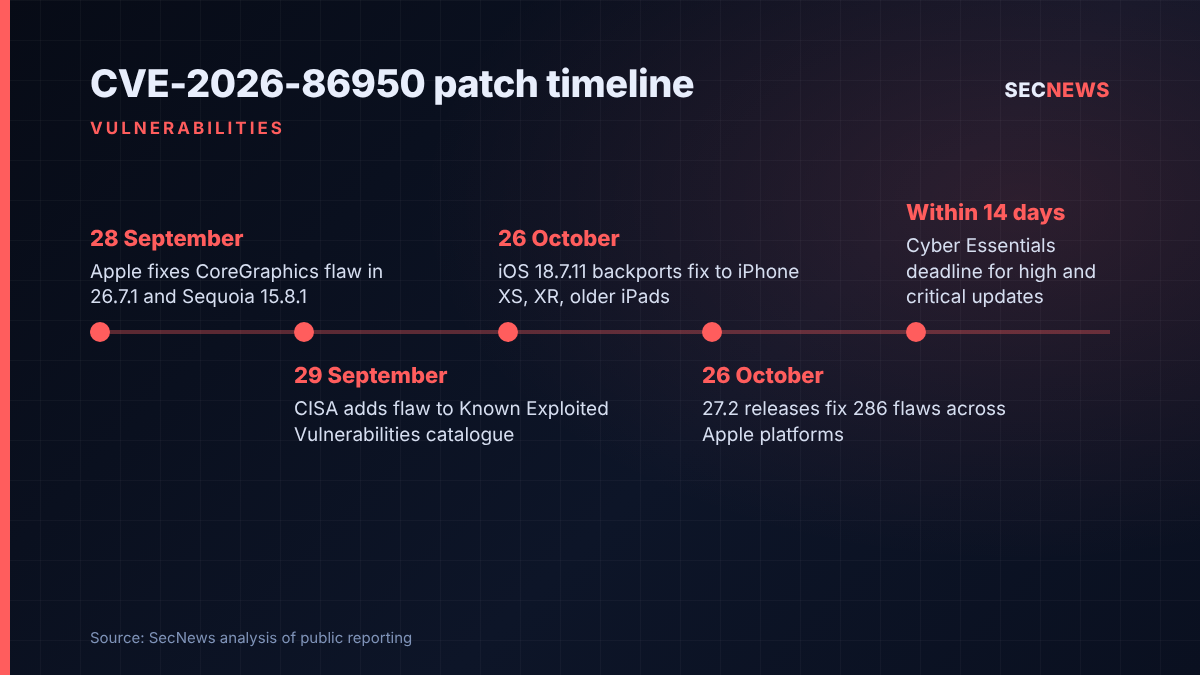
The update that matters most is the smallest one. iOS and iPadOS 18.7.11 contains just three fixes, and one of them is CVE-2026-86950. This is an out-of-bounds write in CoreGraphics, the framework Apple devices use to render 2D graphics, text and images. Meta Product Security found it. Apple says the bug may have been abused in what it calls an “extremely sophisticated attack” against particular targeted individuals, all running releases older than iOS 27.
The bug is not new. Apple first fixed it on 28 September in the 26.7.1 releases for iPhone, iPad and Mac Tahoe, plus Sequoia 15.8.1, and according to The Hacker News CISA added it to its Known Exploited Vulnerabilities catalogue the next day. The news this week is cover for devices that never got past iOS 18, such as the iPhone XS, XS Max and XR and several older iPads. Until 26 October those devices had no fix for a flaw known to be used in real attacks.
The technical picture
An out-of-bounds write happens when code writes data past the end of the memory buffer it was given. In a component that parses attacker-supplied files, that is a classic route to code execution, and Apple says a booby-trapped file is the trigger. Neither Apple nor Meta has said how the attacks were delivered, who was targeted or whether the bug was chained with others. In the past this sort of Apple wording has usually pointed to spyware-style operations, not mass exploitation.
The other two 18.7.11 fixes cover CoreMedia (CVE-2026-86990), where a malicious app could reach the camera without permission, and Audio (CVE-2026-65339), where an app could leak user data.
On the Mac, the Golden Gate 27.2 advisory covers a string of Gatekeeper bypasses, including one triggered by a crafted ZIP archive, plus kernel memory corruption and privilege escalation issues. The one I would read twice is CVE-2026-112427 in Remote Management. Apple says a remote attacker may be able to achieve arbitrary code execution because of an authentication issue that it has addressed with improved state management. Several Screen Sharing Server bugs sit alongside it, including one that lets a hostile peer create arbitrary symlinks as root, one that lets a holder of the legacy VNC password copy files onto the Mac, and memory corruption reachable from the local network. On the iOS side, WebKit gets multiple memory corruption fixes, some of which Apple says could lead to code execution from malicious web content, plus a fix for a media format that should have been blocked in Lockdown Mode.
Apple has not flagged any 27.2 flaw as exploited, and its wording indicates the CVE-2026-86950 attacks hit only releases before iOS 27.
Why it matters for UK organisations
Apple hardware is now standard in many UK estates: executive iPhones, design Macs, shared iPads in retail, healthcare and education, and plenty of personal kit on bring-your-own-device schemes. Older devices pile up in those last two groups. A shared iPad on a ward, or a director’s spare iPhone XR, is unlikely to be on iOS 27.
Cyber Essentials sets a clear bar here. In-scope devices must run supported software, and high or critical security updates must be applied within 14 days of release. BYOD devices that access organisational data or services are in scope. An exploited code execution flaw clears that threshold easily. The iOS 18.7.11 release starts the clock for older devices, while the 27.2 and 26.7.2 builds do the same for everything else.
The Mac Remote Management and Screen Sharing fixes have an operational side too. Many UK IT teams and managed service providers use Apple Remote Desktop or built-in screen sharing to support remote staff. Where those services are on, the remote code execution and VNC fixes belong in the first patch wave.
For people at higher risk of surveillance, such as executives, journalists and politicians, Apple’s “targeted individuals” can include people in the UK. Lockdown Mode is designed for that threat model, and this release fixes a WebKit gap in it.
Expert view
In my experience, the patch that catches organisations out is rarely the headline release. It is the quiet backport for devices nobody thinks about. When we run device reviews, the iOS estate usually looks healthy because MDM shows most phones on the current major version. The exceptions are old handsets enrolled years ago, shared tablets and personal phones that only touch Outlook. That is where a backported zero-day fix earns its keep.
Apple’s disclosure remains thin, so defenders have little to hunt for. Patching is the control that works here.
On the Mac, the number of Gatekeeper bypasses fixed in a single release stands out. Gatekeeper is one of the main barriers between a downloaded file and execution, and several bypasses in one cycle suggest that boundary is under real pressure. Organisations relying on it alone, with no application control or EDR on their Macs, should take note.
What to do now
- Find your pre-iOS 27 devices. Run an MDM report for anything on iOS or iPadOS 18.x or 26.x. Push 18.7.11 or 26.7.2 respectively, and set a deadline inside the Cyber Essentials 14-day window (security update management).
- Raise minimum OS versions. Use conditional access or MDM compliance rules to block access to email and cloud services from devices below the patched builds, including BYOD.
- Prioritise Macs with remote access enabled. Patch to macOS Golden Gate 27.2, Tahoe 26.7.2 or Sequoia 15.8.2 first on machines with Remote Management or Screen Sharing turned on. Disable those services where they are not needed (secure configuration).
- Retire legacy VNC passwords. Where screen sharing must remain, remove the legacy VNC password option and restrict access to named administrators (user access control).
- Plan for devices that cannot update. Hardware stuck on iOS 18 is likely nearing the end of Apple’s support. Budget to replace it, because unsupported devices fall outside Cyber Essentials.
- Brief high-risk users. Make sure executives and other likely targets update promptly, and consider enabling Lockdown Mode on their devices.
Bottom line
The 286-flaw total grabs attention, but the important point is narrower. An exploited CoreGraphics bug now has a fix for older iPhones and iPads that were unprotected for a month. Patch those devices first, then work through the Mac remote access fixes, and use this cycle to remove hardware that will soon get no updates at all.
Sources
- Apple: About the security content of iOS 18.7.11 and iPadOS 18.7.11
- Apple: About the security content of iOS 27.2 and iPadOS 27.2
- Apple: About the security content of macOS Golden Gate 27.2
- SecurityWeek: iOS, macOS 27.2 Patch 286 Bugs; Fix for Exploited Flaw Backported to iOS 18
- BleepingComputer: Apple backports CoreGraphics zero-day patches to older iPhones
- The Hacker News: Apple patches CoreGraphics flaw possibly exploited in targeted attacks