Since at least 10 September, attackers have been planting web shells on self-hosted Nextcloud servers through a command injection bug in Collabora’s built-in document editing app. The fix shipped on 11 September, but the CVE only appeared on 14 October, so scanners driven by CVE data had nothing to flag.
What happened
Collabora has published an advisory for CVE-2026-110447, a critical remote code execution flaw in Nextcloud’s optional “Collabora Online – Built-in CODE Server” app, distributed under the package name richdocumentscode. The bug needs no login, and the CVE record itself confirms attacks through September and into October 2026. Severity is listed at 9.2.
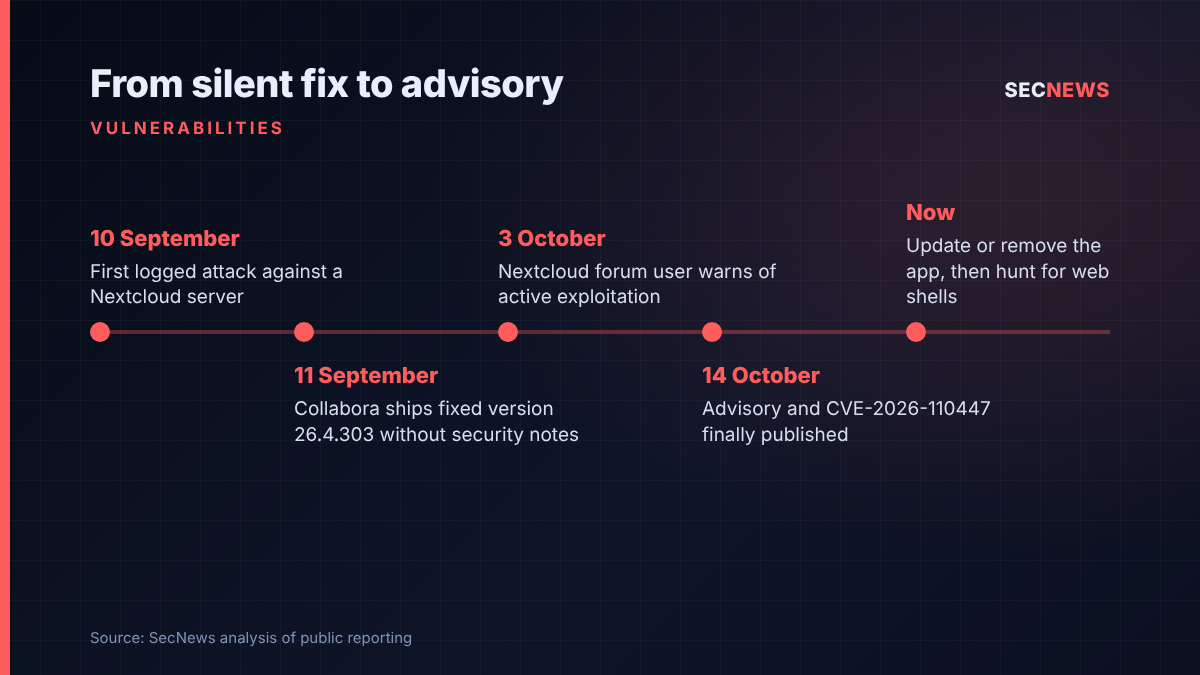
The first sign of trouble came from administrators rather than the vendor. Three people running Nextcloud reported compromises in the project’s GitHub issue tracker, the earliest logged malicious request dated 10 September. Collabora released version 26.4.303 the following day, with release notes that mentioned only the bundled CODE build and said nothing about security. On 3 October a Nextcloud forum user posted an urgent plea to update, noting the bug was already under attack with no warning or CVE in sight. The formal advisory, the NVD entry and GitHub advisory GHSA-g3vx-3m76-fghh followed on 14 October, with press coverage starting the same day.
That gap matters. Anyone relying on CVE feeds or scanners to decide what to patch had about five weeks in which those tools showed nothing.
The technical picture
The richdocumentscode app exists so that Nextcloud Office can edit documents without a separate Collabora server. It pulls down Collabora Online Development Edition (CODE) and launches it locally on the Nextcloud host. The app store listing pitches it at testing, personal use and small teams, but in practice it is the easy option for anyone wanting online editing in a hurry.
The weakness sits in proxy.php, a standalone PHP script inside the app folder that the web server executes directly, without loading the rest of Nextcloud. When a request arrives and the local CODE server is not running, the script builds a shell command to start it. In versions up to 26.4.302, parts of the incoming request were placed inside that command without safe handling, so specially crafted input could be interpreted by bash. The command runs as the web server account.
There is an important precondition: the vulnerable code path is only reached while the CODE server is down, for example after a container restart, a Nextcloud upgrade or a crash. That narrows the window, but hardly closes it. Collabora’s fix, a four-line change, passes the start command as a single escaped argument so the shell no longer expands request text.
According to the reports collected by The Hacker News, the attackers dropped a tiny PHP web shell inside the app directory, tried to send basic system details to a public webhook service and, on at least one server, searched for KeePass databases, password manager data and cryptocurrency wallet files. None of the published reports show the intruders gaining root, and the reviewed logs did not show bulk file exfiltration, but anything readable by the web server user should be treated as exposed.
Scope is limited to this deployment model. Standalone Collabora Online servers, Docker and Linux package installs and hosted Collabora services are not affected. Collabora is also clear that disabling the app does not help, because proxy.php remains reachable on disk: the app needs updating to 26.4.303 or later, or removing entirely. Collabora’s fix for CVE-2025-66208, an earlier injection bug in the same script disclosed last December, does not protect against this one.
Why it matters for UK organisations
Nextcloud has become a popular choice in the UK for organisations that want file sharing and collaboration under their own control, for data residency, cost or independence from the big US platforms. Universities, schools, councils, charities, law firms and small businesses run it, often on a single virtual machine looked after by a small team or an outsourced provider. Those are exactly the environments where the built-in CODE app tends to be switched on because it saves standing up a second server.
Under UK GDPR, a web shell on a file sharing server holding personal data is likely to be a reportable incident. If you find evidence of compromise, the 72-hour clock for notifying the ICO runs from when you become aware, not from when the attacker got in. Organisations in scope of NIS, or preparing for the Cyber Security and Resilience Bill, should consider service impact too.
The disclosure timeline is the other UK lesson. It shows how an open source fix can land quietly, leaving defenders blind while anyone watching the code could spot the change.
Expert view
In my experience, the riskiest services on a network are the ones nobody thinks of as internet-facing infrastructure. Nextcloud gets treated like an application, but it is a public web server holding some of the most sensitive files an organisation has. When we test these deployments, we regularly find optional apps that were enabled during a pilot and never revisited, and that is precisely how something labelled for testing ends up in production.
The detail that “disable” is not enough deserves attention. Many administrators assume that switching an app off in the admin panel removes its attack surface. Here the vulnerable script lives on disk and is served directly by the web server, so it stays reachable.
Finally, the five-week gap between the fix and the advisory is a reminder that scanning for CVEs is necessary but not sufficient. Following vendor forums, issue trackers and release notes for the handful of platforms that really matter to you is still part of the job.
What to do now
- Find every instance. Check whether richdocumentscode, shown as “Collabora Online – Built-in CODE Server” in the app list, is installed on any Nextcloud server you or your suppliers run.
- Update or remove it. Move to 26.4.303 or later, or uninstall the app. Do not rely on disabling it. Nextcloud 29 and older cannot take the fixed version, so upgrade Nextcloud or remove the app (Cyber Essentials: security update management).
- Hunt before you relax. Run Nextcloud’s integrity check and look for unfamiliar PHP files in the app folder, particularly short random names beginning with “shx”, although other names have since been reported. Review web logs back to at least 10 September for odd requests to proxy.php, and look for failed sudo attempts by the web server account.
- Assume exposure if compromised. Rotate credentials, API keys and secrets the web server account could read, and treat the host as untrusted until rebuilt. Assess whether an ICO notification is required.
- Reduce the blast radius. Run Collabora as a separate service, restrict outbound connections from the Nextcloud host, and make sure the web server account cannot read anything it does not need (Cyber Essentials: secure configuration, firewalls).
- Watch more than CVE feeds. Subscribe to release notes and security channels for critical self-hosted platforms.
Bottom line
CVE-2026-110447 is a narrow bug with a wide lesson. If you run the built-in CODE app on Nextcloud, patch or remove it today and then check for web shells, because attackers had a month’s head start before the advisory existed.
Sources
- NIST NVD: CVE-2026-110447
- Nextcloud community forum: To Collabora Built-in User: Update ASAP
- The Hacker News: Hackers Backdoor Nextcloud Servers Through Critical Flaw in Collabora’s Built-in CODE App
- SecurityOnline: Critical Nextcloud Collabora Online Flaw CVE-2026-110447 Actively Exploited in the Wild
- ITdaily: Attackers exploit vulnerability in built-in Collabora server for Nextcloud
- CyberPress: Hackers Exploit Critical Nextcloud Collabora Flaw to Execute Remote Commands