An automated campaign Wiz Research calls Gheist is using stolen GitHub tokens to make victims’ own CI pipelines print their secrets, then quietly removing the evidence. Public repositories have largely escaped, but private and enterprise estates have not, and the clean-up is a job for the SOC as much as the developers.
What happened
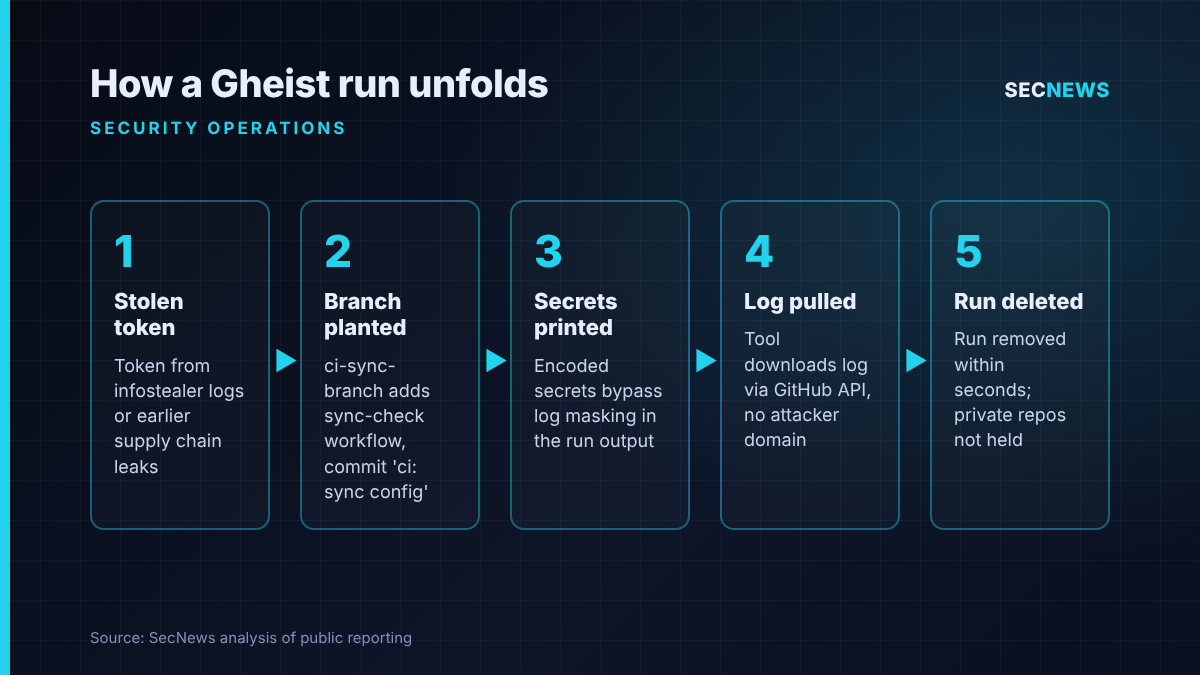
On 25 October 2026, Wiz Research published details of a campaign it has tracked since 15 September. Gheist, named after the user agent its tooling sends with every GitHub API request, takes compromised GitHub tokens and pushes a small workflow called sync-check into every repository each token can reach. That workflow writes the repository’s secrets into its own run log. The tool then downloads the log via the API and deletes the run within seconds.
Wiz counts upwards of 13,500 planted branches belonging to over 850 compromised accounts, including enterprise private repositories. As of 24 October the activity was still running and still changing. Wiz reported it to GitHub, and around two-thirds of the implicated accounts are no longer available on the platform, which Wiz says likely reflects response activity following its report.
Since 28 July 2026, GitHub has paused suspicious workflow runs in public repositories pending sign-off by a collaborator who holds write access. Every public Gheist run Wiz examined was stuck waiting for that approval, so the payload never executed. GitHub’s own changelog is explicit, though, that the hold currently applies only to public repositories on github.com and not to GitHub Enterprise Server. In private repositories and enterprise environments, Wiz saw runs complete, get deleted, and in some cases lead on to cloud activity.
The technical picture
In every repository it reaches, the tool opens a fresh ci-sync- branch with a random six-character suffix, adds one workflow file under the commit message ci: sync config, and lets the push event start the job.
Three design choices let it slip past the controls teams usually rely on. First, GitHub only masks a secret in a log when the exact value appears, so encoding the values first defeats the masking. Second, locking down the job’s built-in token does not limit what the workflow can read from the secrets context. Third, where repositories use deployment environments, one version of the tool enumerates them so that environment-scoped secrets, frequently the production ones, are exposed too. The stolen data never touches attacker infrastructure: it is collected over GitHub’s API, so a proxy or firewall has nothing suspicious to block.
Wiz describes two toolsets running in parallel, distinguishable by the branch suffix format. The more developed one gained a separator marker on 19 October and then a second job aimed at self-hosted runners. That job tries to sweep the host for keys, tokens and cloud and Kubernetes credentials. Wiz says it is buggy and misses several targets, but the intent is clear.
In enterprise organisations the researchers saw tokens belonging to several people and service accounts used in rapid succession, private code cloned ahead of the planted workflow, and, some hours afterwards, that organisation’s cloud credentials being used to list AWS Secrets Manager entries.
Wiz traces likely credential sources to infostealer logs and to tokens exposed in earlier supply chain incidents such as the Trivy compromise in March, and found the same accounts abused by other actors. It is explicit that Gheist is not GhostAction, a separate operation with its own workflow files and exfiltration server.
Why it matters for UK organisations
Many UK organisations that build software, from fintechs and SaaS start-ups to public sector digital teams and their suppliers, keep cloud keys, registry credentials and deployment secrets in GitHub Actions. Many of those repositories are private, exactly where GitHub’s safeguard stops.
The detection gap is the bigger issue. A Gheist run is deleted seconds after it finishes, and the data leaves over a trusted channel. If your security operations centre is not ingesting GitHub audit logs, it will not see the run at all. If it is not correlating cloud role assumptions with the branch that triggered them, it will miss a signal Wiz says reveals the attack even without GitHub telemetry.
For organisations working towards Cyber Essentials, this sits squarely within secure configuration and user access control. A personal access token with broad repository scope on a developer laptop infected by an infostealer is an access control failure, not just a developer hygiene issue.
Expert view
In my experience, CI/CD remains the least monitored privileged system in most estates. When we test build pipelines, we routinely find long-lived personal access tokens with organisation-wide reach, cloud trust relationships that accept any branch, and self-hosted runners that are persistent, over-privileged and sitting on internal networks. Gheist exploits all three, and it does so without a single vulnerability.
What I find instructive is how much GitHub’s approval hold achieved where it applied: none of the public runs Wiz checked had executed. That is a strong argument for gating workflow execution on trust rather than relying on log masking or network egress controls. Private repositories need equivalent friction, which environment protection rules and scoped OIDC trust can largely provide.
Rotating cloud secrets, investigating token owners’ endpoints and rebuilding runners is incident response, and it needs a named owner.
What to do now
- Hunt in GitHub. Query for ci-sync- branches carrying a six-character suffix where the sole change is a new sync-check.yml workflow committed as ci: sync config. In audit logs, flag runs on those branches removed within roughly a minute of completion, plus any API calls identifying as gheist.
- Hunt in the cloud. Where workflows use OIDC, search AWS, Azure or GCP audit trails for role or token exchanges whose subject names a ci-sync- branch. This can catch the attack without GitHub telemetry, provided the OIDC subject carries the branch name.
- Check self-hosted runners for the files .gdmp_pat, .gdmp_patg or .gdmp_sweep, and for gdmp-pivot markers in job output. Any runner that executed a ci-sync branch, and the cloud role attached to it, should be handled as compromised.
- Rotate, do not just delete. For any affected repository, rotate every repository, organisation and environment secret it could access. Removing the branch or run does not undo the exposure.
- Revoke and investigate tokens. Kill every token used to push the planted commits and examine the owners’ machines for infostealer infection (Cyber Essentials: malware protection).
- Harden for the long term. Put mandatory reviewers in front of environments holding production secrets, limit OIDC trust to protected branches or environments, swap personal access tokens for GitHub Apps or brief-lived fine-grained tokens, and make self-hosted runners disposable, with no Docker socket or open metadata access (Cyber Essentials: secure configuration and user access control).
- Feed GitHub audit logs into your SIEM and alert on runs deleted moments after completing. Never approve held sync-check runs.
Bottom line
Gheist is not clever, but it is efficient: stolen tokens, a one-file workflow and a deleted log are enough to empty a private repository’s secrets store. GitHub’s approval hold shows that gating execution works, yet it currently stops at public repositories. UK teams with private or enterprise GitHub estates should hunt today, rotate anything exposed, and bring pipelines into the SOC’s view.
Sources
- Wiz: Gheist: Attempted Scaled Abuse of Stolen GitHub Tokens Stumbles
- The Hacker News: Gheist Uses Stolen GitHub Tokens to Steal Private Repository Secrets via Actions Logs
- RuntimeWire: Wiz says stolen GitHub tokens let attackers dump secrets through Actions logs
- GitHub Changelog: GitHub Actions holds potentially malicious workflows for approval