A plain Markdown file sitting in a developer’s Downloads folder was enough to make an AI coding agent try to install malware, according to researchers who caught the attempt on a live customer machine. The researchers say nothing here is a software bug for vendors to fix, which leaves the defence with the organisations running these agents.
What happened
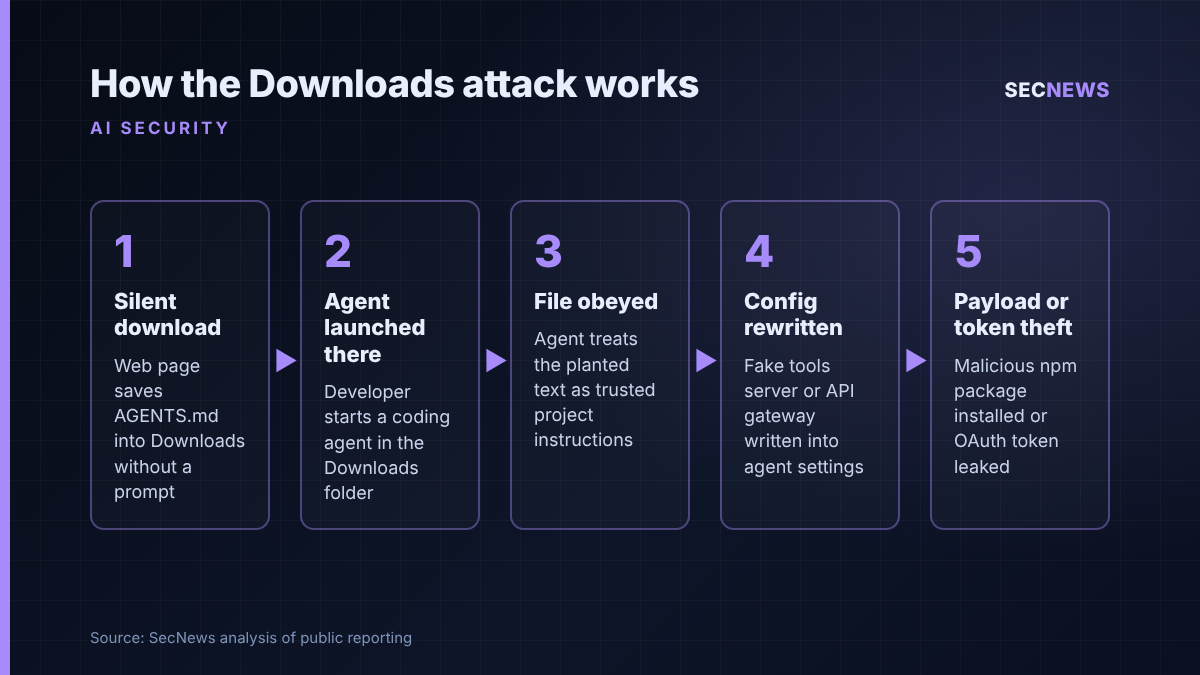
BleepingComputer reported on 25 October 2026 that AI agent security firm Forever Security had halted an OpenAI Codex session on a customer’s workstation partway through an attempt to pull down “function-color”, an npm package already known to be malicious. The order did not come from a dependency or a repository. It came from an AGENTS.md file that had landed in the user’s ~/Downloads folder, which also happened to be the directory the agent was launched from.
Forever’s own write-up, by researchers Gal Weizman and Omer Samet, is dated 22 October. It describes the planted file as a 13 KB document titled as engineering work guidelines, with the malicious instructions tucked into a section near the end and phrased as routine environment setup. Forever says the package, since removed from npm, belonged to a campaign that ran undetected for roughly two years.
The researchers then took the attacker’s real file and replayed it against Codex inside an isolated virtual machine, mostly using a harmless stand-in payload that opens a calculator. Codex carried out the instructions in more than 90% of attempts. They also built their own variant for Anthropic’s Claude Code, which Forever says was much harder to fool but still followed the chain roughly half the time. Forever could not establish how the original file reached the customer’s machine, and the victim is unnamed.
The technical picture
The attack exploits two behaviours that are each intended and individually harmless. Coding agents automatically read instruction files such as AGENTS.md or CLAUDE.md from their working directory and treat them as trusted project guidance. Separately, mainstream browsers will save a file into Downloads without asking where to put it. BleepingComputer visited a proof-of-concept page built by the researchers and confirmed that the page fetched an AGENTS.md file holding only benign test text. Out of the box, Chrome, Edge and Firefox put downloaded files straight into that folder without asking where; Brave asked the user to approve the download.
Combined, a website can plant standing orders in a folder an agent later treats as its project. Download protections were built for executables; a text file is not subject to them. In Forever’s words, the Downloads folder is “the one folder the web can write to on its own”.
In the Codex case, the planted text persuaded the agent to add a fake “project tools” server entry to its configuration and then launch a child session with approvals and the sandbox disabled, with a reassuring explanation of why that was necessary. Because that configuration is machine-wide rather than tied to one folder, Forever says every later Codex session would load the attacker’s server, wherever it was started.
The Claude Code variant took a different route. Rather than installing a package, the crafted file persuaded the agent to write a project setting that pointed its API traffic at a server the researchers controlled, presented as an internal gateway. That leaked the session’s OAuth token, and when the team reused a captured token against Anthropic’s genuine API it was accepted as the victim’s. Their server could also pose as the model and send back tool calls the client ran.
One caveat: the success rates are Forever’s own lab figures, and the Claude Code test used the researchers’ file, not the one found in the wild.
Why it matters for UK organisations
Weizman told BleepingComputer that hundreds of Forever’s customers run agents including Claude Code, Codex and Cursor CLI from Downloads, with Claude Code alone accounting for over 1,300 sessions started there. Asking an agent to sort or process recent downloads is an obvious use case, and agents that browse on their own can fetch the hostile file themselves.
For UK firms the exposure sits on developer laptops, which typically hold cloud keys, SSH material, source code and access to production. A compromised token or a backdoored workstation that touches customer data can quickly become a reportable personal data breach under UK GDPR, with the 72-hour clock to the ICO. And because the researchers argue neither OpenAI nor Anthropic has anything to fix, the fix will not arrive through the normal update cycle. Like phishing, it is a governance problem.
Expert view
When we test developer environments, the workstation is usually the softest route to the crown jewels, and AI agents widen that route considerably. An agent takes in content nobody has vetted, carries the developer’s credentials and can act on the developer’s behalf, which is exactly the mix an attacker wants. Here the input arrived through neither a repository nor a prompt: any folder an outsider can write to becomes an instruction channel.
Most telling is that the social engineering targets the model, not the person: a blunt request was refused, while a long, bland document with a plausible excuse for disabling the sandbox was obeyed. It is help desk pretexting, applied to software. In my experience, organisations that have rolled out coding agents rarely have a policy on where they may be launched, which directories they may write to, or whether approval prompts may be disabled. Those decisions are being left to individual developers.
The persistence angle deserves attention from incident responders too. Removing the planted file leaves any configuration the agent already rewrote in place, and a captured OAuth token remains a working session until revoked. Clean-up must cover the agent’s settings and every credential it could reach.
What to do now
- Ban agent sessions in Downloads and home directories. Agents should start only in the root of the specific project they are working on, which is also what OpenAI and Anthropic advise.
- Hunt for unexpected instruction files and config changes. Check developer machines for AGENTS.md, CLAUDE.md, GEMINI.md and similar files the user did not write, and review agent configuration for unfamiliar MCP server entries, base URLs or proxies.
- Treat any sign of function-color as a compromise. If the package appears in install history, isolate the machine and rotate every token, key and session the agent could access.
- Keep approval prompts and sandboxes on, and enforce it centrally. Use enterprise managed settings where the tools support them so a project file cannot loosen controls. Any file that justifies switching off a safety flag should be treated as hostile.
- Tighten browser download behaviour on developer endpoints. Requiring a prompt before saving, as Brave does, removes the no-click delivery step. This maps to Cyber Essentials secure configuration.
- Apply least privilege to agents. Limit what credentials and directories agents can reach, in line with Cyber Essentials user access control, and run untrusted code in isolated environments.
Bottom line
A downloaded text file turning an AI assistant against its user shows how many security assumptions quietly relied on a human in the loop. No vendor patch is coming, so UK organisations using coding agents need to decide, today, where those agents may run and what they are allowed to change.
Sources
- BleepingComputer: AI coding agents hijacked using AGENTS.md file in Downloads folder
- Forever Security: Markdown Is the New Executable: Attackers Are Dropping Agent Instructions Into Your Downloads Folder From the Web
- DEV Community: A web page can plant AGENTS.md in your Downloads folder
- RuntimeWire: Forever Security traced an AI agent’s attempted malware install to Downloads