Huntress has detailed a ten-week campaign in which one operator replayed stolen Microsoft 365 sessions at scale, getting into mailboxes at 79 organisations without ever needing a password. Multi-factor authentication did not stop it, and a password reset alone would not have removed the intruder.
What happened
On 22 October, managed detection firm Huntress published research on what it calls “token spraying”. Its analysts watched one operator between 14 July and 22 September 2026. Over that period they counted 497 successful sign-ins to Microsoft 365 across 79 organisations, along with more than 200,000 failed attempts. Infosecurity Magazine, Help Net Security and SecurityOnline have since reported the findings.
The name borrows from password spraying, except the operator was cycling harvested session tokens rather than guessed passwords through Microsoft’s sign-in service. Most replay traffic came from a handful of hosts inside 193.26.115.0/24, a block operated by Hamburg-based hoster 1337 Services GmbH. Microsoft Entra ID Protection flagged several of the same addresses on its own. Neither Microsoft nor Huntress has named the operator, and the campaign has not been attributed to any known group.
The technical picture
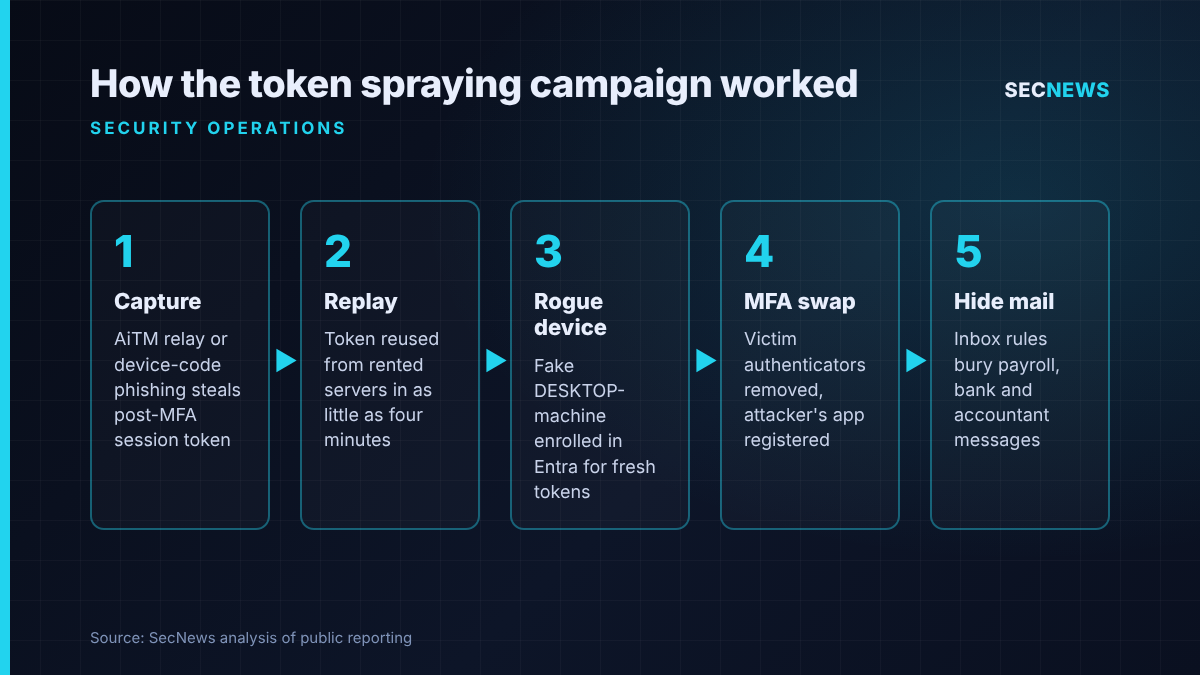
The tokens came from three places. Many were captured by adversary-in-the-middle phishing pages, which sit between the user and the real Microsoft login and pass the genuine MFA prompt through. Once the user completes sign-in, the relay keeps the session token Microsoft hands back. Because that token is issued after the second factor has been satisfied, whoever holds it is treated as authenticated. The rest came from device-code phishing, where the victim is talked into typing a code on Microsoft’s real sign-in page, and from social engineering during an ordinary login.
The gap between theft and use kept shrinking. In a July incident, the hijacked session reappeared from the replay infrastructure 12 minutes after the victim hit the MFA prompt. By 22 September the gap was four minutes. That is quicker than most SOCs can triage an alert, never mind act on it.
Two toolsets were in play: a scripted client with bare or Node.js user agents hitting Graph, Exchange, SharePoint and the Device Registration Service, and a browser-driven one posing as current Chrome or Edge. Activity came in four phases from six rotating addresses, so blocking any one of them would have stopped a single phase at most.
What makes the research useful for responders is what happened once the attacker was inside:
- Rogue devices: at least 48 fake Windows-style machines (“DESKTOP-” plus eight hex characters) were enrolled in Entra. They persist until deleted and can be used to obtain fresh tokens.
- MFA takeover: in 19 organisations, the victim’s existing MFA methods were cleared and a new authenticator added less than three hours after the attacker’s initial access. In one case an app labelled “iPhone 13” appeared less than an hour after the hijack.
- Hidden mail: rules with throwaway names such as “.” and “sss” deleted mail or buried it in rarely opened folders. One victim’s rules caught anything about payroll or bank details and hid every message from an external accountant, who then received a payroll-themed email.
Why it matters for UK organisations
Microsoft 365 is the default platform for most British SMEs, charities and schools, and much of the public sector. Many have dutifully switched on MFA for everyone and assume account takeover is solved. Push prompts, SMS codes and authenticator apps protect the moment of sign-in, not the session issued afterwards.
The financial motive should concern UK finance teams in particular. Rules targeting payroll terms and an accountant’s mail are the groundwork for invoice and salary redirection fraud, a persistent problem for British businesses that is often discovered only when a supplier chases a missing payment.
One figure stands out. In a four-day automated burst in September, one replay address succeeded hundreds of times across almost 30 organisations, yet was refused 1,052 times, all at just four tenants whose Conditional Access policies said no. Controls many organisations already licence made the difference.
Expert view
When we run phishing simulations, an AiTM relay is now the standard tool rather than an exotic one, and session theft against push-based MFA works far more often than clients expect. This campaign is the criminal version of that, run at scale and automated.
The lesson I would draw for incident responders is about eviction. The reflex response to a compromised mailbox is still “reset the password and move on”. Here that leaves a registered device and an attacker-controlled authenticator in place, so the operator walks straight back in. Huntress itself points out that a Conditional Access block on a sign-in still tells you a valid credential or token exists somewhere. That should start an investigation, not close a ticket.
In my experience, the inbox rule is the most reliable tell, and the one least often checked. Rules with one or two characters, or rules that file mail into folders nobody opens, have almost no legitimate use. Hunting for them costs very little.
I would not over-invest in blocklists either. Capture and replay ran on separate infrastructure, and mailbox actions came via VPNs and other rented hosts. Behavioural detection will outlast any IP list.
What to do now
- Hunt this week. Search Entra sign-in logs for token-based sign-ins from hosting providers using Office or authentication broker clients with scripted user agents, and for any Device Registration Service activity from data centre IP ranges.
- Audit devices and MFA methods. List Entra-registered devices matching the “DESKTOP-” plus hex pattern and confirm each is genuine before you remove it. Investigate any account where authenticators were removed and replaced in quick succession.
- Review inbox rules tenant-wide. Flag rules with one- or two-character names, rules filing mail into obscure folders, and anything keyed on payroll, bank or invoice wording.
- Fix your eviction playbook. For a suspected token compromise, revoke all sessions, reset the password, remove attacker devices and authenticators, then check rules and app consents. Do all of it, in that order.
- Close the policy gaps. Make sure a baseline Conditional Access policy covers every user, every cloud app and every client type, with no forgotten exclusions. Restrict device-code flow to the users who genuinely need it. Stop standard users consenting to new applications. These map directly to the Cyber Essentials user access control and secure configuration requirements.
- Plan for phishing-resistant MFA. Passkeys and FIDO2 keys bind sign-in to the genuine site, which defeats relay phishing. Start with administrators and finance staff.
- Brief finance teams. Any change to bank or payroll details should be confirmed by phone using a number already on file, whatever the email looks like.
Bottom line
MFA is still essential, but this research shows its limits. When attackers steal the session rather than the password, the defences that matter are Conditional Access, tight control of device registration, and a response process that removes every foothold, not just the obvious one. If your incident playbook for a hijacked mailbox ends at a password reset, update it today.
Sources
- Huntress: M365 Token Spray and Replay Campaign Compromises Business Email Accounts
- Infosecurity Magazine: Widespread Token-Spraying Attacks Target Microsoft 365 Accounts For Email Compromise
- Help Net Security: Microsoft 365 accounts compromised at 79 organizations, no passwords needed
- SecurityOnline: Token Replay Attack Hits 79 Organizations Through Stolen Microsoft 365 Sessions