Microsoft has set two hard dates in 2027 after which Windows machines without its replacement update certificates can no longer reach Windows Update at all. Unsupported systems and supported ones that have drifted behind on patching are both exposed, and the earliest cut-off lands on 17 May 2027.
What happened
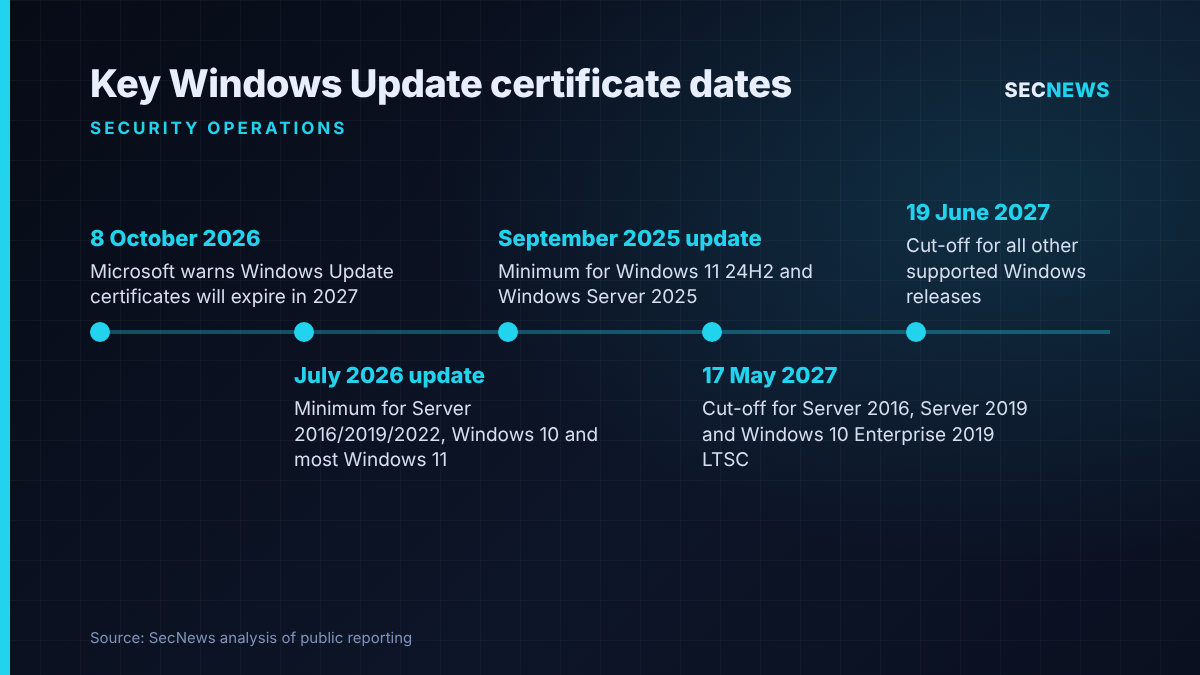
On 8 October 2026 Microsoft posted a notice in its Windows release health message centre, backed by a longer Windows IT Pro Blog article, warning administrators that the certificates which let Windows devices establish a trusted connection to Windows Update are due to expire. One set lapses on 17 May 2027 and the other on 19 June 2027. After the relevant date, any device that has not already received the replacement certificates will be unable to talk to the update service, which means no further security fixes, feature updates or anything else delivered through that channel.
The story was picked up on 9 October by BleepingComputer, Techzine and BetaNews, all of which drew attention to the same uncomfortable point: this is not only about Windows versions that are already out of support. A fully supported server or laptop that has been held back from monthly patching can fall into the same trap.
Microsoft frames this as routine certificate rotation, and the replacements have already been included in its regular security updates for supported releases. Most well-managed estates need do nothing further. The risk sits with the machines that nobody has looked at for a while.
The technical picture
The requirement differs by operating system release. According to Microsoft’s notice:
- Windows 11 version 25H2 and later: nothing to do; the new certificates are already present.
- Windows 11 version 24H2 and Windows Server 2025: the September 2025 security update, or anything newer, must be installed before 19 June 2027.
- Other supported Windows 11 releases, Windows Server 2022 and supported Windows 10 releases: the July 2026 security update or later is required ahead of 19 June 2027.
- Windows Server 2016, Windows Server 2019 and Windows 10 Enterprise 2019 LTSC: the July 2026 update or later is also the minimum, but the deadline is the earlier date of 17 May 2027.
- Everything else: there is no patch route, so the device must be upgraded to a supported client or server release.
Two details matter for operations teams. First, Microsoft says machines fed by Windows Server Update Services (WSUS) are outside the scope of this change, so the exposure is concentrated on machines that talk to Windows Update directly, which is likely to include many estates managed through cloud tooling. Second, the certificates arrive through ordinary cumulative updates, so a supported device that misses the deadline is not necessarily lost. BetaNews reports that Microsoft has documented a manual recovery process, and Techzine notes that missing packages can be pulled from the Microsoft Update Catalog. That, however, turns a silent background process into hands-on work.
The deeper problem is detection. A device that can no longer reach Windows Update does not crash or display an obvious error to its user. It simply stops getting fixes, and unless someone is watching patch compliance closely, that can go unnoticed for months.
Why it matters for UK organisations
Most UK organisations will have the bulk of their fleet on current builds. The concern is the long tail. In my experience, almost every estate we assess has a cluster of Windows Server 2016 and 2019 hosts that have been excluded from automatic patching because a line-of-business application, a vendor support contract or a fragile integration made someone nervous. Those are precisely the systems that face the earliest deadline.
The public sector is especially exposed. NHS trusts, local authorities and universities often run clinical, building management or laboratory systems on older Windows builds that are deliberately frozen, and LTSC editions are common in kiosks, medical devices and operational technology because they were chosen to avoid frequent change.
There is also a compliance angle. Cyber Essentials requires that high and critical security updates are applied within 14 days and that unsupported software is removed or isolated. A machine that has quietly lost its update channel will fail that test, and organisations heading for certification or renewal in mid-2027 could find the problem surfacing at the worst moment. For operators expected to fall under the Cyber Security and Resilience Bill, still before Parliament, demonstrating that patching actually works across the estate is likely to carry more weight, not less.
Expert view
This is a dull announcement with sharp edges. Nothing here is being exploited, and there is no CVE to chase, so it will not trigger the usual emergency patch process. That is exactly why it is dangerous: it will sit at the bottom of the backlog until the first machines go dark.
When we test organisations, the gap between what the patch dashboard says and what is really happening on the network is one of the most common findings. Devices drop out of management tooling, are rebuilt from old images, or sit in isolated segments where nobody checks compliance. Certificate expiry will expose all of those gaps at once, and it will do it on a fixed date that attackers can read as easily as defenders.
The positive side is that Microsoft has given roughly seven months of notice. That is enough, provided the work starts now rather than in April. Treat it as a forcing function for an asset inventory exercise that most organisations should have done anyway.
What to do now
- Build an accurate inventory. Pull every Windows device, including servers, LTSC builds and kiosks, from your management tools and reconcile against network discovery. This underpins the Cyber Essentials secure configuration and security update controls.
- Prioritise the May deadline. Identify Windows Server 2016, Windows Server 2019 and Windows 10 Enterprise 2019 LTSC systems first and confirm they have the July 2026 cumulative update or later.
- Check build levels, not just policy. For Windows 11 24H2 and Server 2025, verify the September 2025 update or newer is installed; for other supported releases, the July 2026 update. Report on installed build numbers rather than assigned update rings.
- Review patch exclusions. List every device excluded from automatic updates and agree with the business owner how it will receive the required update before the relevant date.
- Plan migrations for unsupported Windows. Anything outside support has no patch route. Upgrade it, replace it, or isolate it on a segmented network with compensating controls, as Cyber Essentials expects for unsupported software.
- Add monitoring. Create an alert for devices whose last successful update check exceeds an agreed threshold, so failures after May 2027 are caught in days rather than months.
- Confirm your WSUS position. If you rely on WSUS, document which devices genuinely use it and which have been moved to cloud-based update services.
Bottom line
Microsoft’s 2027 certificate rotation will not hurt organisations that patch consistently, but it will cut off the forgotten servers, frozen LTSC devices and unsupported machines that most estates still carry. The dates are fixed and public. Use the next few months to find those systems, bring them up to date or retire them, and put monitoring in place so that a silent loss of updates never goes unnoticed.
Sources
- Microsoft: Windows message center, Prepare for Windows Update certificate rotation in 2027
- Microsoft Windows IT Pro Blog: Prepare for Windows Update certificate rotation in 2027
- BleepingComputer: Microsoft: Outdated Windows devices will stop receiving security updates
- Techzine: Even supported Windows systems are at risk of missing updates in 2027
- BetaNews: Windows Update certificates expire in 2027: What to patch