D-Link has confirmed a set of unpatched weaknesses in its DGS-3130 managed switches that could let anyone with a foothold on the local network read device secrets, change settings or knock the switch over. There is no firmware fix and no CVE yet, so owners need to lean on configuration changes until one arrives.
What happened
On 6 November 2026 D-Link published an advisory covering several security issues affecting its DGS-3130 family, a range of stackable Gigabit managed switches. The confirmed cases are on the DGS-3130-30TS, hardware revision B1, across more than one firmware build. These switches are aimed at small and mid-sized business networks and metro Ethernet deployments.
According to BleepingComputer, the problems were reported by Giresh Kumar Enugu, a network engineer at Spectrum Community Solutions. D-Link has not released technical details, has not assigned CVE identifiers and has not given a date for fixed firmware. When we tried to retrieve the advisory from D-Link’s own support announcement site on 8 November, the page returned “not found”, so the detail below comes from press coverage of the notice and an independent write-up of its contents. D-Link describes the flaws as involving its discovery protocol and “certain components of the device’s firmware security architecture”.
No exploitation in the wild has been reported. A write-up of the advisory published on 7 November says researchers reproduced some of the conditions in a controlled lab, but third-party attacks have not been seen.
The technical picture
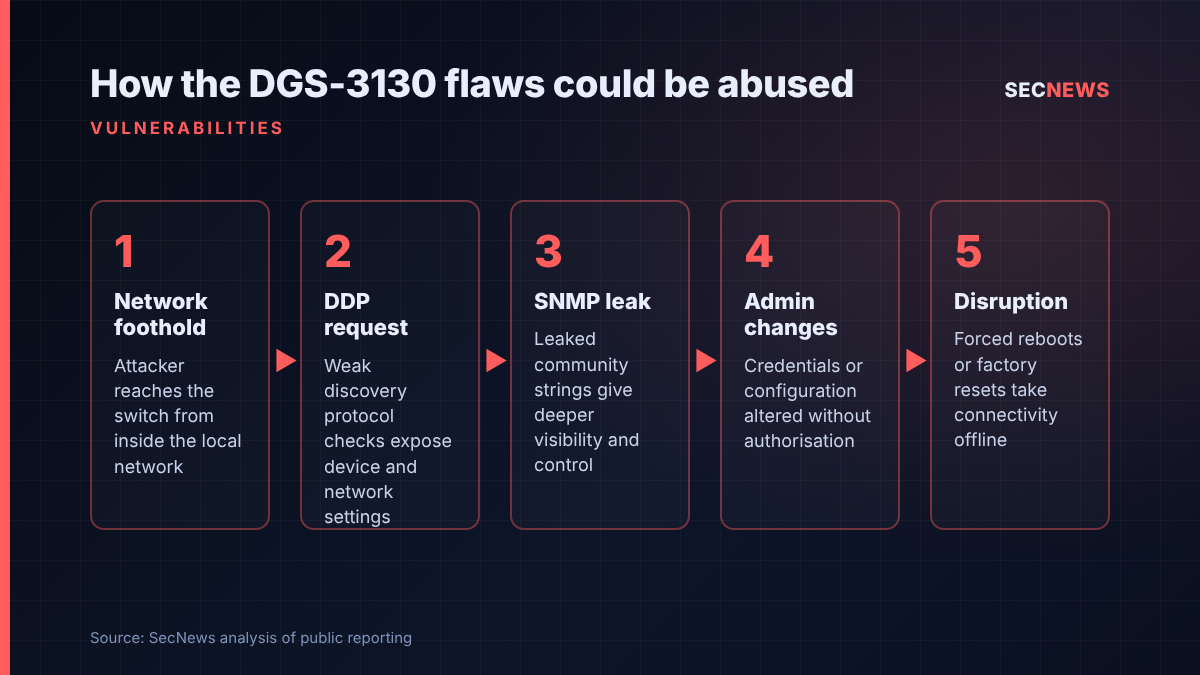
The core of the report concerns the D-Link Discovery Protocol (DDP), a proprietary protocol the vendor uses so that its management tools can find switches on a network and exchange configuration information with them. The researcher found weaknesses in how DDP authenticates requests, enforces access control and processes the information it handles.
If those weaknesses are abused, an attacker who can send DDP traffic to the switch may be able to pull back device and network settings, including SNMP community strings. With those in hand, the next steps described in the coverage are unauthorised administrative actions: changing management credentials, altering configuration, or forcing a reboot or factory reset that drops connectivity for everything behind the switch.
D-Link is also examining other parts of the firmware: the security settings of the SSH service, the protections around operating-system credentials, and how firmware images are encrypted and what cryptographic keys are embedded in them. That second strand matters because, as the independent write-up notes, turning off DDP alone will not close every issue on the list. The independent analysis names four firmware builds under investigation (2.00.B014, 2.00.B034, 2.04.000 and 2.04.001) but notes that D-Link has not yet said which findings apply to which build. D-Link is also still checking whether other switch platforms in its range are affected.
The key prerequisite is network reach. D-Link has not described this as something a remote attacker on the internet can trigger directly; the attacker needs to be able to talk to the switch’s DDP service or management plane. In practice that means an insider, a compromised workstation, a rogue device plugged into a spare port, or an intruder who has already landed elsewhere on a flat network.
Why it matters for UK organisations
D-Link kit turns up regularly in UK small businesses, schools, surgeries and branch offices, often bought on price and installed once by a reseller or managed service provider, then left alone for years. Switches in that position rarely get firmware updates, rarely have their management interfaces segregated, and quite often still carry the default SNMP community they shipped with. Those are exactly the conditions these flaws would reward.
The local-network prerequisite should not be read as reassurance. Many ransomware and extortion incidents begin with a single compromised endpoint or stolen remote access credential. From there, network infrastructure is an attractive target: changing a switch’s configuration can open paths between VLANs, mirror traffic, or simply cause an outage to cover other activity.
The absence of CVE IDs is a practical problem too. Many UK organisations rely on vulnerability scanners and supplier patch reports that key off CVE numbers. Until D-Link assigns them, these flaws will not appear in that tooling, so teams that depend on it may not know they are exposed.
Expert view
In my experience, the switch estate is one of the least examined parts of an internal network test. We routinely find management interfaces reachable from user VLANs, Telnet or HTTP still enabled, and SNMP communities of “public” or “private” that give read or even write access to the device. Vendor discovery protocols are worse still because nobody remembers they are switched on. They exist for convenience at install time, then listen for years.
What stands out here is the combination. A discovery protocol that leaks configuration, an SNMP community that turns that leak into control, and open questions about how credentials and firmware keys are protected add up to a device that may be easier to take over than the edge firewall in front of it. The good news is that the interim advice is sound network hygiene that should already be in place: if your management plane is properly isolated, most of this risk falls away.
I would also caution against waiting for a CVSS score before acting. An advisory without scores or CVEs is easy to deprioritise in a triage meeting, but D-Link has confirmed the issues and there is no fix date. That is a reason to move faster, not slower.
What to do now
- Find your DGS-3130 units. Check asset registers, MSP records and network management platforms for DGS-3130 models, especially the DGS-3130-30TS B1, and note the firmware version on each.
- Disable DDP. D-Link identifies the discovery protocol as the main known attack route. Turn it off globally and on interfaces, then confirm the setting survives a save and reboot.
- Clean up SNMP. Remove default or unused community strings, move to SNMPv3 where your monitoring supports it, and restrict SNMP to named monitoring hosts.
- Isolate the management plane. Limit SSH, web UI and SNMP to a dedicated management network and specific admin hosts, enforced by upstream ACLs or firewall rules rather than VLAN separation alone. This maps directly to the Cyber Essentials firewalls and secure configuration controls.
- Rotate credentials. Change local admin passwords on affected switches and check any RADIUS or TACACS+ accounts used for switch administration. This supports the Cyber Essentials user access control requirement.
- Back up and monitor. Keep offline copies of running and startup configurations, and alert on unexpected configuration changes, unplanned reboots and factory resets.
- Track the fix. Watch D-Link’s security advisory page for firmware and CVE assignments, and plan to patch promptly once released, in line with the Cyber Essentials 14-day update requirement for high-risk flaws.
Bottom line
This is not an internet-facing emergency, and nobody has reported attacks yet. It is, though, a confirmed set of weaknesses in widely deployed business switches with no patch and no CVE to track. Disabling DDP and locking the management plane away from ordinary users costs very little and removes most of the risk, so do it now rather than waiting for D-Link’s firmware.