A newly detailed TeamViewer flaw turns the usual remote support risk on its head: the machine being supported can attack the technician who connects to it. Version 15.83 fixes it; helpdesks and managed service providers should update now.
What happened
TeamViewer’s bulletin TV-2026-1011, issued on 27 October 2026 and rated Important, fixes three client vulnerabilities. For support teams the key one is CVE-2026-111585, which stems from an integer overflow affecting how the viewer handles screen data streamed from the remote machine. TeamViewer rates it 8.8 (High) under CVSS 3.1 and warns that a hostile host could crash the viewer or, on some platforms, potentially execute code with whatever rights the viewer runs under.
Affected products are the TeamViewer Full Client on Windows, Linux and macOS, the Portable edition, plus the Remote Control app for Android, in all versions before 15.83. That includes 15.82, September’s security release. TeamViewer has also shipped fixed builds for legacy branches, including 15.64.10 for Windows 7 and 8, 14.7.48868 and the relevant 13.2 releases.
On 29 October Omri Dar, a researcher at Remedio, published a detailed write-up. Remedio reported the bug to TeamViewer on 14 August, the vendor accepted it on 22 October and the fix followed five days later. In Dar’s words, “the attacker is the host and the victim is the viewer”.
TeamViewer says it is “not aware of any active exploitation in the wild”. Remedio has not released exploit code, and Rescana reports that the CVE was not in CISA’s Known Exploited Vulnerabilities catalogue as of 31 October. The Canadian Centre for Cyber Security issued an advisory (AV26-1093) on 28 October.
The technical picture
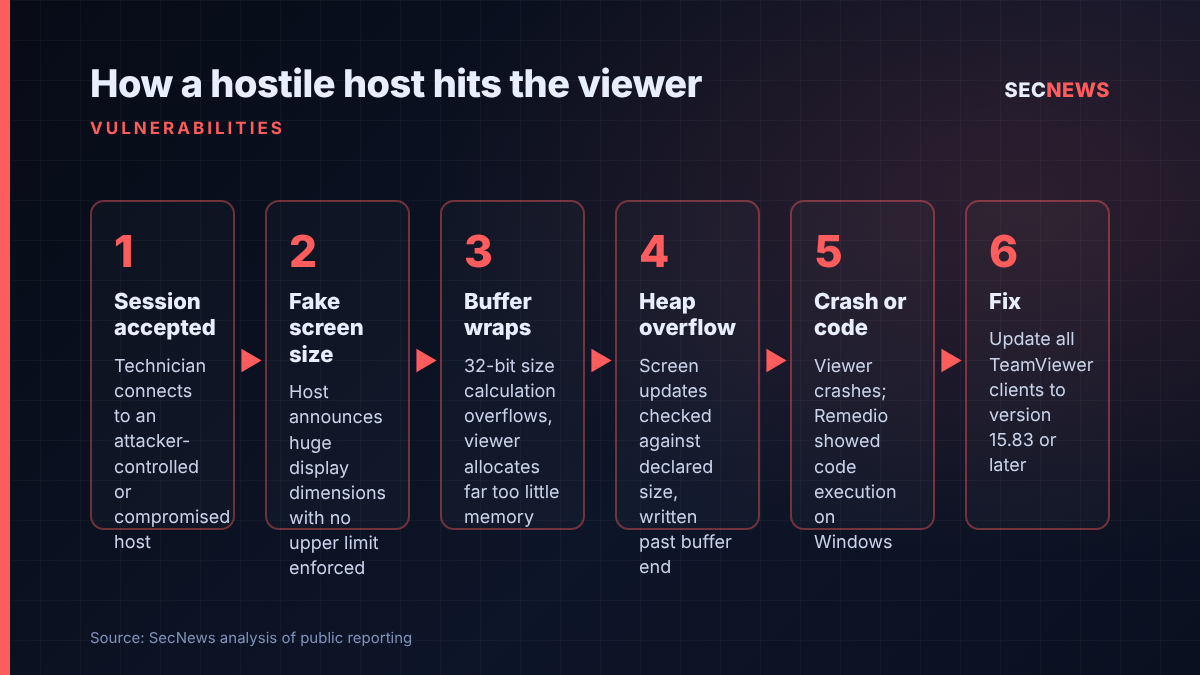
Every session has two roles: the host streams its desktop, and the viewer renders it and returns keystrokes and mouse movements. When a session opens, the host tells the viewer how big its screen is and what colour depth it uses, and the viewer allocates a memory buffer to decode incoming screen updates into.
According to Remedio, the viewer calculates the size of that buffer using 32-bit arithmetic. Feed it implausibly large dimensions and the multiplication wraps round, leaving a buffer far smaller than the screen area the decoder thinks it has. The checks that later validate each screen update compare it against the declared width and height, not against the memory actually reserved. Nothing on the receive path caps the dimensions a host can announce, so a hostile host controls both the size of the undersized buffer and how far past its end the decoder writes.
Remedio adds that the host can steer the viewer onto this vulnerable path deliberately by refusing to negotiate hardware video codecs, which forces a fallback to the bitmap decoder. At minimum that gives a repeatable remote crash of the technician’s client. On Windows, Remedio says it went further, bypassing Control Flow Guard and DEP on an up-to-date client to launch an application it chose. In fairness, its demonstration used a hook on the host side to stand in for the heap grooming step, so it was not a pure over-the-wire attack, and Remedio’s results cover Windows only.
The bulletin fixes two other issues. CVE-2026-92372 (CVSS 8.8) is an out-of-bounds write in the screen-image decoder of the Linux and macOS clients, reachable through a session or by opening a crafted .tvs session recording. CVE-2026-92374 (CVSS 7.8) is a race condition in the macOS privileged helper that lets a low-privileged local user install a malicious package and gain root. A separate bulletin, TV-2026-1012, covers six issues in the Remote Management add-ons, which update automatically.
Why it matters for UK organisations
Remote support tools are central to the UK’s managed service provider market. A single MSP engineer may connect into dozens of customer machines in a day, many unmanaged, poorly patched or already compromised. The usual risk model runs one way: protect the endpoint from a rogue support session. CVE-2026-111585 reverses that. The exposed machine is the technician’s, and the technician’s machine is usually the one holding the keys: RMM consoles, password vaults, admin sessions and customer documentation.
That makes it a supply chain problem as much as an endpoint one. A criminal who compromises one small customer, or simply poses as a customer and raises a support ticket, could use a booby-trapped host to land on the provider, then move into every client it manages. The UK has seen exactly how damaging MSP compromise can be, which is why the Cyber Security and Resilience Bill is set to bring managed service providers into regulatory scope. Internal helpdesks connecting to home workers’ or contractors’ devices face the same issue.
Expert view
In my experience, remote support clients are among the least scrutinised applications on an engineer’s workstation. They are installed once, trusted implicitly and often excluded from application control because they are deemed essential. When we test MSP environments, the support engineer’s laptop is frequently the quickest route to everything else, because it combines broad access with the assumption that its user is the defender rather than the target.
This bug is a useful reminder that any client which parses data from an untrusted peer is attack surface, whether that peer is a web server, a document or the screen of the machine you are fixing. The root cause is a classic: an allocation calculated one way and a bounds check that reads a different number.
I would not panic. There is no known exploitation, the attack needs a technician to connect to a hostile host, and the fix is a routine client update. But it is a high-severity, low-complexity bug in very widely installed software, targeting exactly the people attackers most want to compromise.
What to do now
- Update every TeamViewer client to 15.83 or later, including Portable copies on USB sticks and jump boxes, the Android Remote Control app and any legacy 13.x, 14.x or 15.64 installs. TeamViewer offers no workaround. Cyber Essentials requires updates fixing high or critical flaws (CVSS v3 7 or above) within 14 days of release; from 27 October, that means 10 November for certified organisations, a scheme requirement rather than a TeamViewer deadline.
- Find the stragglers. Use your asset inventory or RMM to list TeamViewer versions, including contractor machines that connect to customers.
- Run the viewer with least privilege. Support staff should not work from accounts with standing local or domain admin rights; any code execution inherits the viewer’s privileges. This maps to the Cyber Essentials user access control requirement.
- Separate support workstations from crown jewels. Where practical, connect to untrusted endpoints from a hardened, segmented machine or virtual desktop that does not hold RMM, vault or cloud admin sessions.
- Treat unexpected viewer crashes as a signal. Ask engineers to report repeated TeamViewer crashes during sessions, and make sure EDR covers the support estate.
- On macOS and Linux, warn staff not to open .tvs session recordings from untrusted sources until patched.
Bottom line
CVE-2026-111585 has no known exploitation, but it targets the most privileged people in many organisations: the ones who fix everyone else’s computers. Update to TeamViewer 15.83, check your MSP has done the same, and use this as a prompt to treat support workstations as high-value assets.
Sources
- TeamViewer: TV-2026-1011 Security Update for Vulnerabilities in TeamViewer Clients
- Remedio: TeamViewer RCE Vulnerability (CVE-2026-111585)
- The Hacker News: TeamViewer Flaw Lets Remote Computers Attack Users Who Connect to Control Them
- Hackread: TeamViewer Vulnerability Lets Attackers Run Code on IT Support Staff’s PCs
- Rescana: TeamViewer CVE-2026-111585, A Malicious Host Can Run Code on the Viewer