mSecure’s developer has told current and former customers to rotate the passwords, two-factor codes and passkeys held in its password manager, but has not said what went wrong. One report says an encrypted vault database was taken from its sync service. That turns a vague notice into a question of how strong each user’s master password is.
What happened
On 3 November 2026, mSeven Software, the US developer behind the mSecure password manager, emailed current and former customers about “suspicious activity” linked to the application. The notice said the firm had opened an investigation, taken unspecified mitigation steps and brought in external cyber security specialists. It told customers to protect everything held in the app, with steps that it said may include changing passwords, resetting or re-enrolling two-factor authentication (2FA) and removing existing passkeys.
The email did not say which systems were involved, when the activity started, whether it had stopped, how many people were affected or whether anyone reached stored data. The Hacker News noted that by that evening mSeven had said nothing on its social channels or in the support forum thread where a customer had posted the email. The Register said mSeven had not answered its questions by the time it published.
On 4 November, BleepingComputer reported that an encrypted customer database had been stolen from mSecure Cloud, the vendor’s own sync service. Its account rests on support replies that customers say they received from mSeven, which also say only people who synced through mSecure Cloud are affected. Those replies also say there is no evidence anyone reached the confidential contents of the encrypted data, and no evidence the app is unsafe to use now. mSeven has not publicly confirmed the database theft or explained how the attacker got in.
The technical picture
mSecure describes its design as zero-knowledge. Vault data is encrypted with AES-256 on the customer’s device before it syncs, so in principle the vendor never holds anything it can read. Customers can sync through mSecure Cloud, Dropbox, iCloud or local Wi-Fi. If the support replies are accurate, only the first group is in scope. The notice itself did not draw that distinction.
If the reports are right, the vaults were probably not opened on the spot. The bigger worry is what happens next. An attacker who holds a copy of encrypted vaults can run guessing attacks against them offline for as long as they like. Vaults protected by long, random master passwords should hold. Short, reused or predictable ones will not, and the attacker can deal with the easy targets first. This is the lesson of the 2022 LastPass breach, when stolen vault backups were later tied to a run of cryptocurrency thefts.
mSecure 7 can store 2FA codes and passkeys next to passwords on its Essentials plan and above. If one vault is cracked, an attacker could get both factors for many accounts at once. Separately, The Hacker News pointed to a December 2025 study by Germany’s Federal Office for Information Security (BSI). It found that in one Android version, mSecure 6.1.5, the developer could in theory access stored data. That finding applied only to the version tested and may not hold for current releases, but it is a reminder that a zero-knowledge claim has to be checked, not taken on trust.
Why it matters for UK organisations
mSecure is a consumer and small-business product rather than an enterprise platform. In my experience that is exactly why it turns up in UK firms. A sole trader or small practice picks it up, staff copy the habit, and before long shared logins for banking, payroll, HMRC, domain registrars and Microsoft 365 admin accounts sit in personal vaults that IT has never seen. If any of those vaults synced through mSecure Cloud, the organisation now has business credentials in an attacker’s hands and possibly no record of which ones.
There is a regulatory angle too. Under UK GDPR, an organisation that knows staff used an affected tool for work data has to judge whether a personal data breach has happened. If the risk to individuals is real, it must report to the ICO within 72 hours of becoming aware. A vendor notice this vague makes that judgement harder, so decisions and their reasoning should be written down now.
Expert view
Password managers are still the right answer for most people and most small businesses. What it does show is how much depends on the vendor’s communication when something goes wrong. Malwarebytes put it plainly: users “should not have to wait for a completed forensic investigation” before getting useful guidance. A notice that lists possible actions without saying who is affected, which sync method matters or whether the tool is safe for new credentials leaves customers to do the risk assessment themselves.
When we review small-business security, the password manager is often the single biggest concentration of risk in the estate, and the least governed. Nobody knows the master password policy, nobody has a list of shared business entries, and nobody has thought about what happens if the vendor is breached. The defence against an offline cracking attack is set long before the breach: a long, unique master passphrase and, where offered, stronger key derivation settings. After the fact, the only real option is rotation, prioritised by impact.
I would also treat vendor reassurance with care until mSeven publishes a proper account. “No evidence of access” means something different a few days into an investigation than it does once the investigation is finished.
What to do now
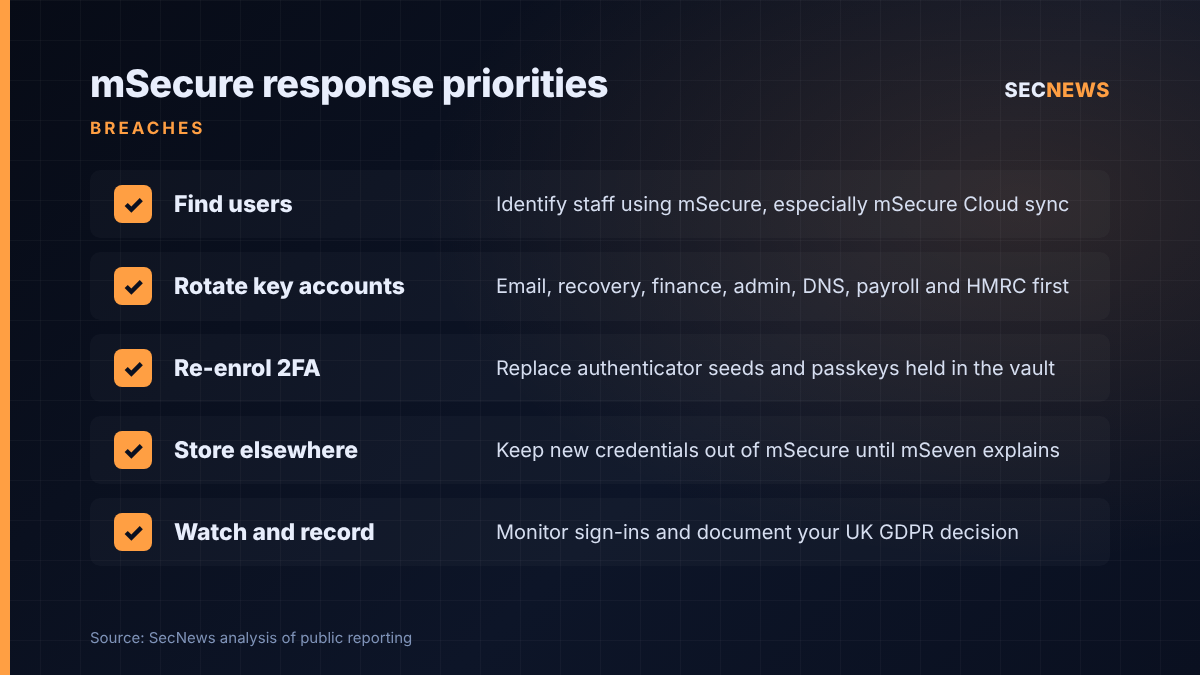
- Find out who uses mSecure. Ask staff and check expense and device records. Confirm which sync method each person used. mSecure Cloud users are the priority, but anyone using it for work should act.
- Rotate the high-impact credentials first. Start with primary email accounts and any account used to recover others, then banking and finance, Microsoft 365 or Google Workspace admin, domain and DNS registrar, payroll and HMRC accounts. Use each service’s official site. This fits the Cyber Essentials user access control requirements.
- Re-enrol second factors. Where a vault held authenticator seeds, set up new authenticators. Before removing a passkey stored in mSecure, register a replacement elsewhere and confirm another sign-in route works, so you do not lock yourself out.
- Store new credentials somewhere else for now. Until mSeven explains what happened, saving freshly rotated secrets in the same product is a needless gamble. Move to a business-grade manager with central administration if you can.
- Watch for misuse. Review sign-in logs for the rotated accounts, enable alerts on unusual logins and warn staff about phishing themed on the incident.
- Record your UK GDPR decision. Document whether personal data was at risk and whether the ICO 72-hour reporting test is met. Revisit it if mSeven publishes more detail.
Bottom line
An encrypted vault copied off a vendor’s server is only as safe as the master password protecting it, and nobody but the user knows how strong that is. mSecure customers, especially those who synced through mSecure Cloud, should assume their vault could eventually be cracked and rotate the credentials that matter most now, without waiting for mSeven to explain.
Sources
- BleepingComputer: mSecure password manager hack prompts password reset warnings
- The Register: Password manager mSecure tells users to change passwords, won’t say why
- The Hacker News: mSecure Warns Users to Change Passwords, Reset 2FA and Passkeys After Suspicious Activity
- Malwarebytes: mSecure tells users to change passwords but won’t say why