OpenSSH has shipped an out-of-cycle release, 10.6p2, to close a password authentication bypass in sshd on musl-based Linux, with Alpine Linux the most prominent casualty. Any UK organisation running Alpine hosts, cloud images or embedded kit with SSH exposed should patch, restart the daemon and check its logs today.
What happened
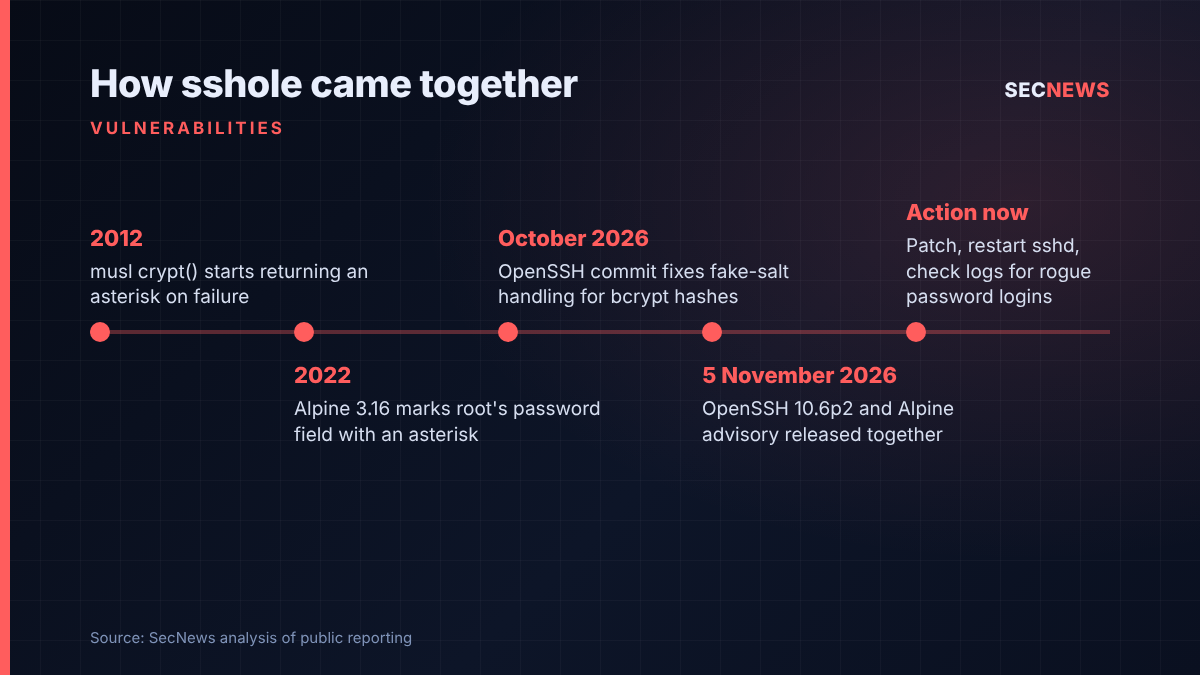
On 5 November 2026 the OpenSSH project published portable OpenSSH 10.6p2, a release driven by a single security fix. On the same day Alpine Linux issued its own advisory and updated packages across its supported branches. The flaw, which the finder has published under the name “sshole”, allows an attacker who can reach the SSH port to log in to certain accounts that were never meant to accept a password at all.
Alpine’s advisory credits Özgün Kültekin of Wakefield with the report, and Damien Miller and Darren Tucker with the upstream fix. The OpenSSH release notes place the root cause outside sshd, but sshd can sidestep it, which is what the new release does.
The Hacker News reported that no CVE identifier had been assigned as of 5 November and that no attacks had been reported. With a public write-up, I would not bank on that lasting.
The technical picture
The bug lives where three long-standing behaviours meet. On Unix-like systems, a password field containing an asterisk has, for decades, meant “no valid password”: the account exists but cannot be used with a password. Alpine uses exactly that marker for root and for key-only users, a choice it made in Alpine 3.16 in 2022.
Separately, the musl C library, which Alpine and many embedded distributions use instead of glibc, changed its crypt() function back in 2012 so that it returns an asterisk when hashing fails, and caps the length of passwords its SHA-based schemes will process. Feed it something too long and the “hash” it hands back is simply that asterisk. When sshd compares the result with a stored field that is also an asterisk, the two match and the login is accepted.
Alpine’s advisory lists the conditions that must all line up:
- sshd checks passwords itself rather than through PAM (the default openssh-server package on Alpine is built without PAM, and openssh-server-pam with UsePAM set to no behaves the same way);
- PasswordAuthentication is enabled, which is the OpenSSH default;
- at least one account carries the asterisk marker, such as root or a key-only service user;
- at least one other local account has a SHA-256 or SHA-512 style password hash.
Systems built on glibc are not affected, nor are setups that authenticate through PAM, accounts locked with an exclamation mark, or hosts with password logins switched off. The researcher’s write-up says OpenBSD and the Dropbear SSH server are also unaffected, but names Buildroot, Yocto and some Docker images alongside Alpine as places musl-based sshd turns up.
On cloud instances it gets worse. Alpine says its tiny-cloud images from 3.18.11 through 3.24.3 ship an alpine user with passwordless doas, so once the bypass conditions are met an intruder can go from network access to root. Affected Alpine releases run from 3.16 through 3.24, plus edge. OpenSSH’s fix makes sshd reject a match when the stored password field is too short to be a real hash, which the project frames as a workaround rather than a cure.
Why it matters for UK organisations
Alpine is everywhere in modern UK estates, usually without anyone thinking of it as an operating system they “run”. It underpins a large share of container images and lightweight cloud virtual machines, and musl-based builds sit inside firewalls, routers and industrial gateways built with Buildroot or Yocto.
The exposure is therefore less about mainstream servers, which are overwhelmingly glibc-based, and more about the long tail: the bastion someone built on a minimal Alpine image, the appliance in a branch office, the build agent in a cloud subscription nobody has looked at since a contractor left. Those assets tend to fall outside patching cycles.
For organisations working towards the Cyber Essentials requirements, this sits squarely in two controls: security update management, where high-risk fixes are expected within 14 days, and secure configuration, which asks you to remove unnecessary accounts and authentication routes. Operators regulated under NIS should expect to be asked how quickly SSH-exposed infrastructure was assessed.
Expert view
When we test externally facing infrastructure, SSH is usually treated as the boring, well-hardened service on the box. This flaw is a reminder that “hardened” often means “assumed”. Teams assume key-only accounts cannot be reached by password, then leave password authentication on for another account. That is exactly the combination this bug needs.
None of the individual behaviours is new; the danger appeared only where they overlapped. The researcher says he tested roughly 17,600 unusual login attempts across different builds and used AI agent swarms in the process, and that the issue appears to have gone unnoticed for about ten years. The OpenSSH release notes say the project is shipping more often because AI-assisted reports are rising and the same bugs may be found independently. According to The Hacker News, Miller also questioned the value of long embargoes when automated tools can rediscover flaws quickly. The gap between disclosure and abuse is shrinking.
In my experience, containers deserve a measured response. Most container images do not run sshd at all, so an Alpine base image is not automatically a problem. The ones to hunt for are images where someone added SSH for debugging, and virtual machines or appliances where sshd is part of the design.
What to do now
- Find your musl-based SSH endpoints. Use your asset inventory, cloud consoles and scanners to list Alpine hosts and Buildroot or Yocto appliances exposing SSH, internally and externally.
- Patch and restart. Update the openssh packages on Alpine (for example 10.3_p1-r2 on 3.24 or 10.6_p2-r0 on edge, per the advisory) and restart sshd. Alpine stresses that upgrading the package alone does not replace the daemon already running.
- Disable password logins where you can. If you cannot patch immediately, set PasswordAuthentication to no, validate the configuration and restart sshd, having first confirmed key-based access works so you do not lock yourself out.
- Check for prior abuse. Alpine recommends searching /var/log/messages for accepted password logins against accounts that have no password. If you cannot rule out such a login, Alpine’s advice is to treat the host as compromised and rebuild it.
- Review cloud images. Update or rebuild instances launched from tiny-cloud images in the affected range, and remove passwordless privilege escalation that nobody needs.
- Chase your suppliers. Ask appliance vendors whether their firmware is affected and when a fix will ship.
- Restrict SSH exposure. In line with Cyber Essentials firewall controls, keep management SSH off the public internet and behind a VPN or allow-list.
Bottom line
This bug does not threaten every Linux server, but where it applies it turns a locked door into an open one, and on some Alpine cloud images it leads straight to root. Patch, restart, check the logs, and use the exercise to find the musl-based kit you did not know you had.
Sources
- Alpine Linux: openssh-server password authentication bypass
- OpenSSH: Release notes for OpenSSH 10.6p2
- sshhole: password authentication bypass in OpenSSH on musl libc
- oss-security: “sshole”: password authentication bypass: OpenSSH + musl libc
- The Hacker News: OpenSSH Issues Emergency Fix for Flaw Letting Long Passwords Bypass SSH Auth on Alpine Linux