A long-running GitHub malware operation has widened its sights from crypto gamers to security professionals, baiting them with fake scanning and log-parsing utilities. Doctor Web says more than 2,000 Windows machines have been infected with a backdoor, a wallet-swapping clipper and a credential stealer.
What happened
On 5 November 2026 the security vendor Doctor Web published research into a set of poisoned GitHub repositories that has been active for around two years. BleepingComputer reported the findings the following day. Early on, it hid malicious code in Visual Studio projects posing as blockchain game tools, bots and cheats, aimed at cryptocurrency wallet holders.
The new phase is the part that should worry this readership. According to Doctor Web, the people behind it now dress their repositories up as security utilities: scan automation, security testing helpers and log analysis scripts. One bogus project offered to tidy and format the output of Fscan, a network scanner familiar to penetration testers. Doctor Web counted more than 2,000 infected PCs at the time of its research. It has not explained how it counted them or split them by lure, so treat that as a vendor estimate.
To be clear, this is a different operation from the trojanised ARTEX AI pentest container we covered earlier this week. We have seen nothing linking the two. The common thread is the target: offensive security practitioners who download and run other people’s tooling as part of their daily work.
The technical picture
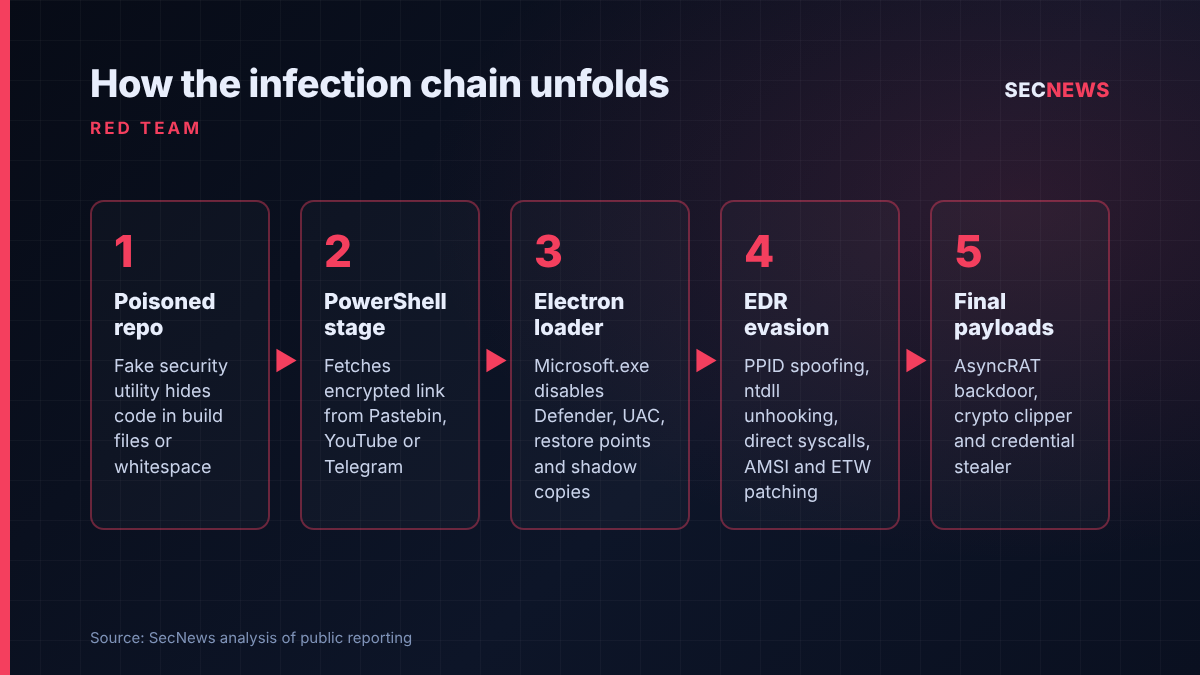
The infection begins in the files most of us never open. In the Visual Studio projects, Doctor Web found a pre-build event in the .csproj file that runs attacker code before compilation starts, along with .suo solution option files carrying a PowerShell command. In the newer, security-themed repositories, the malicious code also sits in Go and Python source files, pushed far off to the right of the visible code by long runs of whitespace so that a quick scroll through the file looks clean.
Once triggered, a PowerShell stage (detected as PowerShell.Packed.270) fetches an encrypted string from either attacker infrastructure or legitimate services, including YouTube, Telegram, Google Docs, GitCode and Pastebin. Decrypting that string reveals a download link for an archive, which unpacks an Electron application named Microsoft.exe. This loader, Trojan.Loader.3261, reports system details to the operators through a Telegram bot, sets itself up to restart, tries to elevate privileges, switches off Windows Defender, UAC, System Restore and Volume Shadow Copy, adds Defender exclusions, attempts to uninstall ESET, McAfee and Malwarebytes, and edits the hosts file to cut security products off from their update servers.
The loader’s default mode is a catalogue of current EDR evasion tradecraft: parent process spoofing so the payload appears to be launched by explorer.exe, tampering with the Smart App Control setting, restoring a clean copy of ntdll.dll to strip user-mode hooks, direct system calls, and in-memory patching of ETW and AMSI. Payloads are injected into legitimate Windows processes such as RegAsm.exe and dwm.exe.
Three payloads arrive at the end. The first is AsyncRAT, deployed twice on different ports, which Doctor Web suggests may let two operators share one victim. The second is a clipper (Trojan.Clipper.688) that swaps copied cryptocurrency wallet addresses and sends screenshots back via Telegram. The third, JS.Stealer.191, collects browser data, VPN settings, Discord tokens, gaming accounts and configuration files from FileZilla, MobaXterm and Total Commander. Doctor Web also found an unfinished module designed to reinstall the loader if it is removed, and has published indicators of compromise on its GitHub account.
Why it matters for UK organisations
Look at that stealer’s shopping list through the eyes of a UK consultancy or in-house red team. MobaXterm and FileZilla configurations routinely hold saved hosts, usernames and sometimes credentials for client and production systems. VPN profiles describe how to reach networks that are deliberately kept off the internet. A tester’s laptop often holds scoping documents, findings and access that the client has granted for a fixed window. If that machine is compromised, the breach is not only yours: it may become your client’s, with the contractual and UK GDPR consequences that follow.
There is also the problem of trust. Security staff are frequently given local administrator rights and exclusions from endpoint controls so their tools are not quarantined. That is exactly the kind of environment in which a loader that disables Defender and adds exclusions will meet the least resistance. Developers in UK firms face the same exposure, since anyone who clones and builds an unfamiliar Visual Studio project can trigger the pre-build event.
Expert view
In my experience, offensive security teams are among the least disciplined consumers of third-party code in any organisation. We grab a parser or a proof of concept from GitHub at midnight before a test window, build it on the same machine that holds the engagement data, and move on. Attackers have noticed. Fake exploit repositories are nothing new; extending the idea to mundane helper scripts is arguably worse, because nobody expects a log formatter to be hostile.
The whitespace trick deserves attention precisely because it is so unsophisticated. It defeats the casual review that most people actually do, rather than the thorough review they claim to do. Equally, build-time execution in project files is something many practitioners simply do not think about: we treat compiling as safe and running as risky, and that distinction does not hold.
I would not over-read the 2,000 figure. What matters more is the shift in targeting. Compromising one well-connected tester can be worth more to a criminal than hundreds of gamers’ wallets.
What to do now
- Hunt first. Check Doctor Web’s published indicators against proxy, DNS and EDR telemetry, and look for Microsoft.exe running from unusual ProgramData folders, unexpected Defender exclusions and recent hosts file changes.
- Separate build from engagement. Compile and run untrusted tooling in disposable virtual machines or containers with no client data, saved credentials or VPN profiles. This supports the Cyber Essentials secure configuration control.
- Read the project files, not just the code. Inspect .csproj build events and .suo files before opening a solution, and view source with whitespace made visible or with line wrapping on.
- Stop blanket exclusions. Scope any antivirus exclusions for testing tools tightly and review them regularly, in line with the Cyber Essentials malware protection control. Alert on Defender being disabled.
- Limit admin rights. Give testers separate privileged accounts or just-in-time elevation rather than standing local admin, as the user access control requirement expects.
- Rotate secrets after any suspected exposure. Assume saved MobaXterm, FileZilla and VPN credentials, browser sessions and Discord tokens are compromised, and tell affected clients.
- Prefer known sources. Use tools from maintainers you can verify, pin to reviewed commits, and keep an internal vetted copy of the utilities your team relies on.
Bottom line
This is a criminal operation that has realised defenders make rewarding targets. Nothing in the chain is cutting edge, yet it works because security people habitually build unvetted code on privileged machines full of client access. Treat every downloaded helper script as untrusted until proven otherwise, and keep your testing workstation as clean as you would expect a client’s domain controller to be.
Sources
- Doctor Web: Insolence beyond belief. Threat actors target information security developers on GitHub
- BleepingComputer: Fake security tools on GitHub push backdoors and infostealers
- Windows Forum: Fake GitHub security tools target Windows developers with Visual Studio build malware
- Lunar Cyber: Infostealer malware in GitHub tools: the build can be the trigger