Microsoft will start switching on AI-driven phishing detection in Teams chats in early November, aimed mainly at the first message an outsider sends. It is on by default and admins do nothing to enable it, so SOCs, helpdesks and awareness teams need to get ready for the warnings before users start seeing them.
What happened
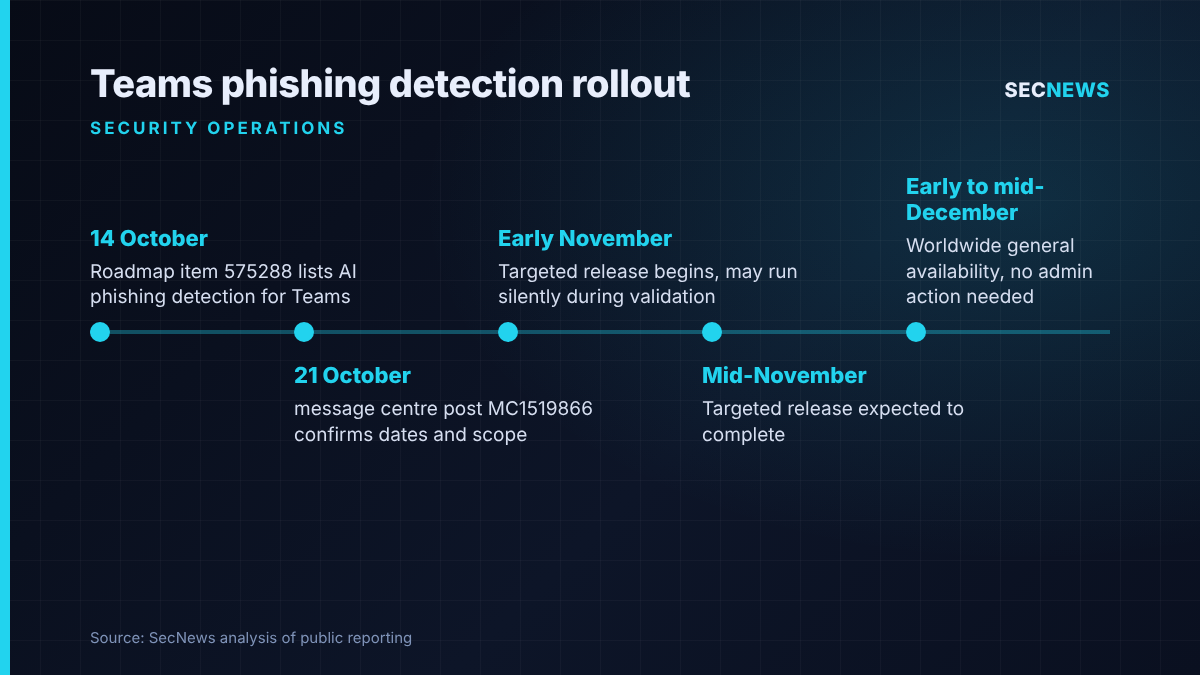
On Wednesday 21 October 2026 Microsoft published message centre post MC1519866, confirming that Teams will gain what it calls AI-powered, context-aware phishing detection for messaging. It first appeared on the Microsoft 365 roadmap as item 575288 on 14 October, marked “in development” for November 2026, and BleepingComputer reported the update on 23 October.
Targeted release starts in early November and should be complete by mid-November, with worldwide general availability running from early to mid-December 2026. The roadmap entry covers the standard worldwide multi-tenant cloud and lists the Windows and Mac desktop clients, web, iOS and Android. Neither the roadmap entry nor the message centre post mentions a licence requirement, and Microsoft says administrators do not need to do anything to turn it on.
The technical picture
Most Teams protection so far has worked on the payload. Malicious URL protection, documented on Microsoft Learn, checks links shared in chats, channels and meeting messages against threat intelligence and puts a warning in front of both sender and recipients. The older external chat notification, described in Microsoft’s support pages, flags possible spam or impersonation when someone outside the organisation asks to chat, and makes the user choose between accept and block.
The new capability looks at intent rather than artefacts. In the message centre post, Microsoft says the model reads the conversation itself and can pick up phishing, social engineering, impersonation and deception even when the message carries no malicious link or file. For most users the scope is limited to external first-contact chats. Microsoft’s support article adds that Teams mobile users in China may get wider coverage that also includes in-tenant conversations, because of fraud patterns specific to that region.
Three details matter for operations teams. First, the detector may run silently in the background during an initial quality validation phase, before any warning is shown. Second, users get two responses when a warning appears: block and report the sender from their contact card, or, if the flag is wrong, choose “Report as not a concern” under More options on the message. Third, Microsoft has made a privacy commitment: the analysis is used only for security, and message content is not kept for model training or any other secondary purpose.
It sits alongside two other roadmap items: blurring QR code images from external senders (570439, now rolling out) and in-app reporting of suspicious guest invitations (571297, due in November).
Why it matters for UK organisations
Teams is embedded in a large share of UK organisations, from public bodies and universities to professional services firms. Many of those tenants still allow chat with external organisations because suppliers, partners and clients rely on it. That openness is what attackers exploit. BleepingComputer notes that cybercrime groups, including ransomware gangs, have abused Teams to socially engineer staff, and that Microsoft has already let admins block external users from the Defender portal to counter that abuse.
The typical lure does not need a payload. A message claiming to be from the IT service desk, a supplier changing bank details or an executive asking for a quick favour often contains nothing that URL scanning or attachment sandboxing can catch. Detection based on intent targets that gap. It is also the problem the NCSC describes in its phishing guidance, which warns against relying too heavily on users to spot every lure and recommends layered defences where technical controls catch what training misses.
Be clear about the limits. It does nothing about attackers who have already stolen a valid session or token and are messaging from inside a compromised account, and in-tenant chats remain outside its scope for most of the world. It is a first-contact filter, not a replacement for identity protection.
Expert view
When we run social engineering engagements, Teams chat from an external tenant is now one of the most reliable ways to get a foot in the door. The message looks internal enough, arrives in a tool people trust more than email, and usually skips the mail gateway entirely. Anything that adds friction at that first contact is welcome, and putting it on by default is the right choice because most tenants would never have turned on an opt-in setting.
I would still treat it with professional caution. Microsoft has published no detection rates, no false positive figures and no admin tuning controls, and gHacks points out that it is unclear whether those controls will exist at general availability or whether coverage will extend beyond first contact. A classifier that reads language can be steered by attackers who learn what it ignores, and good lures will adapt. In my experience the bigger risk is cultural: if users come to believe that no warning means a chat is safe, the control could make them less careful. Use it as a sensor that feeds your reporting process, not as the decision-maker.
There is also a visibility question for SOCs. None of the material published so far explains how these detections will show up in Defender or the audit logs. Until it does, plan on user reports being the main signal.
What to do now
- Review external access before November. Decide which domains really need to chat with your staff and move from open federation to an allow list where you can. This fits the secure configuration control in Cyber Essentials and costs nothing.
- Brief the service desk. Users will start asking about the new warnings during targeted release. Give the helpdesk a short script on what the banner means, how to block and report, and how to use “Report as not a concern” for genuine partners.
- Close the verification loop. Make sure staff know that IT will never cold-contact them on Teams to ask for credentials, MFA approvals or remote access, and publish a call-back route they can use to check.
- Route reports to the SOC. Confirm where Teams user reports end up in Defender and that someone triages them. Following the NCSC, measure how many people report, not only how many click.
- Keep the other layers. Check that malicious URL protection is enabled on older tenants, plan for QR code blurring, and keep phishing-resistant MFA and conditional access in place for the attacks this feature will miss.
- Track MC1519866. Watch for updates on logging, admin controls and any expansion of scope, and update your detection runbooks when they arrive.
Bottom line
Microsoft is finally applying intent-based analysis to the part of Teams that attackers use most: the unsolicited first message from outside. It appears to need no extra licence, is on by default and arrives within weeks, which makes it a useful addition. Treat it as one extra layer with unknown accuracy, get your helpdesk and reporting process ready for it, and do not let it become the reason to leave external chat wide open.
Consider a fast pen test or taking a fast cyber essentials plus assessment to ensure that MFA controls are in-place to mitigate.
Sources
- Microsoft 365 message centre (archive): MC1519866 Microsoft Teams: Phishing detection for messaging
- Microsoft 365 Roadmap: Microsoft Teams: Phishing Detection in Teams Messaging (575288)
- Microsoft Support: Phishing content detection in Microsoft Teams
- Microsoft Support: Prevent spam or phishing attempts from external chats in Microsoft Teams
- Microsoft Learn: Malicious URL protection in Microsoft Teams
- BleepingComputer: Microsoft Teams to get AI-powered, context-aware phishing detection
- gHacks: Microsoft Teams adds AI phishing detection for external chats starting in early November
- MWPro: MC1519866 Microsoft Teams adds AI-powered phishing detection for messaging
- NCSC: Phishing attacks: defending your organisation

One thought on “Teams to flag AI-detected phishing in external chats from November”
Comments are closed.