Attackers began probing a newly fixed WordPress core flaw within a day of the 7.1.4 release, trying to catch sites in the few seconds a core update leaves its installer exposed. Any organisation running WordPress should confirm it is on 7.1.4 or a patched branch release and check its upgrade folder for signs of tampering.
What happened
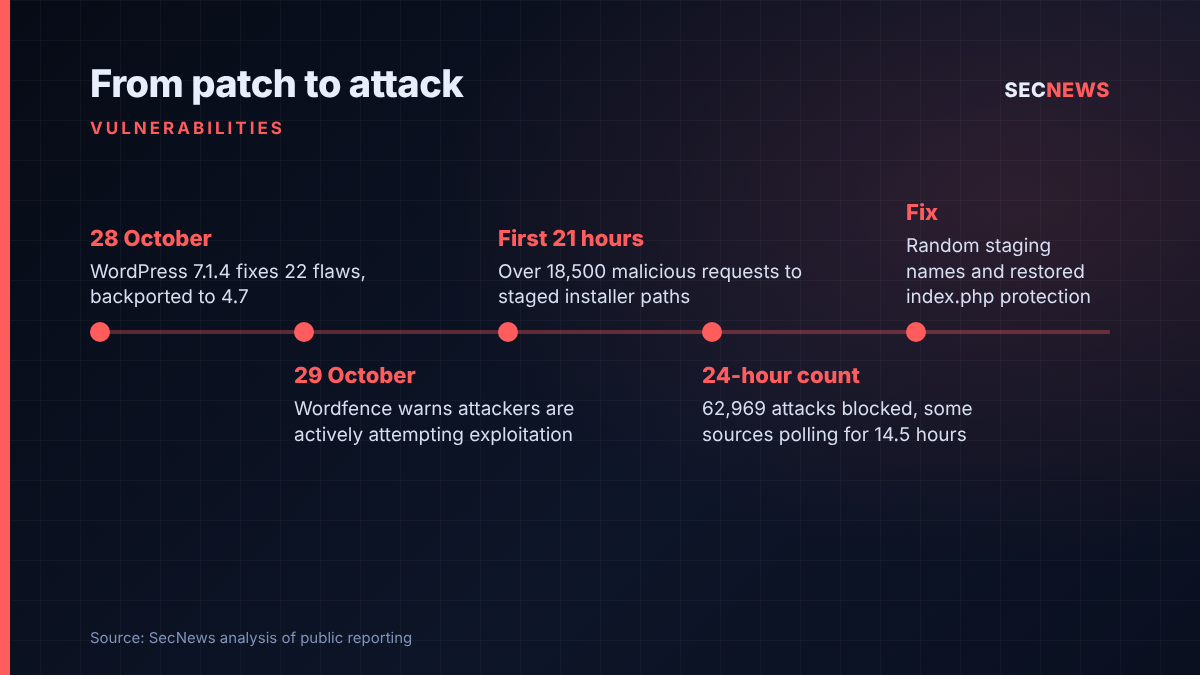
On 28 October 2026 the WordPress project shipped version 7.1.4, a security release covering 22 vulnerabilities, with fixes backported across older branches as far as 4.7. Much of the list is stored cross-site scripting reachable by Contributor-level users and above, mainly in the block editor and the Interactivity API. One item stands apart: a race condition in the core update process, reported by researcher Umut Bayram, that can give an attacker with no account code execution on the server. It is rated CVSS 8.1 and, at the time of writing, has no CVE identifier.
A day later, on 29 October, Wordfence said its telemetry showed threat actors actively trying to exploit the bug. SecurityOnline reported that Wordfence had initially counted more than 18,500 malicious requests aimed at staged installer paths over 21 hours. On 30 October The Hacker News reported a later Wordfence count of 62,969 blocked attacks over 24 hours. No working public proof of concept had been confirmed, but Wordfence said the traffic showed attackers had quickly understood the race condition.
Affected versions run from 4.7 to 7.1.3. Sites still on 4.6 or earlier get no security updates at all and will stay exposed.
The technical picture
The flaw sits in how WordPress handles a full-package core update, as opposed to the smaller partial updates it often uses. During a full update, the old code unpacks the new release into a temporary folder under wp-content/upgrade before copying files into place. That staged copy is a complete WordPress tree, installer included. In vulnerable versions the folder name was predictable, and the cleanup step could strip out the placeholder index.php that normally discourages browsing. On many hosts the folder is also served by the web server and PHP will execute scripts inside it.
Put together, that means that for a short period during the update there is a fresh, unconfigured WordPress installer sitting at a guessable URL. According to the Cyber Security News write-up of Patchstack’s analysis, someone who reaches it can walk through setup and point it at a database they control, which can then lead to running their own PHP on the server. Wordfence’s Alex Thomas said attackers need to request the installer “at precisely the right moment”.
That timing is the main obstacle. Wordfence said that in its lab tests the vulnerable folder normally stayed reachable for only a few seconds, and Patchstack rates exploitation as difficult for that reason. Attackers have responded with brute persistence rather than skill. Wordfence said two of the biggest sources hammered small sets of sites for around 14.5 hours, repeatedly requesting paths such as setup-config.php, while others cycled through many variations of staging folder and version names.
The 7.1.4 fix adds random characters to the temporary folder names, restores the index.php protection, and stops wp-config.php being copied from the working directory into the staged tree.
Why it matters for UK organisations
WordPress runs more than 43 per cent of all websites, according to W3Techs figures cited by SecurityOnline. In the UK that covers a huge spread of organisations: small businesses, charities, schools, councils, parish websites, marketing microsites and plenty of corporate press pages. Many are run by an agency or a volunteer on shared hosting, not an IT team.
The awkward part of this bug is that the exposure arises during a full core update. A busy patching week means more full-package updates, and so more of the brief windows that attackers are polling for. Sites that update automatically will usually be fine once they reach a fixed release, but the move itself is precisely the moment they are watching for.
A compromised WordPress server is rarely just a defaced homepage. In my experience it becomes a staging point for phishing kits, malicious redirects, card skimmers on checkout pages, or a foothold into whatever else shares that hosting account or database. Where the site handles personal data, a breach may also need reporting to the ICO under UK GDPR.
Expert view
This is a clever bug, not a catastrophic one. A race condition with a window measured in seconds is hard to win against a single site at a single moment. The numbers tell you attackers do not care about elegance: they will happily poll thousands of sites for hours on the chance that one of them starts a full update while they are watching. Low odds multiplied by huge scale still pays.
When we test web estates, the wp-content tree is almost always fully served and allowed to execute PHP, because that is the out-of-the-box behaviour and nobody changes it. This flaw is a good argument for treating upload and upgrade folders as data, not code. A simple rule refusing PHP execution under wp-content/upgrade would have blunted this attack, whatever the version number.
I would also not dismiss the other 21 fixes. Contributor-level stored XSS sounds minor until you remember how many sites hand Contributor accounts to freelancers, students or guest authors. Script running in an administrator’s browser is a well-worn route to full site takeover.
Finally, the speed is worth noting. A patch on Wednesday and exploitation attempts by Thursday is now normal for widely deployed software. Monthly patch cycles for public-facing web platforms no longer match the threat.
What to do now
- Update today. Move to 7.1.4, or the matching branch release if you cannot jump versions (for example 7.0.8, 6.9.11 or 6.8.12). Check the Dashboard rather than assuming auto-updates have run. This maps to the Cyber Essentials security update management control.
- Block the staging folder. At the web server or WAF, deny public access to wp-content/upgrade and refuse PHP execution there and in uploads. Patchstack recommends blocking web access to this path.
- Look for signs of compromise. Search access logs for requests to PHP files under wp-content/upgrade, especially setup or install scripts, since 28 October. Check for unfamiliar administrator accounts, plugins and PHP files, and for changes to wp-config.php.
- Review user roles. Remove dormant Contributor, Author and Editor accounts, and enforce strong passwords and multi-factor authentication for all privileged users, in line with the Cyber Essentials user access control.
- Retire unsupported installs. Anything on 4.6 or older will never be fixed. Rebuild or take it offline.
- Ask your suppliers. If an agency or host runs your sites, get written confirmation of the version and the folder protections, not a verbal assurance.
Bottom line
The WordPress update race is hard to win against any one site, but attackers are already running it at industrial scale, and the risky window opens during updating itself. Patch to 7.1.4 or your branch release now, lock down wp-content/upgrade so it can never run PHP, and check your logs for the past few days.