Google has pushed Chrome 156 to the stable channel with 353 security fixes, six of them rated critical and more than 300 rooted in memory safety. None is reported as exploited, but the sheer volume means every organisation running Chrome or a Chromium-based browser should treat this as a priority update rather than routine housekeeping.
What happened
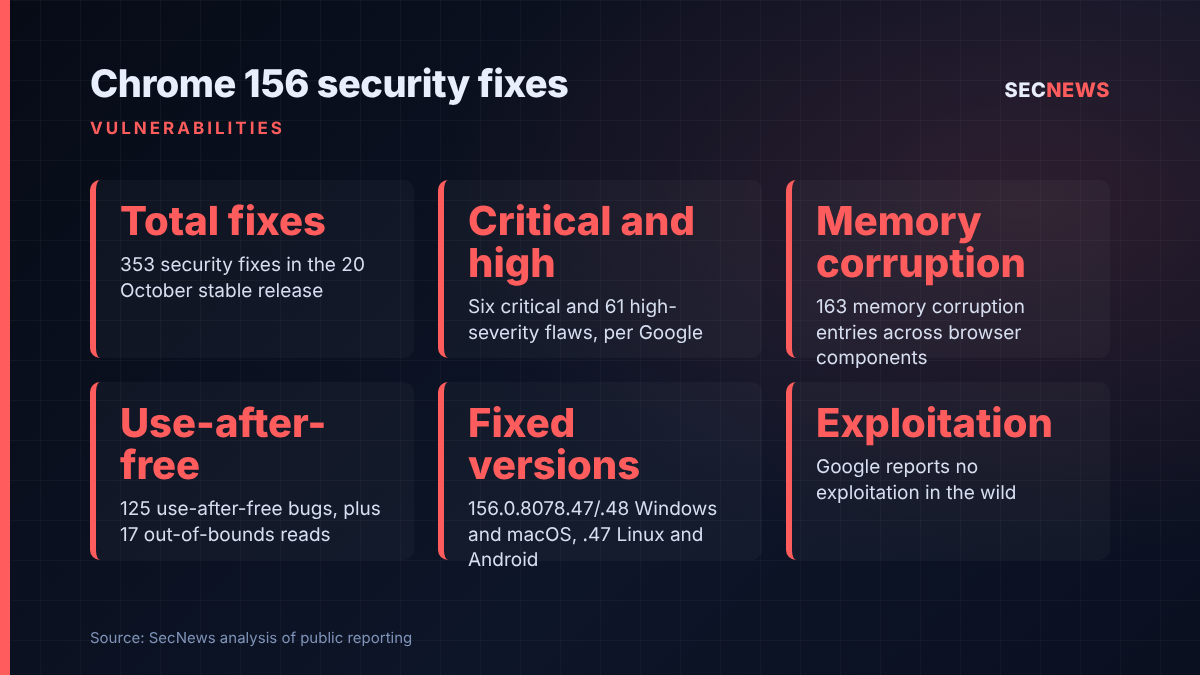
On 20 October 2026 Google promoted Chrome 156 to stable for Windows, macOS and Linux. The fixed builds are 156.0.8078.47 and 156.0.8078.48 on Windows and macOS, and 156.0.8078.47 on Linux. Google says the release will reach users in stages over the coming days and weeks. A companion Android build, also numbered 156.0.8078.47, is arriving through Google Play over the next few days, and Google states that it carries the same security fixes as the desktop release unless noted otherwise.
The advisory lists 353 security fixes. By Google’s own severity ratings, six are critical, 61 high, 197 medium and 89 low. That breakdown comes directly from the Chrome Releases post; at least one widely shared write-up quoted 68 high and 190 medium, which does not match the table Google published.
Google gives no indication that any of these flaws has been exploited in the wild. As is normal practice for the Chrome team, technical detail and bug tracker links are being withheld until most users have the fix, and may stay locked longer where a shared third-party library is affected. The advisory includes no CVSS scores.
The technical picture
This is overwhelmingly a memory-safety release. Tallying Google’s table, memory corruption accounts for 163 entries and use-after-free for 125, alongside 17 out-of-bounds reads and one out-of-bounds write. Add one type confusion and you have well over 300 of the 353 entries in the classic C++ memory-safety family. The remainder is mostly improper input validation (36 entries) and improper access control (seven), plus a few one-offs.
The six critical entries are:
- CVE-2026-113341: memory corruption in Skia, the 2D graphics library, found internally by Google.
- CVE-2026-113279: memory corruption in Accessibility.
- CVE-2026-113271: an Accessibility use-after-free.
- CVE-2026-113072: memory corruption in CSS.
- CVE-2026-113280: memory corruption in Paint.
- CVE-2026-113303: memory corruption in WebRTC.
Among the 61 high-severity bugs, the graphics stack stands out. ANGLE, the layer that translates WebGL and other graphics calls to the native GPU interface, accounts for 14 high-rated entries alone, with further high-rated fixes in GPU, Dawn, WebGL and Canvas. The JavaScript engine is also well represented: seven high-severity bugs in V8 and its Turbolev compiler tier, a mix of memory corruption and use-after-free. Other high-rated fixes cover Site Isolation (CVE-2026-113101), FileSystem (CVE-2026-113097), Passwords, Network, PDF, ServiceWorker and Navigation.
The credits tell their own story, briefly. Google found 266 of the bugs internally, and five of the six critical entries and 13 of the 61 high-rated ones are credited to Xinyang Ge of Anthropic, in some cases noted as “assisted by Claude”, or to OpenAI Codex Security. For defenders, who found the bug matters far less than getting the fix deployed.
Why it matters for UK organisations
Chrome is the default browser across a great many UK estates, and Chromium is the engine underneath Microsoft Edge, Brave, Opera, Vivaldi and countless Electron desktop applications. It is the most exposed software most staff use. Critical memory-safety flaws in rendering, graphics and the JavaScript engine are exactly the class of bug that attackers chain together for drive-by compromise, typically a renderer bug paired with a sandbox escape.
The absence of reported exploitation is reassuring but temporary. Once a fix ships, the source changes are public in the Chromium repository even while the bug reports stay restricted, and capable attackers diff patches to build n-day exploits against people who have not updated. With 353 changes in one release, there is plenty of material to work with.
There is also a compliance angle. Cyber Essentials requires vendor-rated critical and high-risk updates to be applied within 14 days of release. Chrome 156 contains 67 fixes Google rates as critical or high, so the clock started on 20 October. A stale browser build on a sampled endpoint is an easy assessment failure.
Expert view
In my experience, browsers are where organisations think they are patched and are not. Chrome downloads updates quietly, but the new version only takes effect after a relaunch, and plenty of users keep a browser open for weeks. When we test endpoints, it is common to find the updated binary sitting on disk while the running process is several versions behind. That gap is what an attacker exploits.
The second blind spot is everything else built on Chromium. Edge, Brave and the rest pick up these fixes only when their own vendors ship rebuilt versions, and Electron-based apps such as chat, collaboration and note-taking clients can lag Chrome by months.
Finally, I would not read too much into the severity mix. Google’s ratings reflect its own judgement of impact, not confirmed exploitability. A medium-rated bug can still be the missing link in a chain. With this many memory-safety fixes, the sensible stance is to update the whole release promptly rather than triage individual CVEs.
What to do now
- Confirm versions, not just policy. Check that endpoints are actually running 156.0.8078.47 or .48 (Windows and macOS) or 156.0.8078.47 (Linux). Use Chrome Browser Cloud Management, your endpoint management tool or software inventory to report the running version, and chase stragglers. This maps to the Cyber Essentials security update management control.
- Force a relaunch. Use Chrome’s relaunch notification policies to require a restart within a short window, ideally a day or two, so downloaded updates take effect.
- Review update-blocking policies. Any policy that pins Chrome to an older version or disables automatic updates should be justified and time-limited. If you stage updates through a pilot ring, shorten it for this release.
- Track Chromium-based browsers separately. Watch for Microsoft Edge, Brave, Opera and Vivaldi builds that incorporate the Chromium 156 fixes and deploy them as they land. Do not assume Chrome’s update covers them.
- Update Android. Push Chrome 156 to managed Android devices via your mobile device management platform and Google Play, as the same fixes apply.
- Inventory Electron and embedded Chromium. Ask vendors of desktop apps built on Electron when they will rebase on a patched Chromium, and record the answer.
- Keep defence in depth. Ensure staff do not browse with administrative rights, keep site isolation enabled, and consider restricting WebGL or other high-risk features for high-value users through policy if your risk appetite warrants it.
Bottom line
Chrome 156 is an unusually large security release, with six critical and 61 high-severity fixes, the vast majority of them memory-safety bugs in rendering, graphics and the JavaScript engine. Nothing is known to be exploited yet, but patch diffing will close that window quickly. Get the update deployed, force the relaunch, verify the running version across your estate, and do not forget the other Chromium browsers and apps that share the same code.