Google has given Chrome’s Enhanced Protection mode the ability to inspect commands a user copies from a web page and warn them before a ClickFix lure can turn into a malware infection. The timing is useful for UK defenders: Jisc, as reported by Computer Weekly, says ClickFix attacks on British universities and colleges are climbing as the new academic year gets under way.
What happened
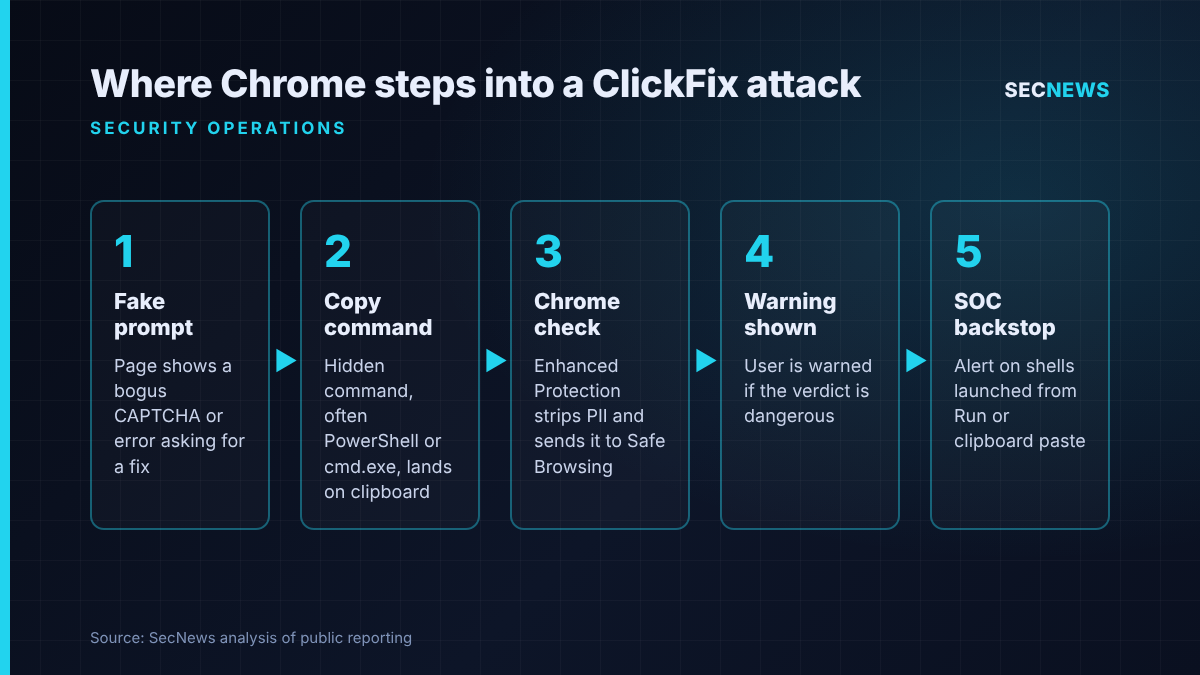
On 20 October 2026, Google published a round-up of new defences in Chrome’s Safe Browsing Enhanced Protection mode. The headline feature for security teams is a ClickFix detector. When an Enhanced Protection user copies text that looks like a ClickFix script, Chrome strips personal data from the clipboard contents, sends them to Safe Browsing for a verdict and displays a warning if the command is judged dangerous.
The same post described two further changes. Chrome now splits site warnings into “suspicious” (a lower-confidence verdict with its own look) and “dangerous” (the familiar full-page red screen). Gemini-assisted scam checks, previously run locally on supported hardware, now use a larger model on Google’s servers, and cover fake antivirus and fake browser update pages as well as tech support scams.
On 21 October, Computer Weekly reported Jisc’s warning that ClickFix scams aimed at UK higher and further education are on the rise. The sector’s network provider said it is tracking a large number of them through its security operations centre and incident response team.
The technical picture
ClickFix is social engineering rather than an exploit. A compromised or malicious page shows a fake CAPTCHA, an error message or a “verify you are human” prompt, then tells the visitor to open the Windows Run box or a terminal, paste what has been placed on their clipboard and press Enter. As Google points out, the command that lands on the clipboard is often not the one displayed on screen. It almost always calls a living-off-the-land binary such as PowerShell or cmd.exe to pull down and launch a payload.
Because the download happens in a native shell, outside the browser, it never touches Chrome’s download protections or Safe Browsing file checks. And because the tools involved are signed parts of the operating system, endpoint products tend to trust them by default.
Google’s answer is to intervene at the copy step, the last point the browser can see. The company says the system is “designed to be high precision” to avoid getting in the way of developers who copy commands legitimately all day. The new server-side Gemini model works in a similar way for scam pages: it scores a page on the brand it claims to represent, its apparent intent and how likely it is to be a scam, and Safe Browsing then combines that with domain reputation before reaching a verdict. Google says page text is only sent when a site already shows strong scam signals, and that the content is processed ephemerally and is not logged, retained or used for model training.
Two caveats are worth keeping in mind. Everything here applies only to Enhanced Protection, not Standard Protection. And Google’s claim that Enhanced Protection users are ten times safer is based, as its own footnote says, on the average number of warnings shown, not on infections prevented.
Why it matters for UK organisations
The Jisc figures, as reported by Computer Weekly, show how much pressure the education sector is under. Since term started, Jisc says its weekly tally of blocked phishing emails aimed at UK colleges, universities and research bodies has ranged from 300 to 37,000, and it believes many are the opening move of a ClickFix attempt. The payloads it lists are a familiar set: LummaStealer and other infostealers, remote access trojans including Xworm, AsyncRAT, NetSupport and SectopRAT, loaders such as Latrodectus and MintsLoader, and rootkits for persistence. In universities with valuable research, an infostealer foothold can be the start of data theft, potentially by state-backed actors.
Computer Weekly also cites Microsoft data showing ClickFix volumes rising more than twentyfold between December 2025 and May 2026, with a malware payload following in 96% of cases. Jisc’s head of security intelligence and capability, Nicole Stewart, was quoted as saying: “All organisations should ensure that employees and students are aware of ClickFix scams.”
None of this is limited to education: ClickFix lures hit UK small businesses, charities and the public sector too. Universities simply add a large, shifting population on unmanaged devices, exactly where a browser-level control matters most.
Expert view
I welcome this, but I would not treat it as a fix. In my experience, ClickFix lands so well in assessments because it turns the user into the delivery mechanism, and most organisations still let any standard user open PowerShell or the Run dialogue. Chrome’s warning adds a useful moment of friction at the exact point where a person is about to make a mistake, and the copy-time check is a smart place to put it. It will not help a user on Edge, Firefox or Safari, on Chrome in Standard mode, or on a device where the lure arrived through a PDF, a chat app or a fake Teams call instead of a web page.
Attackers will adapt. Expect obfuscated commands built to dodge the classifier, instructions to type text out by hand rather than paste it, and more delivery through WebRTC and other channels already seen in reported variants. When we test environments, the ones that cope well with ClickFix are those where clipboard-launched shells raise an alert in the SOC within minutes, not the ones relying on users to spot a fake CAPTCHA.
What to do now
- Turn on Enhanced Protection for managed Chrome. Use the SafeBrowsingProtectionLevel policy through Intune, Google Admin or Group Policy so users cannot quietly drop back to Standard. Check what equivalent protections exist for Edge and other browsers you allow.
- Restrict the tools ClickFix depends on. Limit the Run dialogue, PowerShell and script hosts for standard users where the business allows, and use PowerShell Constrained Language Mode with application control (AppLocker or WDAC). This maps to the Cyber Essentials secure configuration and user access control requirements.
- Hunt for clipboard-driven execution. Alert on explorer.exe spawning PowerShell, cmd.exe, mshta or similar with encoded or download-style arguments, and review RunMRU registry entries for pasted commands. Treat any hit as a possible infostealer incident and rotate the user’s credentials and session tokens.
- Brief users in plain terms. No genuine CAPTCHA, update or IT check will ask anyone to paste a command into Windows. Give staff and students a fast way to report the prompt rather than ignore it.
- Keep anti-malware and patching current. Cyber Essentials malware protection and security update controls will not stop the social engineering, but they shorten the payload’s life on the device.
Bottom line
Chrome’s copy-time ClickFix warning is a sensible, well-placed control, and UK organisations running Chrome should enable Enhanced Protection now. Jisc’s warning is a reminder that the technique is growing fast in British education. The browser can help, but stopping ClickFix still comes down to locking down the shells it abuses and making sure the SOC sees when someone pastes the wrong thing.
Sources
- Google: Our latest defenses against evolving web scams
- Computer Weekly: ClickFix scams pose growing risk to education sector, Jisc says
- BleepingComputer: Google Chrome adds Gemini-powered scam detection, warns users of ClickFix attacks
- SecurityWeek: Google Hardens Chrome Against ClickFix Attacks, Insecure HTTP Connections
- The Hacker News: Google Chrome Adds ClickFix Warnings to Stop Users From Running Malicious Commands
- Help Net Security: Chrome flags malicious commands that scammers pass off as fixes
- CyberInsider: Google Chrome adds Gemini-powered ClickFix warnings and scam detection