A compromised credential belonging to ConnectWise Cloud Backup, the MSP backup service formerly sold as SkyKick, has been used to sign in to customers’ Microsoft 365 tenants as the application itself. Because no user is involved, MFA did nothing to stop it, and any tenant that still has the app consented should be treated as exposed until proven otherwise.
What happened
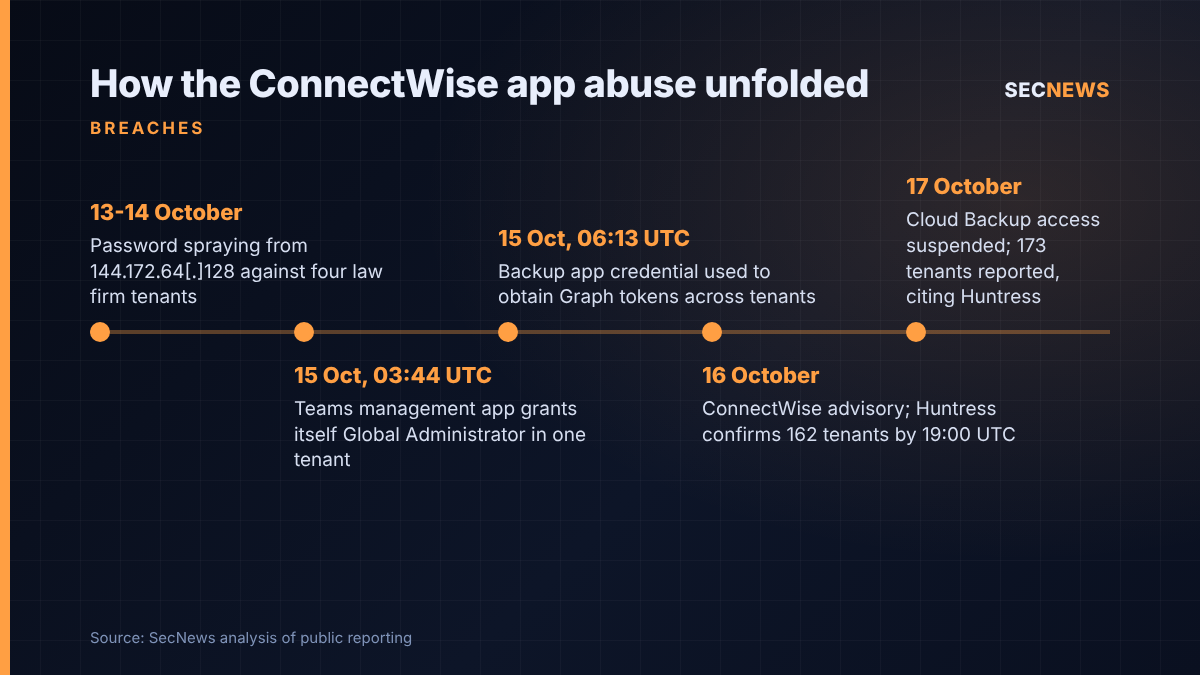
On 15 October an attacker began authenticating to Microsoft 365 tenants using the identity of ConnectWise Cloud Backup, the SkyKick product ConnectWise acquired in 2024 and sells to managed service providers to back up clients’ Microsoft 365 data. Huntress, which first raised the alarm, says the app’s credential was used from the hosting address 144.172.64[.]128 between 06:13 and 08:34 UTC that morning, working through tenants a few seconds apart in what looked like a scripted run against a target list.
The victim count depends on which update you read. Huntress’s own blog says that, as of 19:00 UTC on 16 October, it had confirmed unauthorised sign-ins in 162 tenants; SpecterOps repeats that figure. The Hacker News, citing Huntress, reported 173 tenants on 17 October. Huntress has since added that close to 1,000 Entra tenants showed sign-ins from the attacker’s address, of which more than 300 succeeded, although some of those failed to yield access because the ConnectWise app was not present.
ConnectWise published an advisory on the afternoon of 16 October (17:47 UTC, according to Blumira) saying it was investigating attempted unauthorised access and had no indication that partner backup data had been touched. It has since suspended access to the Cloud Backup application pending its investigation. How the credential was obtained has not been disclosed. According to The Hacker News, Microsoft is describing the incident as an active supply chain attack.
The technical picture
This is not a phished password or an MFA bypass in the usual sense. A backup product needs standing, admin-consented permissions to read and restore mail, files, chats and directory data in every tenant it protects. Whoever holds the application’s credential can request Microsoft Graph tokens with exactly those rights, from anywhere, with no user, device or MFA prompt in the loop. Todyl’s head of detection engineering, Nicholas Koken, told The Hacker News that revoking user sessions does not end this kind of access.
In one Huntress-monitored tenant, a second application in the same family, ConnectWise Cloud Management for Microsoft Teams, added itself to the Global Administrator role and then used a Python script to place new client secrets on two other trusted applications: an MSP management tool and Huntress’s own security platform app. Huntress points out that an MSP management app is often consented across many customer tenants, so a credential planted there could reach well beyond the original victim. Huntress notes this happened hours before the first sign-ins from the attacker’s address and has not yet tied the two to one operator. Huntress later said the Exchange Online and SharePoint Online variants were probably also abused.
Huntress also logged password spraying from the same address against four law firm tenants on 13 and 14 October, and a second, more targeted wave on 15 October aimed at 16 organisations in policy, national security, trade and critical minerals, most of which do not use ConnectWise at all. Those attempts failed. Huntress saw no visible mail or file access in the one audit log it reviewed closely, but Graph reads leave little trace, so that is not reassurance.
Why it matters for UK organisations
A large share of UK small and mid-sized businesses, charities, schools and professional practices have their Microsoft 365 estate run by an MSP, and Microsoft 365 backup is one of the most commonly bundled services. Many of those customers will have no idea which third-party applications their provider consented into their tenant. Blumira makes the point that tenants which stopped using SkyKick long ago, or which were inherited from a previous provider, can still carry the app.
If an attacker read mailboxes or SharePoint libraries holding personal data, that is a personal data breach in UK GDPR terms, and the clock for deciding whether to notify the ICO within 72 hours starts when the organisation becomes aware of it. But the data controller is the customer, not ConnectWise and often not the MSP, so customers need answers from their providers quickly.
The incident lands as Parliament debates the Cyber Security and Resilience Bill, which is set to bring managed service providers into the UK’s regulated perimeter. One supplier credential, many downstream victims, is precisely the risk it targets.
Expert view
In my experience, OAuth applications and service principals are the least reviewed identities in almost every Microsoft 365 tenant we assess. Organisations harden people with Conditional Access and strong MFA, then leave multi-tenant apps with mail or directory write rights unreviewed for years. Those controls do not apply to app-only tokens, and workload identity Conditional Access policies do not extend to third-party multi-tenant apps, as Blumira notes.
When we test cloud environments, the question I ask is not “who can log in?” but “what can act as this tenant without a person present?” Backup, archiving, email security and RMM integrations are usually near the top of that list, and they are exactly what attackers want: broad, trusted and quiet. The self-granted Global Administrator role and the secrets added to other apps are the persistence trick to focus on. Disabling the backup app does not undo credentials already planted elsewhere.
What to do now
- Disable, do not delete. In Entra, find application ID 506e08f9-6e9a-4da4-942b-a099a03644ae (search by ID, with the filter set to all applications) and set sign-in to disabled. Do the same for the other ConnectWise and SkyKick Cloud Management apps until ConnectWise confirms all credentials are reset. Deleting removes consent and evidence.
- Assume up to 90 minutes of residual access. Tokens already issued stay valid for a while after you disable the app. Removing its admin-consented permissions cuts access sooner; export the permission list first.
- Hunt service principal sign-ins. Check the service principal sign-ins tab, not the default user view, for the app IDs above and for 144.172.64[.]128. Huntress suggests auditing from about 01:00 UTC on 15 October onwards.
- Audit every application credential. Look for client secrets or certificates added to any app since 13 October, and for service principals assigning themselves directory roles. Remove anything unexplained.
- Review the audit log for what was done. Sign-in logs show access; audit logs and mailbox and SharePoint activity show actions. Preserve both.
- Ask your MSP directly. Request written confirmation of whether the app was in your tenant, what they found and when, so you can make a timely ICO decision.
- Fix the underlying gap. Inventory third-party apps and their permissions quarterly, remove unused ones and apply least privilege. This sits squarely under the Cyber Essentials secure configuration and user access control themes, applied to non-human identities.
Bottom line
A single compromised application credential gave an attacker the same reach into Microsoft 365 tenants as a trusted backup service, and in at least one case a path to plant fresh credentials on other privileged tools. If your organisation, or your MSP, ever used SkyKick or ConnectWise Cloud Backup, check your tenant today.
Sources
- Huntress: ConnectWise (SkyKick) Vendor Credentials Abused in M365 Attacks
- The Hacker News: Hackers Use Compromised ConnectWise Credential to Sign In to 173 Microsoft 365 Tenants
- SpecterOps: ConnectWise SkyKick Breach: How to Check Your Microsoft 365 Tenant
- Blumira: ConnectWise Cloud Backup (SkyKick) compromise: disable this app in every Microsoft 365 tenant you manage