Mozilla has launched Firefox Enterprise, a paid browser whose management console, telemetry and update services run on the customer’s own infrastructure. For security operations teams, the launch puts the browser forward as a managed control point for data loss prevention, device posture checks and event logging into the SIEM.
What happened
On 12 October 2026 Mozilla announced Firefox Enterprise, a commercial edition of its browser aimed at organisations with strict security, governance and compliance obligations. The first release, Firefox Enterprise 158.0, is built on the standard Firefox 158 codebase and its security fixes. For now, organisations have to request early access, according to heise.
The main difference from the existing free options is the management layer. Firefox and Firefox ESR could already be configured through enterprise policies, but Firefox Enterprise adds an Admin Console that the customer deploys and operates itself. According to the release notes, the customer also hosts the services for updates, sync, remote configuration, telemetry and crash reports. Non-essential links back to Mozilla or outside services are permanently disabled.
Mozilla is pitching it as a digital sovereignty product. Sales start in France, Germany, Austria and Switzerland, with other markets later, and Thunderbird Enterprise is in development. Chief executive Anthony Enzor-DeMeo summed up the argument as: “If all your options are built with the same technology underneath, ‘choice’ is a lie.”
The technical picture
For defenders, the release notes matter more than the marketing: they turn the browser into an enforcement and telemetry point.
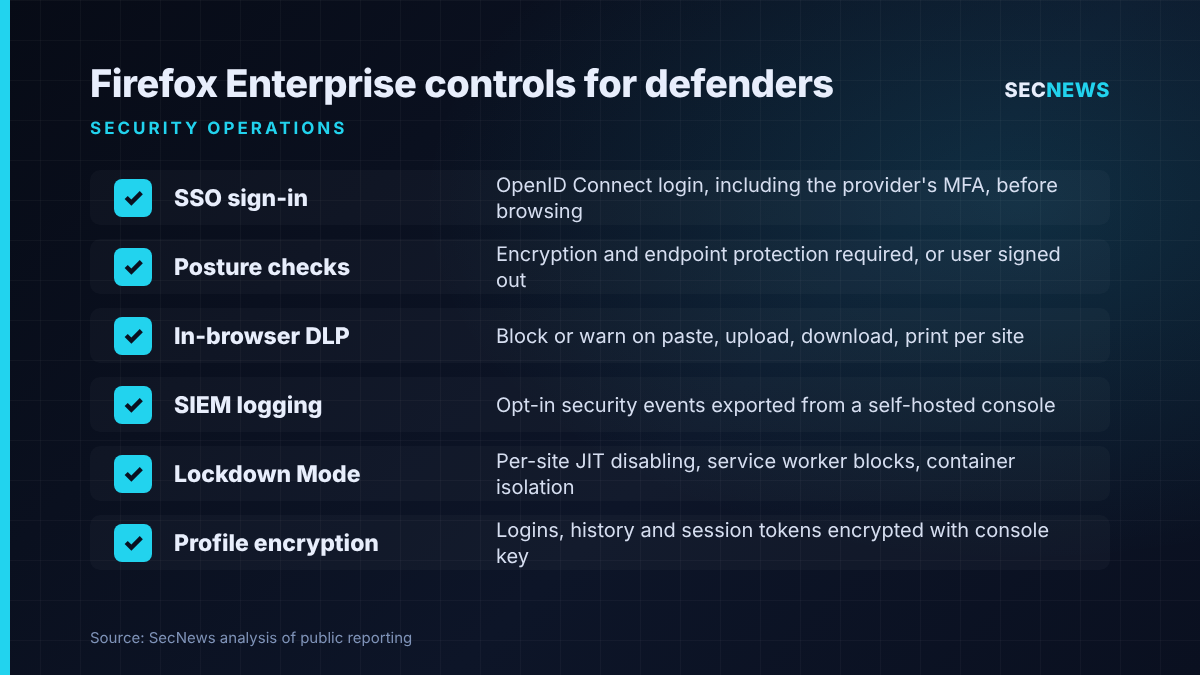
Identity and posture. Users have to sign in through the organisation’s single sign-on before they can browse. Any OpenID Connect provider works, including its MFA. The console receives posture data including OS version, whether the disk is encrypted, whether endpoint protection is active, domain membership, extensions and network details. Administrators can block sign-in on a non-compliant device, and Firefox signs the user out if the device later stops meeting the requirements.
Data loss prevention. On chosen sites, administrators can stop or warn on pasting, uploads, downloads and printing, for example preventing pastes into unapproved AI tools while sanctioned ones keep working. The built-in checks run on the device, so content is not sent over the network for inspection. Where a third-party DLP agent already connects through Firefox’s Content Analysis interface, the browser turns off its own engine and defers to the agent. Help Net Security reports that Trellix and Broadcom products are among those that can be extended into the browser this way.
Telemetry for the SOC. Security event logging covers downloads, printing, extension installs, visits to sites blocked by policy, and unsafe sites and downloads flagged by Safe Browsing. Every event type is off by default. Administrators choose how much detail to record: a full URL, just the domain, or nothing at all, and for downloads either full file details or only the file type. Events go to the customer’s console rather than to Mozilla, and the console can export them to a SIEM along with audit logs of administrator actions. Users see a badge telling them the browser is managed and may apply logging, DLP or watermarking.
Hardening. Per-site Lockdown Mode options include switching off the JavaScript JIT compiler, blocking service workers, refusing HTTP downgrades and confining the site to a disposable container. Profile data, including history, saved logins and TLS session tokens, is encrypted on disk with a key from the console, so a copied profile folder cannot be decrypted elsewhere. Extensions can be allowed or blocked by type, permission and website, a minimum browser version enforced, and an Access Connector proxies internal apps to personal devices without a VPN.
Why it matters for UK organisations
The UK is not among Mozilla’s initial sales markets, so this is not an immediate procurement decision. It is still a useful marker. The browser is where staff authenticate to SaaS, where session cookies live, where files move in and out and where unapproved AI tools get used. It is often the component the SOC sees least.
Comparable capability exists for Chromium-based browsers. heise notes that Google offers central policy management through the cloud-hosted Chrome Enterprise Core, while Chrome Enterprise Premium adds anti-exfiltration rules and AI controls. Mozilla is selling something different: management infrastructure the customer hosts, and a non-Chromium engine. Mozilla argues that running a different engine reduces an organisation’s shared exposure to vulnerabilities in a single engine. Anyone who has chased an emergency Chromium zero-day across Chrome, Edge and Electron apps in one week will recognise the point.
For regulated sectors facing tighter operational resilience expectations, the self-hosted model also changes the third-party risk picture. Keeping browser telemetry and policy inside your own boundary removes one external dependency. It also hands your team a new system to patch, back up and keep available.
Expert view
When we test organisations, the browser is usually where the interesting compromise happens. Stolen session tokens, consent phishing, malicious extensions and data pasted into the wrong web form are all far more common than anything exotic. Few organisations can say afterwards which extensions were installed or what was uploaded where.
A few cautions. A DLP rule is only as good as its site list, and paste controls are easy to work around with a phone camera, which is presumably why watermarking is included. Posture checks rely on the browser’s own reporting, so they should support conditional access at your identity provider, not replace it. And because every logging category starts switched off, an organisation that deploys this without a deliberate telemetry plan will have no audit trail when an incident happens.
Self-hosting cuts both ways: a browser update service you run yourself becomes a high-value target.
What to do now
- Inventory your browser estate. List which browsers and versions are in use, who manages them and what extensions are installed. This supports the Cyber Essentials secure configuration and security update management controls.
- Get browser events into the SIEM. Whether you use Chrome, Edge or Firefox management tooling, start forwarding extension installs, policy-blocked visits, Safe Browsing hits and downloads. Decide how much URL detail you need and record why.
- Write an AI data handling policy and enforce it in the browser. Allow approved AI services and block or warn on pastes and uploads to the rest.
- Tie posture to access. Require disk encryption and running endpoint protection before browser sign-in, and make sure remote session revocation is part of your lost-device runbook. This maps to user access control and malware protection.
- Lock down extensions. Move to an allowlist, force auto-updates and restrict which sites high-risk extensions can run on.
- If you evaluate Firefox Enterprise when it reaches the UK, treat the Admin Console and update service as tier-zero assets: segment them, monitor them and include them in your penetration testing scope.
Bottom line
Firefox Enterprise is not yet being marketed in the UK, but its feature list is a good checklist for what a managed browser should give a security team: identity-bound sessions, posture checks, local DLP, hardened profiles and configurable telemetry that you own. If your SOC cannot currently see what happens inside the browser, fix that now with whatever tooling you already have.
Sources
- Mozilla: Mozilla introduces Firefox Enterprise
- Mozilla: Firefox Enterprise 158.0 release notes
- heise online: Firefox Enterprise: Mozilla launches business browser
- Help Net Security: Mozilla’s Firefox Enterprise lets companies block shadow AI in the browser
- TechRadar Pro: Mozilla launches Firefox Enterprise to give European firms more choice
- CyberInsider: Mozilla launches Firefox Enterprise with self-hosted browser management