Broadcom has launched VMware HyperArmor, an add-on that puts virtual patching, executable allow-listing and SSH multi-factor authentication directly on ESX hosts. For defenders who know how quickly a compromised hypervisor turns into a full-estate outage, it is a welcome control, but it does not replace patching, monitoring or a proper recovery plan.
What happened
On 13 October 2026 Broadcom announced VMware HyperArmor at VMware Explore in Frankfurt. The software protects the ESX hypervisor layer of VMware Cloud Foundation (VCF). It is sold as a separate product on top of VCF, available directly from Broadcom or through its partner and reseller channels, and it supports ESX 8.x and later. Broadcom has not published pricing.
Broadcom’s own explanation is the pace of patching. Prashanth Shenoy, a marketing vice president in Broadcom’s VCF division, told The Register that VMware recently switched to monthly software updates, partly to deal with flaws found with AI tooling. Customers were already struggling to test and roll out fixes before that change. He said they need “room to breathe”. Paul Turner, chief product officer for the VCF division, argued in the launch announcement that reactive detection and patching cannot keep up with attacks that run at machine speed.
According to The Register, Broadcom’s Symantec and Carbon Black security teams built the product, rather than VMware itself. The Register also noted that customers will be paying extra for multi-factor authentication.
The technical picture
Broadcom says two weaknesses sit behind most hypervisor compromises: stolen root credentials and vulnerabilities left unpatched. HyperArmor deals with them through three mechanisms.
Host-level virtual patching. HyperArmor watches for, and stops, malicious actions on the ESX host that indicate an attempt to exploit a vulnerability. It does this without modifying the vulnerable code, and with no reboot or upgrade. VMware already offers a network-layer version in vDefend, which inspects traffic for exploit patterns. HyperArmor moves the same idea onto the host itself. Eric Chen, a Broadcom distinguished engineer who worked on the product, told SiliconANGLE that the control is a stopgap, not a substitute for updating: “this basically buys you time”.
Positive security baseline. A hypervisor runs a small, predictable set of processes, which makes allow-listing far more practical than on a general-purpose server. HyperArmor records the scripts already present and permits them, blocks any executable or script it does not recognise, and requires an administrator to approve anything new. When a person approves a change, the policy updates to treat the new state as legitimate. Turner described the approach as allowing only what is “known good” to run on the host. No agent is needed inside guest virtual machines.
MFA on the SSH path. Signing in to the ESX shell over SSH now takes the normal credentials plus a time-based one-time password linked to a separately defined identity. The aim is to make a phished or leaked root password useless on its own.
Broadcom positions HyperArmor as one layer among several. The others are vSphere live patching, which applies critical hypervisor fixes without putting hosts into full maintenance mode, vDefend micro-segmentation and traffic inspection, and the Avi load balancer’s web application and API protection.
Why it matters for UK organisations
Many UK businesses, local authorities, NHS bodies and managed service providers still run large parts of their estates on VMware. The hypervisor is the most valuable target in those environments. A single host can carry dozens of production servers, and an attacker who reaches the ESX shell can stop or encrypt every one of them without touching the guest operating systems, where most endpoint detection is deployed.
The two routes Broadcom names, stolen root credentials and slow patching, match what defenders see in practice. Monthly VMware releases, alongside every other vendor’s cadence, put real pressure on change windows. A compensating control that narrows the exploitation window without an outage will appeal to infrastructure teams.
There is a cost question as well. Organisations that have already absorbed VMware licensing changes now face another paid add-on for controls many would expect as standard, MFA above all. Smaller UK organisations on tight budgets may decide to get most of the benefit from free hardening first.
Expert view
In my experience, the hypervisor is where internal tests most often turn from “a serious finding” into “game over”. We regularly find ESXi management interfaces on ordinary user VLANs, SSH left enabled after a support call, root passwords shared across hosts or stored in a password manager the attacker already has, and hosts joined to an already compromised domain. None of that needs a zero-day.
So the most interesting part of HyperArmor is not virtual patching. It is the positive baseline. Blocking unknown binaries and scripts on the host goes straight at the stage where ransomware drops and runs its encryptor, and it creates a clear, high-fidelity signal for the SOC: anything blocked on a hypervisor deserves immediate attention. Virtual patching is useful, but it generally depends on knowing what an exploit attempt looks like, whatever Broadcom’s zero-day marketing says. It should be treated, as Broadcom’s own engineer says, as time bought, not risk removed.
I would also caution against reading SSH MFA as the end of credential risk. It closes one door. Attackers with vCenter admin rights, or access to the host client and API, may not need the ESX shell at all, so identity controls must cover the whole management plane.
What to do now
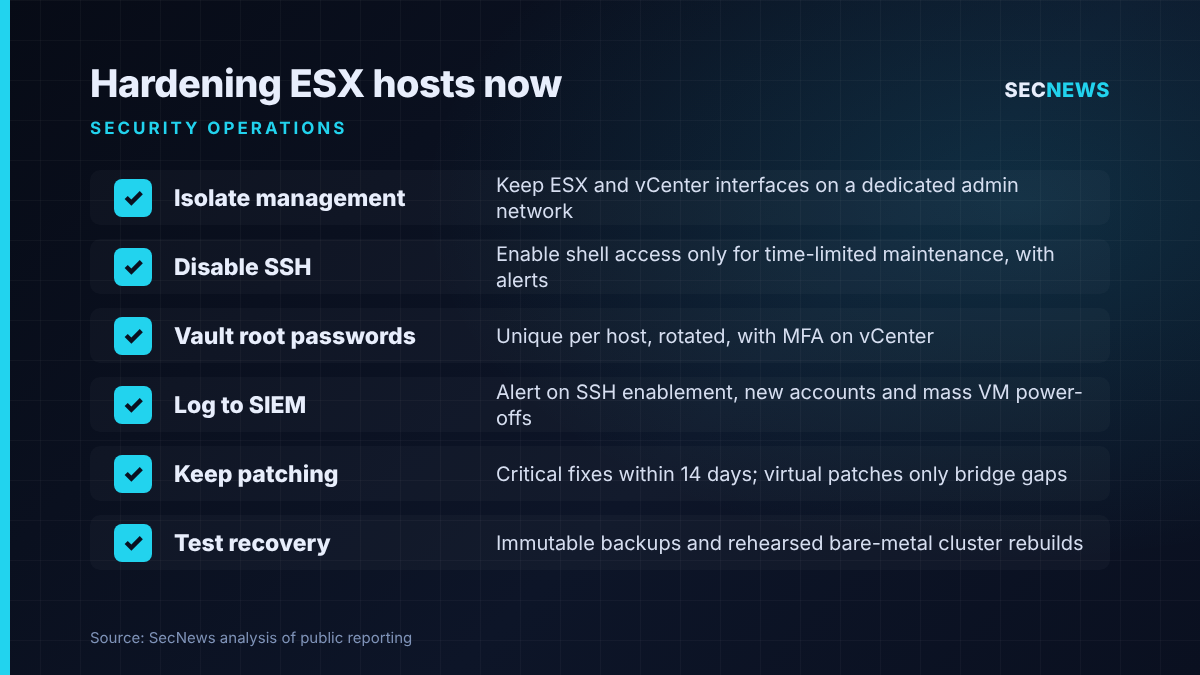
- Isolate the management plane. Put ESX and vCenter management interfaces on a dedicated network reachable only from hardened admin workstations or a jump host. This maps to the Cyber Essentials firewall and secure configuration controls.
- Disable SSH and the ESXi shell by default. Enable them only for time-limited maintenance, and alert whenever they are switched on.
- Fix root credentials. Use unique, vaulted root passwords per host, rotate them after any administrator leaves or any compromise, and consider lockdown mode. Enforce MFA on vCenter and its identity source (Cyber Essentials user access control).
- Break the Active Directory dependency where you can. A domain compromise should not hand over the hypervisors automatically.
- Forward hypervisor logs to the SIEM. Alert on SSH enablement, new local accounts, unusual shell commands, mass virtual machine power-offs and changes to datastores.
- Keep patching. Apply critical VMware fixes within 14 days, in line with Cyber Essentials security update management, and use any virtual patching only to cover the gap.
- If you evaluate HyperArmor, pilot the allow-listing in a monitored mode first, review what it would block, and wire its alerts into incident response playbooks.
- Test recovery. Keep immutable or offline backups of virtual machines and host configuration, and rehearse rebuilding a cluster from bare metal.
Bottom line
HyperArmor targets the right problems: unpatched hypervisors and stolen root passwords. Its allow-listing could give SOC teams a valuable early warning on the hosts that matter most. But it is a paid layer, it supports only ESX 8.x and later, and most of what it adds can be approximated today with segmentation, disciplined credential management, logging and timely patching. Do those first, then decide whether the extra protection is worth the price.