A phishing operation is inviting office workers to fake OpenAI, SpaceX and Anthropic events, then using the registration step to take over their Microsoft and Google work accounts. Two off-the-shelf phishing services do the heavy lifting, and both are built to get past the kind of MFA many UK organisations still rely on.
What happened
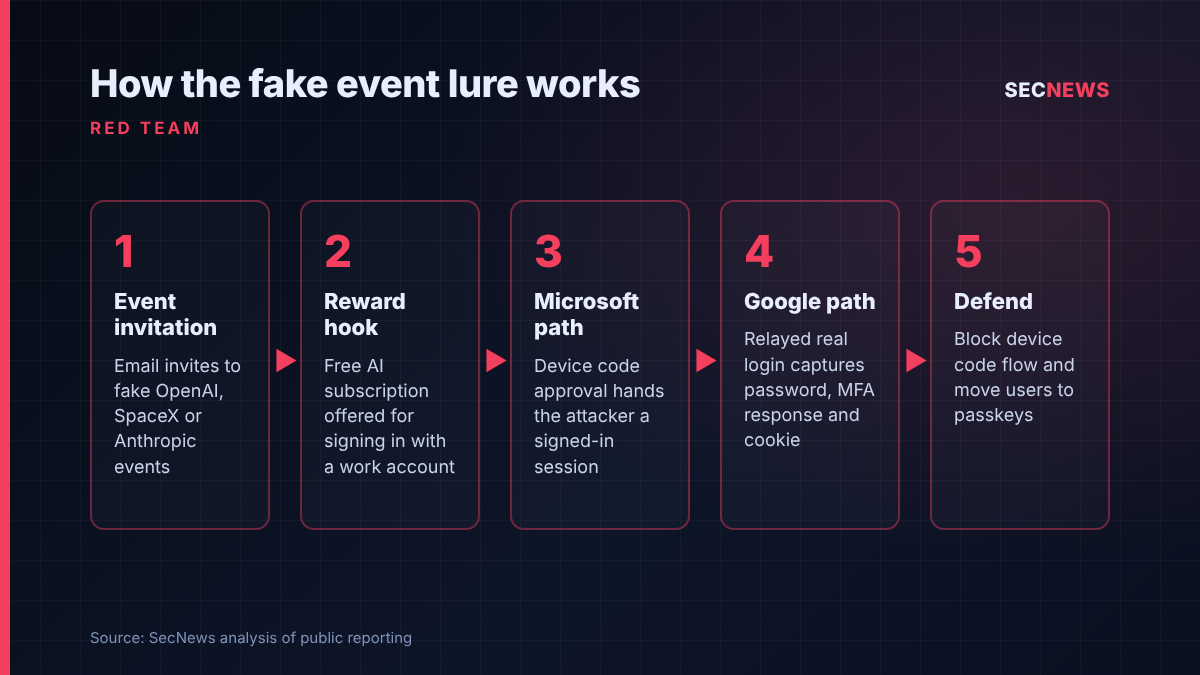
On 5 November 2026 the browser security firm Push Security published an analysis of a campaign built around bogus event invitations. Its customers’ browsers had encountered and blocked the pages in late October. The lures copy the look of genuine event and academy sites. One advertised an OpenAI livestream on ChatGPT for social and digital marketing teams. Another promised an invite-only SpaceX “Starship Product Briefing” on AI for marketing. A third, no longer live when Push examined it, borrowed Anthropic’s name alongside AWS re:Invent.
The hook is a reward. Visitors are told they can claim three months of ChatGPT Pro, three months of Grok Heavy or a “SpaceX share”, but only after signing in with a work account. The page offers two buttons, one for Microsoft and one for Google, and each leads to a different method of account theft. 2-Spyware reported the campaign on 6 November.
Push tracks two lure kits behind the activity. It calls the older one ZoomMock, used for fake Zoom event pages between May and October 2026, and the newer one MSDRoot, which appeared on 22 October as the operator moved to AI-branded themes. It links the two with medium-high confidence. The pages translate themselves into the visitor’s language, so this is not aimed at one country, and the people most likely to bite are marketing staff and anyone keen to get their hands on premium AI tools.
How it works
From the victim’s side the experience is unremarkable. An email invitation arrives, often routed through link shorteners and redirects belonging to well-known services, which helps it past reputation filters. A “confirm you’re not a robot” challenge sits in front of the lure page. It also hides the phishing content from most automated scanners.
The Microsoft path relies on what is known as device code phishing, delivered here through a phishing-as-a-service platform called Kali365. Device code sign-in is a legitimate Microsoft feature for kit with no keyboard, such as conference room displays: one device shows a short code and the user approves it on another. In this campaign the fake page presents a code in an “access confirmation” box and steers the victim to the genuine Microsoft sign-in site to enter it. Because the domain is real, every check a trained user might make passes. The approval goes to the attacker’s session, not the victim’s. Push says victims are then passed to a second page that harvests their password and session cookie as well.
The Google path uses VoidProxy, an adversary-in-the-middle service. Okta documented it in September 2025 as a highly evasive platform that relays the real sign-in flow between the victim and the provider. The user completes a normal login, MFA prompt included, while the proxy records the password, the MFA response and the session cookie issued at the end. With that cookie the attacker can be logged in without facing MFA again.
Push assesses that the operator is most likely a customer of both services, not their author, so the same back end may be serving many other campaigns.
Why it matters for UK organisations
Both techniques defeat the MFA that many UK firms adopted to meet insurer requirements and Cyber Essentials. App push approvals, one-time codes and SMS are all exposed when the attacker sits in the middle of a live session or asks the victim to approve someone else’s sign-in. In its April 2026 blog on passkeys, the NCSC said one-time codes and push approvals remain phishable, since an attacker sitting in the middle can grab and replay them as the victim types. It says it will recommend passkeys wherever a service supports them.
The lure is also timely. Staff across the UK are being encouraged to experiment with AI tools, and a free premium subscription is a believable perk. A hijacked marketing account is a ready launch pad for invoice fraud and internal phishing.
Finally, the domains change every few weeks. Push warns that its published indicators are mainly useful for searching back through old logs. Blocklists alone will not keep up.
Expert view
Device code phishing is the technique I would most like UK IT teams to take seriously this winter. When we run social engineering exercises, the classic lesson is “check the address bar”. Device code abuse makes that advice useless, because the user really is on Microsoft’s own site. The only reliable fix is to remove the flow for people who do not need it, and in my experience almost no one in a typical office does.
Adversary-in-the-middle kits have been around for years, but bundling them as a service with anti-scanner challenges and automatic translation lowers the bar a long way. The answer is not more awareness training on its own. It is authentication that cannot be relayed. FIDO2 security keys and passkeys are bound to the genuine site, so a proxy has nothing useful to capture. The NCSC’s Dave Chismon put it bluntly: “Passkeys remove this class of attack entirely.”
Nor is this a Microsoft-only problem: many UK SMEs run Google Workspace alongside Microsoft 365 without matching controls.
What to do now
- Block device code flow by default. Microsoft’s own guidance is to block it wherever possible. Use the Conditional Access authentication flows condition, start in report-only mode, check sign-in logs for genuine device code use, and allow it only for named devices or locations such as meeting room hardware.
- Move privileged and high-risk users to phishing-resistant MFA. Prioritise administrators, finance and marketing staff for passkeys or FIDO2 keys, in line with NCSC advice. This strengthens the user access control area of Cyber Essentials.
- Tighten session controls. Require compliant or managed devices for access to sensitive apps. Shorten sign-in frequency for risky users, and make sure revoking sessions is a standard step in your account compromise playbook.
- Hunt in your logs. Look for device code sign-ins from users who never normally use them, sign-ins from unfamiliar infrastructure shortly after a user received an event invitation, and new mailbox rules or OAuth consents that follow.
- Brief staff with a simple rule. Never enter a code on a Microsoft or Google device login page unless you started the process on a device in front of you. Treat surprise prizes for signing in with a work account as phishing.
- If someone has already signed in, reset their password, revoke all sessions and refresh tokens, review MFA methods registered to the account, and check for forwarding rules and consented apps.
Bottom line
This campaign shows that the old phishing advice of checking the link and turning on MFA is no longer enough. One branch uses a genuine Microsoft page against the user, and the other relays a real login. The fixes are well understood: block device code flow where it is not needed, and move people to passkeys, starting with those attackers most want to impersonate.
Sources
- Push Security: Fake event invites combine Kali365 and VoidProxy payloads
- 2-Spyware: Fake OpenAI and SpaceX events steal Microsoft logins
- Okta Threat Intelligence: Uncloaking VoidProxy
- Microsoft Learn: Conditional Access authentication flows
- NCSC: Passkeys are more secure than traditional ways to log in