An attacker took over cloud-hosted ScreenConnect panels run by managed service providers and used them to plant rogue remote access clients on at least 288 customer machines in about 90 minutes. No new ScreenConnect flaw was needed, and the toolkit was built to spread from infected machines to the technicians who connect to them.
What happened
Huntress says its security operations centre first saw the activity at roughly 17:47 UTC on Wednesday 11 November 2026. Endpoints belonging to customers of several MSPs began receiving commands from their own ScreenConnect consoles. Those commands silently installed a second, attacker-controlled ScreenConnect client and a toolkit Huntress has named SCKit. By its count, 288 hosts across 48 organisations protected by Huntress were affected, with around a third hit in the first ten minutes. BleepingComputer, citing Huntress, reported that six MSPs had been compromised and that the numbers were still climbing.
ConnectWise, which owns ScreenConnect, published an advisory at 22:45 UTC the same evening. It confirmed unauthorised access to partner accounts and the installation of unapproved remote access software in customer environments, and said it had found no evidence that its own infrastructure had been breached or that a ScreenConnect vulnerability was involved. As a precaution it disabled five third-party extensions (Labtech Plus, RMM Plus, RMM+, RMM Plus Password Link and RMM+ Password Link) in roughly 400 cloud-hosted partner environments. Partners running ScreenConnect on their own servers have to switch them off themselves.
Sophos X-Ops separately reported unauthorised client deployments using the same method. It traced the activity to three ScreenConnect instances it believes were compromised and then used to push two malicious instances out to endpoints.
The technical picture
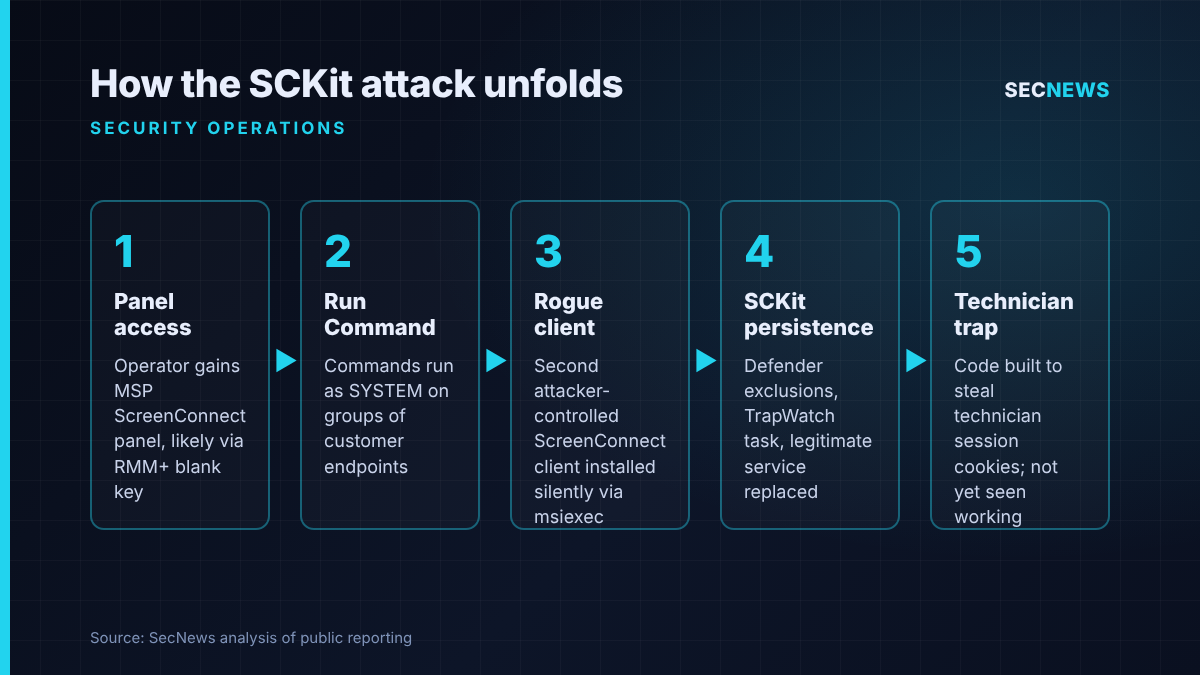
Huntress’s investigation now centres on RMM+, a third-party extension that lets other tools drive ScreenConnect sessions without a technician using the console. In an update late on 11 November, Huntress said versions 1.0.31 and 1.0.32 authenticate API requests with a shared access key that defaults to blank. If an administrator never set that key, an empty value would pass the check, sidestepping ScreenConnect’s user accounts, roles and multi-factor authentication. Huntress said this fits what it saw: commands reached endpoints across several instances within minutes, with no matching login activity. ConnectWise has not publicly confirmed the initial access route, so that finding should be treated as Huntress’s assessment for now.
Once inside a panel, the operator used the Run Command feature to execute commands as SYSTEM on groups of machines. According to Huntress, the commands checked for an existing client, dropped an installer into the Windows temp folder, installed it quietly with msiexec and then fetched an encrypted SCKit package. Each package is keyed to the machine’s own identifier, so the server only hands back the decryption values to the host that asked.
SCKit then adds Microsoft Defender exclusions, creates a scheduled task called TrapWatch, compiles a “relay trap” executable on the host and replaces the legitimate ScreenConnect service with the attacker’s copy. Huntress warns that file hashes are a weak indicator, as scripts and the trap binary vary per host.
The part that should worry MSPs most is what Huntress found in the code rather than in the incidents. The kit is designed to wait for a technician to connect to an infected endpoint, steal the technician’s ScreenConnect session cookie, replay it to list other sessions, and stage a payload in the panel’s shared Toolbox before deleting it about a minute later. Huntress stresses it has not seen this lateral step succeed; every console takeover attempt in the host logs it has reviewed so far failed. Attacker tags on compromised MSPs are also numbered sequentially and the ones observed start partway through, which suggests earlier victims exist.
Why it matters for UK organisations
A large share of UK small and mid-sized businesses, schools, charities and local public bodies rely on an MSP for day-to-day IT, and remote monitoring and management tools are the backbone of that model. A compromised MSP console turns a supplier’s convenience into a trusted, signed, SYSTEM-level delivery channel straight into the customer estate.
The NCSC has been warning about MSP supply chain risk for years, and the Cyber Security and Resilience Bill is set to bring larger managed service providers into regulatory scope for the first time. An incident like this is exactly the scenario that regime is meant to address. Customers should not assume their supplier would spot this first: here it was a detection vendor watching endpoints.
Expert view
What stands out to me is that no exploit was needed. An optional extension, probably installed for one project and never revisited, with a security key left empty, appears to have been enough to bypass every control the MSP had put on its console, including MFA. When we test MSP environments, the RMM platform is nearly always the most powerful system in the building and, too often, the least audited.
The response advice is also unusual. Huntress is telling technicians not to connect to suspect machines through ScreenConnect at all, because that interactive session is the route the toolkit is built to abuse. The instinctive reaction of any helpdesk, to remote in and look, is the wrong move here. In my experience, that nuance is lost at 2am unless the runbook already says it.
Isolation alone is not a fix either. Huntress reports hosts reinfecting soon after isolation was lifted, because the scheduled task and rogue client survive. Disabling the extensions does nothing for machines already compromised.
What to do now
- MSPs: audit every ScreenConnect instance today. Confirm the five named extensions are disabled (on-premises partners must do this manually), and review Run Command, Toolbox, extension installation and authentication history for activity your staff did not initiate, even if nothing has alerted.
- Hunt for a second client. On managed endpoints, look for more than one ScreenConnect client service, a scheduled task named TrapWatch, a C:\ProgramData\RelayTrap folder, sckit files in temp directories and new Defender exclusions. Check ConnectWise, Huntress and Sophos for the published client IDs, domains and IP addresses and block them.
- Investigate out-of-band. Use EDR live response or another separate tool rather than a ScreenConnect session. Treat any technician workstation that has already connected to a suspect host as potentially exposed and examine it from a clean device.
- Contain properly. Keep affected hosts isolated until the rogue client and persistence are removed and you have confirmed they do not return.
- Reset sessions and secrets. End active ScreenConnect web sessions, rotate affected credentials from a clean machine and revoke browser and identity provider sessions, since the toolkit targets session tokens.
- Customers: ask your MSP directly whether they use ScreenConnect and these extensions, and what they have checked. Map this to Cyber Essentials secure configuration and user access control: remove unused plugins, require strong unique keys and limit who can run remote commands.
Bottom line
This attack worked because a trusted management channel was trusted completely and watched barely at all. MSPs should treat their RMM consoles, and every extension bolted onto them, as crown-jewel systems with logging and alerting to match. Customers should ensure someone is watching for remote access tools that appear without a ticket.