Apple is reworking the two most powerful privacy permissions on the Mac, so that desktop AI agents and automation tools can no longer get blanket control with a single click. The changes are in the macOS 27.3 beta. Any UK organisation running a Mac estate should start planning for them now.
What happened
On 16 November 2026 Apple told developers that the second beta of macOS 27.3 changes how apps request Full Disk Access and the setting currently called Device Control and Data Access. Both are among the most sensitive grants a Mac user can make. Apple’s developer note is blunt about the stakes, warning that granting such access “puts all of the data on their Mac at risk”.
The redesign was not a surprise. Last month Apple said it would add extra controls around Full Disk Access because some developers were using it in ways that could expose everything on users’ systems. As both MacRumors and 9to5Mac reported, the company tied that warning to the rise of increasingly autonomous AI agents. These tools read mail, drive other apps and move files without a human approving each step. The 27.3 beta is the first build in which those promised controls actually appear.
Apple has not given a general release date.
The technical picture
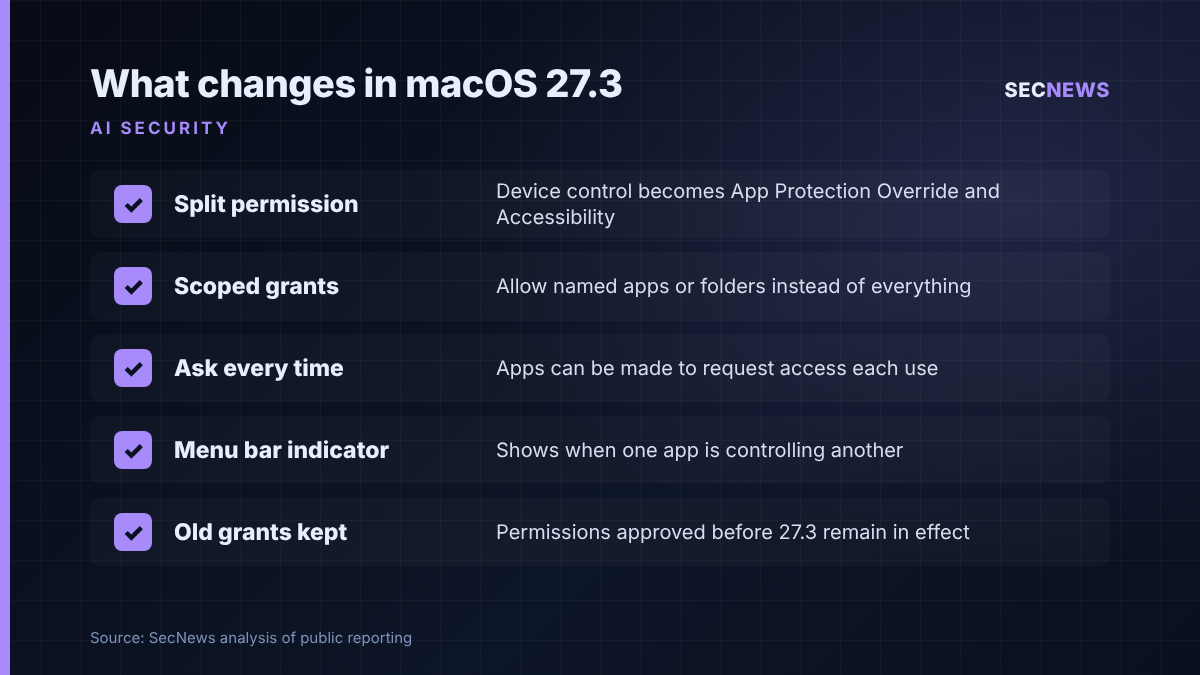
The biggest structural change is a split. Today a single toggle covers what Apple describes as the ability to send email, edit contacts and photos, watch keystrokes, record the screen and operate any other app. In 27.3 that becomes two separate settings:
- System & App Protection Override: for software that needs to get past macOS protections to automate or control other applications. This is the category most agentic AI tools are likely to fall into.
- Accessibility: reserved for assistive technologies, with access handled through an entitlement process.
Around that split, Apple has added several controls that narrow what a single approval hands over:
- Users grant access by picking the requesting app from a list.
- Users are steered towards scoped grants. An automation tool can be allowed to drive specific apps rather than everything, and 9to5Mac gives the example of allowing Mail but not Messages. Full Disk Access can likewise be limited to named folders.
- Approval screens now set out in plain terms which data and protections are being given up.
- An app can be set to ask every time it needs access instead of keeping a standing grant.
- A transparency indicator appears in the menu bar whenever one app is controlling another through System & App Protection Override.
Some things have not changed. According to 9to5Mac, the underlying APIs stay the same and full, unrestricted Full Disk Access can still be granted. The difference is that it now takes a deliberate decision behind a much more explicit warning. Permissions granted before 27.3 stay in place, and the new flow only applies to new requests. Backup tools that rely on Full Disk Access, and assistive technology apps, can apply for entitlements that keep their previous behaviour for new installations. Apple says apps it already knows about will keep working for now without one.
The menu bar indicator has drawn the most criticism. Early testers quoted by Help Net Security, along with commenters on MacRumors, say it cannot be dismissed and lights up for everyday utilities such as window managers, not just AI tools.
Why it matters for UK organisations
Macs are firmly established in UK development teams, creative agencies, media, and parts of financial services and higher education. These are often early adopters of agentic assistants. In my experience, the permission prompts these tools trigger are accepted almost on reflex, because the tool does not work until they are.
A permission is only as safe as the code holding it. Once an agent has blanket control of the desktop, it does whatever its instructions say, and those instructions can be steered by content it reads: an email, a web page, a document from a supplier. Prompt injection turns broad local privileges into a data protection problem. If an agent with access to Mail, Messages and the file system is manipulated into collecting personal data and sending it out, that is a reportable incident under UK GDPR, whoever technically “did” it.
The direction also matches UK guidance. The NCSC’s advice on agentic AI calls for least privilege, sandboxing and oversight scaled to risk. CTO Ollie Whitehouse has said that “appropriate human oversight is paramount” when agents are given autonomy. Apple’s per-app scoping, ask-every-time prompts and on-screen indicator are, in effect, those principles built into the operating system.
Expert view
This is a sensible change, and overdue. When we test Mac estates, Full Disk Access and Accessibility grants are some of the most useful things an attacker can find. Taking a single all-or-nothing switch and making it a scoped, visible and revocable decision closes off a lot of quiet abuse, whether by malware or an AI agent talked into misbehaving.
It has limits, though. Grants made before 27.3 carry straight over, so a machine that has already approved half a dozen tools gets no safer on the day it updates. The indicator also risks becoming background noise: if it is lit for a window manager all day, nobody will notice when it is lit for something else. And scoping only helps if people actually choose narrow options. Users in a hurry may still pick “everything” to make the prompt go away.
The bigger point for security teams is that AI agents are now a recognised class of privileged software on the endpoint. They need the same governance as remote access tools: an inventory, an owner, a stated purpose and a review date.
What to do now
- Audit existing grants. Because earlier approvals survive the upgrade, list which apps on managed Macs already hold Full Disk Access, Accessibility or automation rights. Remove anything that is unused or unexplained. This maps to the Cyber Essentials secure configuration and user access control themes.
- Inventory AI agents and automation tools. Find out which desktop agents staff are running, what each one touches and who approved it. Treat unknown agents like any other unapproved software.
- Test 27.3 beta 2 now. Check how your device management tooling, pre-approved privacy profiles and line-of-business automation behave under the new flow before it reaches production.
- Set a scoping standard. Write down the default: named apps or folders only, and ask-every-time for any agent that handles mail, messages or customer data. Reserve full access for backup and similar tools with a documented need.
- Brief users on the indicator. Explain what the menu bar marker means and tell people to report it when it appears unexpectedly, rather than leaving them to learn to ignore it.
- Update risk assessments. Where an agent can reach personal data, record it in your DPIA and incident response plans, including how you would revoke its access quickly.
Bottom line
Apple is treating desktop AI agents as the high-privilege software they are, and macOS 27.3 makes blanket control harder to hand over by accident. UK organisations should not wait for release: clean up existing grants, decide how agents are scoped and prepare users for the new prompts.
Sources
- Apple Developer: Updates to Device Control and Data Access, and Full Disk Access in macOS
- MacRumors: macOS 27.3 Warns Against Giving AI Apps Full Mac Control
- 9to5Mac: macOS 27.3 includes new privacy controls for Full Disk Access and more
- Help Net Security: Apple splits Mac app permissions fearing overreaching AI agents
- Computing: NCSC urges firms to keep humans in charge as agentic AI adoption rises