Microsoft’s October 2026 Windows security update quietly flips a long-trailed NTLMv1 control from audit to enforcement, and domain-joined laptops using password-based Wi-Fi and wired 802.1X single sign-on are dropping off networks as a result, and VPN logins are also at risk. The breakage is deliberate, and the right response is to fix the dependency rather than roll back the patch.
What happened
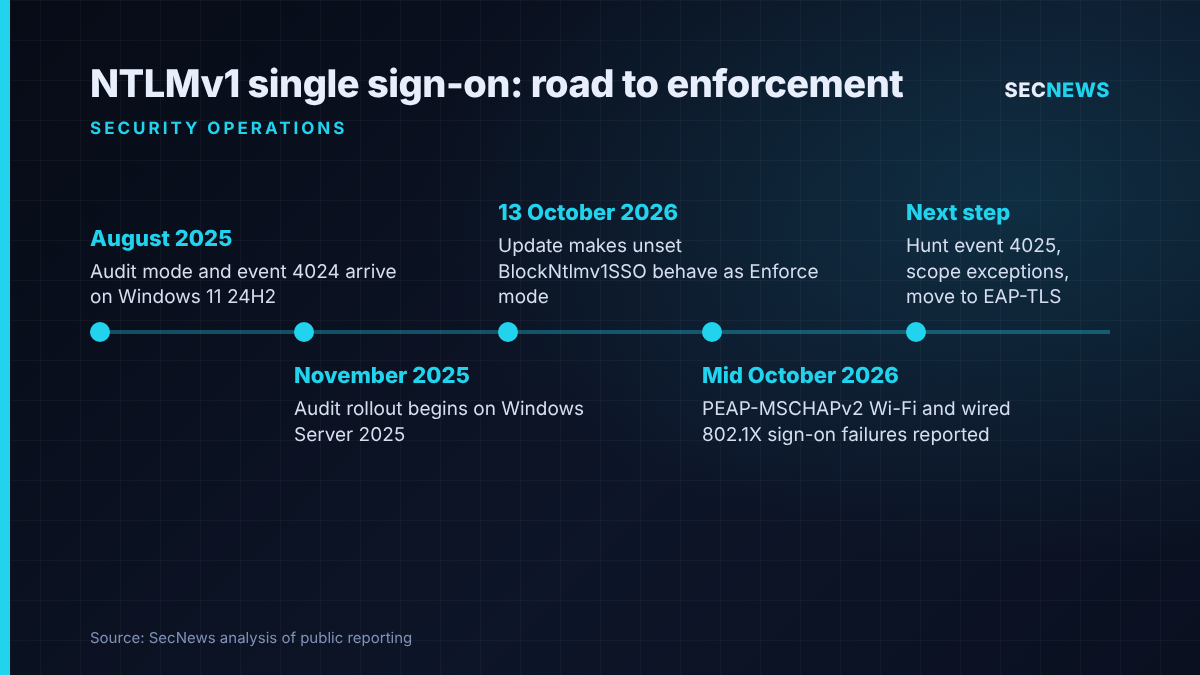
The security updates Microsoft shipped on Patch Tuesday, 13 October 2026, are KB5127648 for Windows 11 and KB5126646 for Windows Server 2025. Among their changes is a new default for a registry value called BlockNtlmv1SSO. Since August 2025 that value has controlled whether Windows merely logs, or actively refuses, requests to build NTLMv1-derived credentials for single sign-on. Where the value has never been set, Windows used to behave as if it were in Audit mode. From this update onwards, an unset value is treated as Enforce mode.
Microsoft updated its support article on the change on 14 October, spelling out the likely impact on MS-CHAPv2-based wireless, wired and VPN logins. The Register warned on 16 October that the update may break networking for some customers, and stressed that Microsoft regards the behaviour as by design, not a bug. Keytos, a vendor of cloud PKI and RADIUS services, published a detailed write-up on 14 October collating reports from administrators on r/sysadmin, Microsoft Q&A and EduGeek.
The change only bites on machines where Credential Guard is switched off. Devices with Credential Guard enabled already block this credential path; Keytos notes that those relying on MS-CHAPv2 single sign-on were already broken.
The technical picture
The NTLMv1 protocol itself is already gone from the latest Windows client and server releases, yet fragments of its cryptography linger. The main example is MS-CHAPv2, which still sits inside PEAP-MSCHAPv2 and EAP-MSCHAPv2. These are the inner methods behind a great deal of WPA2-Enterprise Wi-Fi, wired 802.1X and some VPN deployments.
With the “use my Windows user account” option set, the supplicant skips the password prompt and asks the Local Security Authority for a credential derived from the stored NT hash and uses that to answer the MS-CHAPv2 challenge. That request is exactly what Enforce mode now refuses. Microsoft confirms that typing credentials manually still works; Keytos explains that the supplicant then computes the response itself rather than requesting anything from LSA.
The symptoms are distinctive once you know where to look. Microsoft documents two events in the Microsoft-Windows-NTLM/Operational log: ID 4024, a warning raised in Audit mode, and ID 4025, an error stating that an NTLMv1-derived single sign-on attempt was blocked by policy. Keytos adds that the failure happens on the client before anything reaches the RADIUS server, so NPS logs may stay silent. It lists WLAN-AutoConfig and Wired-AutoConfig failures carrying error 0x80070285, and wired ports looping in a “connected, not authenticated” state. Certificate-based EAP-TLS clients and pre-shared key networks are not reported as affected.
Microsoft’s timeline makes clear that none of this was a surprise. Audit logging arrived on Windows 11 24H2 clients in late August 2025, the rollout reached Windows Server 2025 from November 2025, and Keytos describes the October 2026 default change as the final step of that published schedule.
Why it matters for UK organisations
PEAP-MSCHAPv2 with single sign-on is everywhere in the UK estate I see: schools and colleges, NHS trusts, local authorities, professional services firms and plenty of mid-sized businesses that set up an NPS server a decade ago and never revisited it. It is cheap and needs no client certificates, which is precisely why it has lingered.
The operational risk is twofold. First, help desks face a wave of “Wi-Fi is broken” tickets that look like a network fault rather than an authentication policy change, particularly because RADIUS logs may show nothing. Second, and more dangerous, is the pressure to fix the problem by uninstalling or pausing the October update. That release also fixed an actively exploited Windows Shell zero-day, so rolling it back to restore Wi-Fi swaps an inconvenience for a genuine exposure.
There is also a compliance angle. Cyber Essentials requires high and critical security updates to be applied within 14 days of release. Organisations that pause the October update across their fleet to dodge the authentication problem could quietly fall out of line with that requirement.
Expert view
MS-CHAPv2 has been cryptographically weak for well over a decade. Keytos points back to the 2012 DEF CON research by Moxie Marlinspike and David Hulton, which reduced the whole exchange to one 56-bit DES brute force. On wireless tests the practical problem is usually even simpler: clients that do not properly validate the RADIUS server certificate will happily talk to a rogue access point, which hands the attacker a challenge-response pair to crack offline or relay. When we test corporate Wi-Fi, a PEAP network with lax certificate validation is one of the more reliable routes from the car park to a domain credential.
So I have little sympathy for the idea that Microsoft has broken anything. It published the schedule, shipped the audit events more than a year ago and said plainly that Audit mode is a stopgap. In Microsoft’s words, falling back to Audit mode “should only be considered as a scoped, temporary security exception”. The organisations hurting this week are largely those that never looked at event 4024. That is a detection failure as much as a networking one.
The registry workaround is legitimate, but it re-opens a weak credential path, and nobody knows how long Microsoft will honour it. The Register suggests it may survive until the next major Windows release. I would plan on considerably less.
What to do now
- Do not uninstall the October update. It carries fixes for an exploited zero-day and keeps you within Cyber Essentials patching timelines (security update management control).
- Find the affected devices. Collect Microsoft-Windows-NTLM/Operational events 4024 and 4025 centrally in your SIEM, alongside WLAN-AutoConfig and Wired-AutoConfig failures. A rise in 4025 after patching tells you exactly which users and networks depend on NTLMv1-derived single sign-on.
- Apply a scoped, time-limited exception only where needed. Setting BlockNtlmv1SSO to 0 under HKLM\SYSTEM\CurrentControlSet\Control\Lsa\MSV1_0 restores the old behaviour with no reboot required. Target only affected groups via Group Policy Preferences or an Intune remediation, and log it as a risk acceptance with an expiry date.
- Tighten PEAP while it remains. Make sure every client profile validates the RADIUS server certificate and expected server name, so a rogue access point cannot harvest MS-CHAPv2 exchanges (secure configuration control).
- Plan the move to EAP-TLS. Certificate-based authentication removes the password, does not depend on NTLM and survives Credential Guard.
- Enable Credential Guard where hardware allows. Microsoft recommends it on all supported platforms, and once your network authentication no longer relies on MS-CHAPv2 there is no reason to hold back.
Bottom line
The October 2026 update makes NTLMv1-derived single sign-on fail by default, and it is doing exactly what Microsoft said it would. Use the 4025 events to map the damage, buy time with a tightly scoped registry exception if you must, and spend that time moving network authentication to certificates. Rolling back a security update to keep a broken protocol alive is the one option that should be off the table.
Sources
- The Register: Networking problems after the October 2026 Windows update? NTLM might be to blame
- Microsoft Support: Manage changes to NTLMv1 and prevent network issues in Windows 11 and Windows Server 2025 (KB5066470)
- Keytos: KB5127648 Breaks PEAP Wi-Fi and 802.1X Authentication: What Happened and How to Fix It