Microsoft has paid an Australian researcher US$16,000 for two privilege escalation bugs in the Windows 11 Get Help diagnostics, and fixed one of them without a CVE or a public advisory. Bounty hunters were rewarded, but defenders who rely on vulnerability feeds were never told there was anything to fix.
What happened
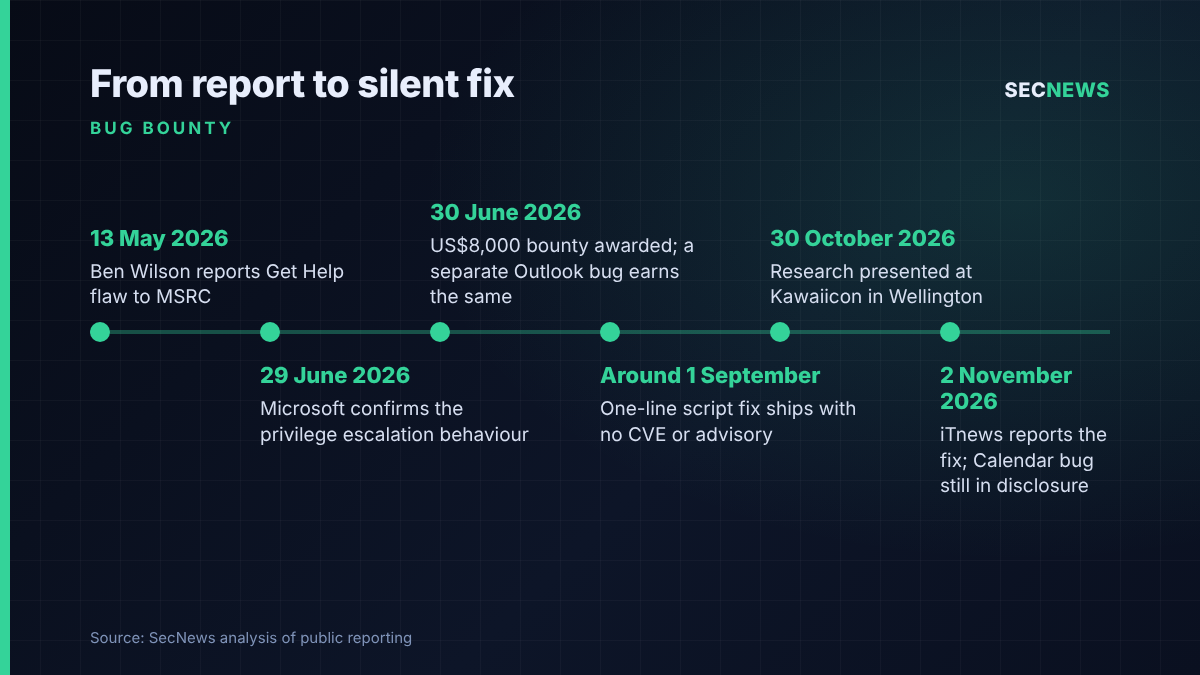
Ben Wilson, a consultant at Melbourne firm Tanto Security, spent part of this year looking at Windows Diagnostics. That is the machinery behind the Get Help app and its guided troubleshooters. On 13 May 2026 he reported a local privilege escalation flaw in one of those troubleshooters to the Microsoft Security Response Centre (MSRC). Microsoft acknowledged the issue on 29 June, and a US$8,000 award followed the next day. It paid the same amount for a second bug in the Outlook diagnostic package. A third issue, in the Calendar diagnostic package, is still going through disclosure and has not been paid.
The fix for the first bug landed around 1 September. iTnews, which reported the case on 2 November, says Wilson discovered the change only while preparing a demo for a talk. No CVE identifiers have been issued, and Wilson told the publication he is “not sure I ever will” receive any. Wilson presented the research as “Troubleshooting to SYSTEM” at BSides Canberra in September and at Kawaiicon in Wellington on 30 October. The abstract credits the research with three new escalation exploits, and Wilson knows of no real-world attacks using the Media Creation Tool bug.
The technical picture
Get Help runs troubleshooting packages, which are Microsoft-hosted bundles of PowerShell scripts. They execute through the Diagnostic Execution Service, DiagSvc, which runs as SYSTEM, the most powerful account on a Windows machine. Older troubleshooters needed an administrator to approve them before DiagSvc acted. On Windows 11, Wilson found that a standard user could start the service directly and no elevation prompt appeared.
The package he concentrated on downloads and launches the Media Creation Tool, Microsoft’s utility for building Windows installation media. Its script worked in a temporary folder that ordinary users could write to. It fetched the tool into that folder and then executed it as SYSTEM. Wilson chained two race conditions. In the first, the script deleted the old folder, logged a message and only then made it again, and that brief gap let a low-privileged process create the folder first and own it. In the second, he swapped his own program in for the genuine executable as the download finished, and the script then launched his program with SYSTEM rights. It is a textbook time-of-check to time-of-use flaw, with no memory corruption needed.
Wilson said Microsoft’s fix was a single-line change to the PowerShell script, which stops users from gaining full control of the download folder and so breaks the chain. He has not yet tested whether the patch can be bypassed. The Outlook and Calendar issues involve different packages and different bugs, and no technical detail on them is public.
Why it matters for UK organisations
A local privilege escalation bug is rarely how an intrusion starts, but it is often how one gets worse. Once an attacker has code running as an ordinary user through a phishing payload, a malicious download or a stolen session, the jump to SYSTEM lets them turn off endpoint protection, dump credentials and settle in. Shared machines are the obvious worry: hot desks, contact centres, library and school PCs, kiosks and the jump boxes that many UK firms give contractors.
The bigger issue is visibility. UK vulnerability management runs on identifiers. Scanners match CVEs, service desks raise tickets against them, and managed service contracts quote patch timescales by CVSS score. Cyber Essentials sets its 14-day patching deadline for updates that fix vulnerabilities rated critical or high. A flaw with no CVE has no score, so it never trips any of those triggers. Because troubleshooting packages are hosted by Microsoft, the fix may not even line up neatly with a monthly cumulative update. My reading is that this makes it harder to prove from build numbers alone which machines are protected.
There is a policy angle too. The UK government’s voluntary Software Security Code of Practice asks vendors to provide timely security updates, patches and notifications to customers. A US$8,000 payout shows Microsoft judged the bug real; the missing advisory meant customers never heard about it.
Expert view
A bounty buys the researcher’s silence until a fix ships, on the understanding that the vendor will then tell its customers. Only the first half happened here. US$8,000 for a local-only bug is in line with the market, and under four months from report to fix is unremarkable. What bothers me is that the public record now depends on a researcher choosing to give conference talks and a trade publication choosing to write about them.
In my experience, privileged helper services are among the most reliable sources of escalation paths on Windows estates during internal tests. Updaters, repair tools and vendor agents run with high rights and act on files a user can touch. Diagnostics fit that pattern, and removing the administrator prompt on Windows 11 moved all the trust onto the quality of the scripts. With three exploits from one researcher in one framework, I would expect others to look at the remaining packages, and the Calendar bug is still open.
Quiet fixes do avoid handing attackers a signpost, and Microsoft has not explained its reasoning. But defenders need an identifier to audit against, and organisations should plan around its absence.
What to do now
- Keep Windows 11 fully updated and check it. Confirm that endpoints are on current builds and taking Microsoft’s updates normally, with particular attention to devices that have been offline, sit on long deferral rings or are pinned to old builds (Cyber Essentials: security update management).
- Start with shared and lower-trust machines. Check kiosks, hot desks, training rooms and contractor systems first.
- Keep standard users standard. The bug only matters once someone has a foothold, so continue to remove local administrator rights and enforce application control on shared systems (Cyber Essentials: user access control and malware protection).
- Watch the diagnostics service. Ask your SOC or EDR provider to alert on unusual child processes started by the diagnostic service and on executables launched from user-writable temporary folders with SYSTEM rights.
- Write a no-CVE procedure. Cover fixes that arrive without identifiers in your patch policy, and track researcher disclosures alongside scanner output.
- Ask suppliers the question. In contract reviews, ask key software vendors whether they issue CVEs for every security fix they pay a bounty for, and how they notify customers when they do not.
Bottom line
Microsoft paid fairly and fixed the Media Creation Tool bug in reasonable time. It then left customers to find out from the conference circuit. For UK security teams, the lesson is that a clean scanner report shows which known CVEs are covered and nothing more. When fixes arrive without identifiers, a secure configuration, restricted user rights and good detection are what keep a standard user from becoming SYSTEM.