Kaspersky has published its investigation into a BlackNevas attack in which an organisation lost its entire VMware estate over 10 days without any hypervisor vulnerability being exploited. The attackers got in with stolen credentials and used VMware’s own management features against it, including a configuration tool that is meant to enforce security.
What happened
On 13 November 2026, Kaspersky’s Global Emergency Response Team (GERT) published a detailed write-up of a ransomware engagement it had investigated. Over roughly 10 days, the attacker destroyed four VMware ESXi hosts, every virtual machine running on them, both vCenter Server Appliances and the connected backup infrastructure. The ransom notes named BlackNevas, a group first seen in November 2024. SentinelOne has previously described it as an offshoot of the Trigona ransomware family. The victim and its location were not disclosed.
Researchers had nothing new to patch. Kaspersky says no guest-to-host escape took place and no hypervisor memory was corrupted. Every action against ESXi went through legitimate VMware administration interfaces.
This is a separate case from the destructive Check Point gateway campaign we reported on 14 November. That campaign relied on a zero-day in Check Point Security Gateways and PHP2Shell-related access; the BlackNevas intrusion needed no exploit at all.
The technical picture
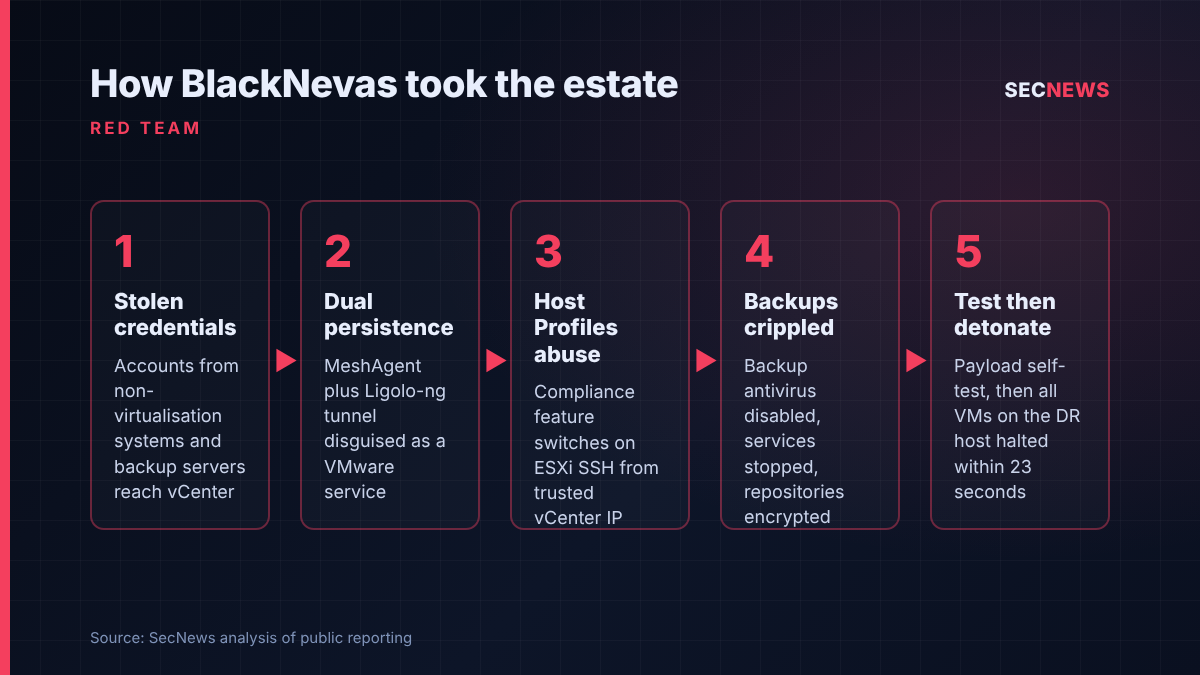
The first access to vCenter came from valid credentials harvested on systems outside the virtualisation tier. The attacker also took stored secrets from the backup servers, which almost always hold privileged accounts for the hypervisors they protect.
On the disaster recovery vCenter appliance, the intruder logged in as root over SSH and installed MeshAgent, the agent used by the open-source MeshCentral remote administration tool. Kaspersky says that SSH session lasted under two and a half minutes and was not repeated. Roughly four hours on, the intruder returned via MeshAgent and added a second foothold: a Ligolo-ng reverse tunnel running as a systemd service called vmware-vdma, with its binary under a VMware-looking path. Kaspersky’s indicators show the tunnel beaconing to a domain that typosquats Cloudflare.
The most instructive step was the abuse of vCenter Host Profiles. The feature exists to capture a standard configuration and push it to ESXi hosts so they stay compliant. The attacker used it to switch the ESXi SSH service from its policy-disabled state to running. Kaspersky’s timeline shows about 11 minutes between first reading the configuration and having remote shell access to the hosts. The SSH connections that followed came from the vCenter appliance’s own IP address, which is about as trusted a source as a management network has.
Recovery was attacked well before production. Days before the final stage, antivirus on the backup environment was switched off. Backup services were later stopped, the recovery repositories were encrypted and administrative access was disrupted. The payload reached ESXi by SFTP and ran a short self-test about three hours before detonation, which Kaspersky reads as the operator checking compatibility with the target build. At detonation, all guests on the recovery site’s host were halted inside 23 seconds, and roughly the first 2 KB of the virtual disk files was overwritten, which can destroy boot structures such as the MBR and primary GPT header. A surviving backup GPT may permit partial recovery.
Kaspersky also points to a visibility gap. EDR agents inside guest VMs cannot see a hypervisor process altering VMDK files, and Broadcom does not support third-party security agents on ESXi or vCenter appliances. The evidence that rebuilt this incident came from ESXi and vCenter logs, not from endpoint tooling.
Why it matters for UK organisations
VMware remains widely used across UK enterprise, the public sector and many managed service providers. Many of those estates run vCenter joined to the corporate domain, back up through a domain-joined server, and let infrastructure staff use the same privileged accounts across tiers.
The impact model should worry boards most. Locking a single server is a bad day. Losing every VM and the means to restore them is an existential event, and the recent UK retail and manufacturing incidents have shown how long operational recovery takes once core platforms are gone. The NCSC has long warned that backups must survive the compromise that hits production; this attacker deliberately targeted them first.
Organisations that measure ESXi readiness mainly by patch speed would have had no warning here.
Expert view
When we test virtual estates, the hypervisor itself is rarely the weak point. The route is nearly always identity. Domain admin on a jump box, a backup service account with rights to every host, or a vCenter tied to Active Directory with group mappings nobody has reviewed in years. This report is a textbook example.
The Host Profiles technique deserves attention from defenders and testers alike. Kaspersky’s point is that a compromised central management tool cannot be treated as an independent control. If vCenter is allowed to change host security state, then whoever controls vCenter can switch that security off in a way that looks like routine compliance. In my experience, few organisations alert on Host Profile remediation at all, never mind correlate it with a new SSH session from the appliance a few seconds later.
I would also stress how methodical the attacker was. They kept dual persistence through a legitimate remote management agent and a tunnel disguised as a VMware service, test-fired the payload, and degraded the backups days in advance. Each step was detectable, but only by teams collecting ESXi and vCenter telemetry somewhere the attacker could not reach.
What to do now
- Treat vCenter as Tier 0. Give it the same protection as domain controllers: dedicated administrative accounts, access only from hardened management workstations, and phishing-resistant MFA. This maps to the Cyber Essentials user access control and secure configuration requirements.
- Separate virtualisation identities. Do not reuse domain or workstation admin credentials for ESXi or vCenter. Where hosts are domain-joined, follow Broadcom’s guidance, review the ESX Admins group mapping (the CVE-2024-37085 issue) and audit permissions regularly.
- Keep ESXi SSH off and watched. Use Lockdown Mode where it is practical. Alert when Host Profile remediation changes TSM or TSM-SSH state outside a change window, especially when an SSH session from vCenter follows.
- Baseline the appliances. Maintain an approved list of systemd services and binaries on vCenter appliances. Treat unfamiliar VMware-named units and remote management agents as high-priority findings.
- Get logs off the host. ESXi logs to a ramdisk by default. Forward auth, shell, hostd, vpxa, vobd and Host Profile logs, along with vCenter events, to a SIEM outside the virtualisation trust domain.
- Make recovery a separate security boundary. Use independent identities for backup, isolate repositories, keep immutable or offline copies out of reach of production credentials, and test a full restore assuming both vCenter and Active Directory are gone.
- Watch for pre-impact signals. Disabled backup protection, stopped backup services, new executables in temporary directories on hosts and mass VM shutdowns all warrant immediate escalation.
Bottom line
BlackNevas did not need a zero-day to destroy an entire virtual estate. Stolen credentials, a trusted management appliance and a compliance feature turned against itself were enough. UK organisations running VMware should test whether one compromised admin account could do the same to them, and whether their backups would still work afterwards.
Sources
- Securelist (Kaspersky GERT): ESXi ransomware: why it is dangerous and how to defend against it
- GBHackers: BlackNevas Ransomware Attacks VMware ESXi Servers, Destroying Virtual Machines and Backup Infrastructure
- CyberPress: BlackNevas Ransomware Gang Destroys VMware ESXi Servers and Backups in 10-Day Attack