Microsoft’s preliminary post-incident report says last week’s global Exchange Online outage was caused by a software defect deployed in July that lay dormant for more than three months. For UK security teams, the bigger lesson is about latent change risk, cascading failure and whether you can run an incident when your collaboration platform is the thing that has failed.
What happened
Microsoft released its preliminary post-incident report (PIR) for the 12 to 13 November outage early on Monday 16 November UK time. Tenant administrators can read it in the Microsoft 365 admin centre under incident IDs EX1550543 and MO1550821, and Microsoft’s Charles Lamanna posted an abridged public version on X. A final report is due on 20 November.
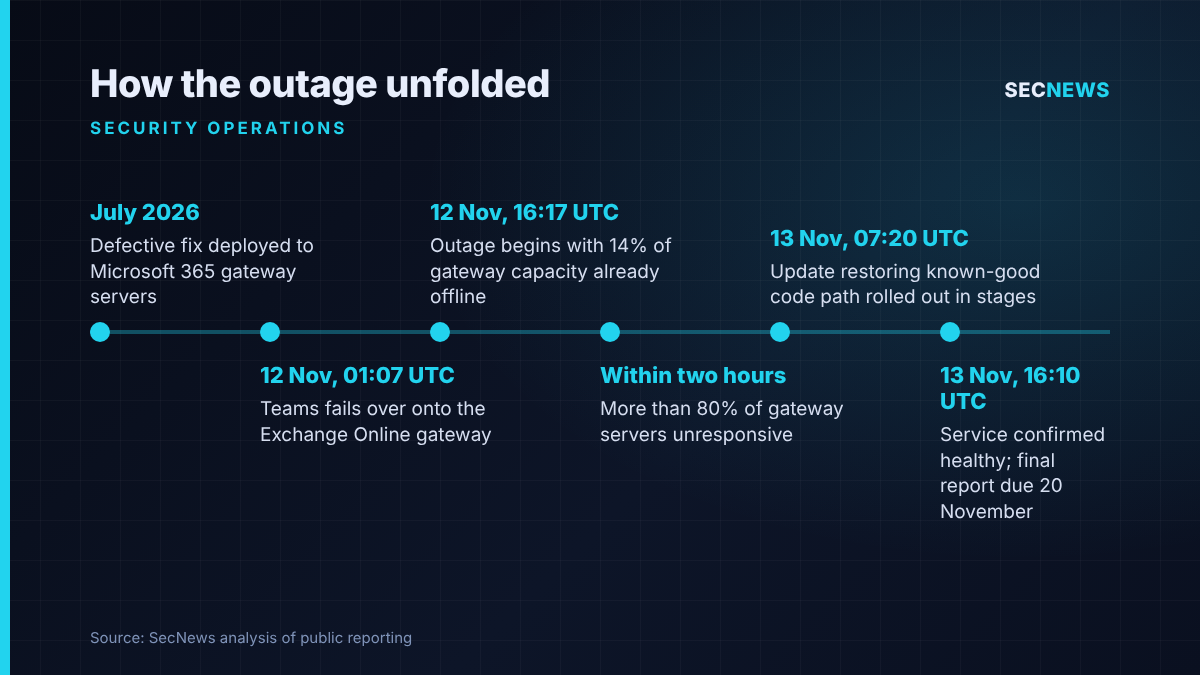
Our 14 November coverage looked at early loss estimates. The new development is the root cause. According to the PIR, a fix built specifically for the Microsoft 365 network gateway servers in July 2026 contained a defect. It passed load testing, went through Microsoft’s staged deployment process and ran in production without visible problems for over three months. Microsoft states that the flawed change is confined to those gateways and does not apply to broader Windows deployments.
Microsoft’s service health entries put the main impact at 16:17 UTC on 12 November to 16:10 UTC on 13 November, which is the same in UK time. In the UK, an NHS trust reported staff unable to send or receive email, forces including the Metropolitan Police and South Wales Police asked the public to phone 101 rather than use online forms, and Northern Ireland’s Education Authority said schools had lost Outlook.
The technical picture
The PIR describes three conditions lining up. First, the July change introduced lock contention inside an internal Windows process on the gateway servers, which under certain load exhausted CPU and memory until machines stopped responding. Microsoft admits its testing regime “tended to focus on weaker hardware with fewer cores”, yet the problem is worse on newer, higher-core machines. The test lab simply did not look like production.
Second, at 01:07 UTC on 12 November, Teams moved its traffic onto the primary gateway that also serves Exchange Online, a failover Microsoft regards as routine. Third, close to 14 per cent of that gateway’s capacity was already offline because of a separate fault the day before. Either condition alone was survivable, Microsoft says. Combined during the busy US working day, they tipped the servers into the dormant bug.
What followed was a classic cascade. As servers stopped responding, traffic management pushed users to the remaining endpoints, which then hit the same fault. Within two hours more than 80 per cent of gateway servers were unresponsive. Microsoft adds that a separate problem prevented the bulkheads between capacity partitions from containing the failure, which is how a local fault went global. Teams, OneDrive, SharePoint and Office apps could route around the broken gateway and recovered sooner. Exchange Online cannot, for reasons of scale, so mail stayed down longest.
Recovery was slow because the usual levers did not work. Servers returned to service were immediately overwhelmed again, and the automated recovery tooling was never built for so much of the fleet failing at once. Rolling back was impossible because the change was months old. Engineers pinned the problem on connection negotiation at 00:30 UTC on 13 November, then from 07:20 UTC applied an update restoring the affected Windows code path to its earlier known-good state, server group by server group. Microsoft extended the mail timeout window to 48 hours so delayed messages were not lost.
Why it matters for UK organisations
This was not a cyber attack. But availability is a core security property, and for many UK organisations Exchange Online and Teams are where incidents are declared, bridges convened, on-call staff paged and supplier security notices received. When both fail, much of the typical incident response plan fails with them.
The NHS showed why separation matters. Guy’s and St Thomas’ said staff could not send or receive email while services carried on, and Leeds Teaching Hospitals stressed that its clinical systems were unaffected. Organisations whose ticketing, alerting and identity workflows all depend on Microsoft 365 mail will have felt the outage far more.
The trigger pattern also applies to your own estate. Firewall clusters, VPN concentrators, identity providers and SIEM ingestion pipelines all have failover paths that rarely carry full production load until the day they must.
Expert view
In my experience, the most revealing part of any post-incident report is the section on testing, and this one is unusually candid. A change that behaves on test kit and only fails on bigger production hardware is something I see regularly in client environments, at smaller scale. Staging rarely mirrors production, and nobody notices until a failover exposes the gap.
The second lesson is blast radius. Microsoft had bulkheads designed to stop exactly this spread, and they failed for an unrelated reason. Segmentation is usually discussed as a brake on lateral movement by attackers, but it matters just as much for containing faults, and it deserves the same adversarial testing.
Third, rollback. Most change processes assume you can revert the last change. A defect that waits three months breaks that assumption, and good change records and configuration baselines are what shorten the hunt for the culprit.
None of this is a case for leaving the cloud. The point is to plan for the platform being unavailable.
What to do now
- Save the PIR. Service health only retains issue history for 30 days. Keep the preliminary report now and the final one after 20 November for your risk register and supplier reviews.
- Build an out-of-band incident channel. Your response plan should run without Microsoft 365: a separate messaging tool, an SMS or phone cascade, and offline contact lists for responders and key suppliers.
- Send service health alerts outside Microsoft 365. Route them to an external mailbox or pull them into monitoring through the Microsoft Graph service communications API, so you hear about an outage even when Outlook is down.
- Map security workflows that depend on mail. SIEM and EDR alerts, ticket creation, password reset messages and supplier breach notices each need an agreed fallback.
- Freeze your own changes during a supplier incident. Microsoft paused its deployments while recovering, which keeps diagnosis clean.
- Test failover under realistic load. Apply the lesson to your own clustered firewalls, VPNs and identity services. This complements the Cyber Essentials secure configuration and security update controls, though the scheme itself does not assess resilience.
- Warn staff about outage-themed phishing. Big outages make reliable lures for fake “service restored” and re-authentication emails. Genuine notices appear in the admin centre.
Bottom line
Microsoft’s report replaces a vague early explanation with a clear chain: a three-month-old defect, test hardware unlike production, a routine failover, missing capacity and containment that did not hold. Use the final report on 20 November to test your own plans against one question: could you still run an incident if email and Teams vanished for a day?
Sources
- The Register: Microsoft blames monster email outage on software defect introduced in July fix
- Microsoft service health incident entries EX1550543 and MO1550821 (University of Pennsylvania extract)
- StatusStack: Microsoft 365 and Exchange Online outage, November 12, 2026
- Azure Blog UK: Microsoft 365 outage, 12 November 2026: what happened and what admins can do
- The Independent: Microsoft outage sparks chaos across NHS, police and schools