Signal now blocks AI assistants on iOS 27, and detectable ones on Android, from capturing its chat screens by default. It also admits that the fix is partial: it does nothing about filesystem access or macOS, and it depends on the operating system vendors giving apps a proper way to opt out.
What happened
On 20 November 2026 Signal Foundation president Meredith Whittaker published a blog post setting out new restrictions on the AI agents that Apple and Google are building into their mobile operating systems. The updated iOS and Android apps now try to stop those agents from reading Signal conversations off the screen. Signal names Apple’s Onscreen Awareness for Siri and Google’s Gemini Intelligence as the features it has in mind.
Signal has done something similar before. Last year it switched on screenshot blocking by default on Windows 11 to keep Microsoft Recall, which captures the screen every few seconds and indexes the text, from storing copies of messages. The new measures apply the same reasoning to phones.
The timing matters. Shortly before the post, Reuters reporting showed Meta’s Muse agent reading Signal message text on Android and on a Mac through permissions granted during setup. We covered those findings on 20 November. Signal’s post names Muse and says such agents treat accessibility settings as a skeleton key.
The technical picture
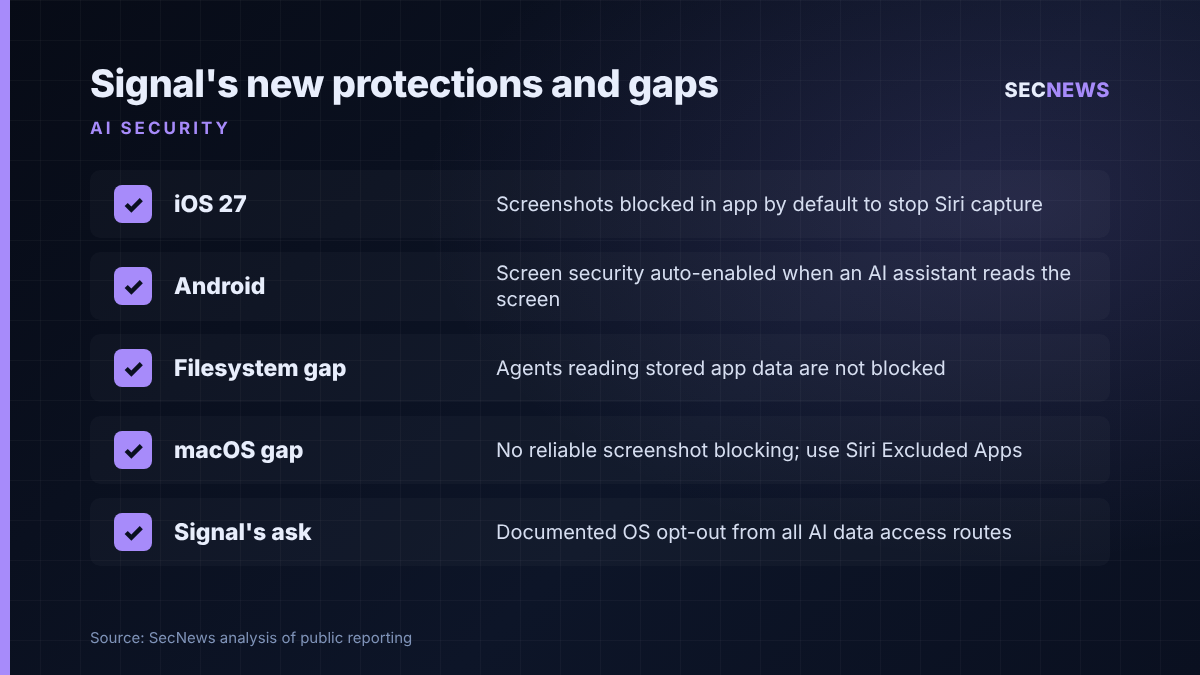
The controls differ by platform. On iOS 27, Signal now blocks screenshots inside the app, which takes away the main way an on-device assistant gets at app content. According to The Hacker News, users can switch this off under Settings, Privacy, App Security, using a toggle labelled “Block Siri AI”.
Android is harder. Signal says that on many vendor builds it cannot reliably detect a screenshot attempt if screenshots are already disabled. Instead it watches for an AI assistant trying to read the screen. When it sees one, it turns on its existing “Screen security” setting automatically. As a result, coverage depends on the device and the Android distribution.
Signal lists three gaps itself:
- Filesystem access. Blocking screenshots does nothing to stop an agent that reads app data already stored on the device.
- macOS. Signal says it cannot reliably block screenshots on the Mac because Apple has no clearly documented API for it. For now it suggests Mac users list Signal under Excluded Apps in the Siri settings.
- User opt-out. Anyone who turns the protection off to take screenshots also exposes their contacts’ messages, not just their own.
After months of forensic work to understand how the assistants reach app data, Signal is asking Apple, Google and Microsoft for two things. The first is a simple, documented way for an app to opt out of AI access through every route: screen reading, filesystem, notifications, APIs and other OS frameworks. The second is proper technical specifications for how the agents handle data. Signal says confidential computing is not a complete answer, because the platform vendor still decides how much privacy users actually get.
The platforms are changing too. The Hacker News reports that Apple’s iOS 27.2 added an Excluded Apps option for Siri and suggestions, and that Gemini users can disconnect apps through Connected Apps settings. The Register notes that the macOS 27.3 public beta adds finer controls over Full Disk Access and Device Control and Data Access. Apple says the risks of broad access will “grow substantially” as agents become more capable.
Why it matters for UK organisations
Many UK organisations allow Signal, or quietly tolerate it, for conversations staff consider sensitive: incident bridges, board discussions, journalism, legal matters and dealings with suppliers. The usual risk assessment rests on the protocol, which is open source and formally verified. Signal’s post makes clear that the protocol is no longer the weak point. Once a message is decrypted and shown on screen, any agent with screen, notification or accessibility access can capture it and send it on to a local database or a remote service. Signal cannot control what happens next.
From a data protection point of view, that is an unplanned transfer of personal data to an AI provider, possibly including messages from people who never used the agent at all. If staff use phones that carry organisational data, the employer has to account for it under UK GDPR.
Signal will not be the only app affected. Banking, email and password manager apps face the same issue; Signal is simply among the first to ship a countermeasure.
Expert view
When we assess mobile estates, we test the encryption carefully and the permission model hardly at all. That needs to change. An OS assistant with screen access, or a third-party agent granted accessibility rights during a hurried onboarding, has more reach than most of the malware we write detections for, and it arrives signed, trusted and wanted by the user.
I respect Signal for publishing where its fix stops working. Blocking screenshots deals with the most common capture route but leaves the filesystem and the Mac exposed, and on Android it relies on detecting the assistant. Security teams should read the post as a statement of what an app developer cannot do alone, not as an all-clear. Whittaker’s own framing, that Signal is “the canary in the coal mine”, is right. Until platforms provide an enforceable opt-out, control has to come from device management and policy, not from individual apps.
In my experience, organisations that already track which apps hold which permissions adapt fastest. If you cannot say which corporate phones run an assistant with screen access, start there.
What to do now
- Update Signal everywhere it is used for work and check that the new protection is on. Tell staff not to switch it off on devices used for sensitive conversations.
- Inventory AI assistant permissions on managed and BYOD devices. Find out which devices have Gemini, Siri Onscreen Awareness or third-party agents with screen, notification or accessibility access. This maps to the Cyber Essentials controls for secure configuration and user access control, and BYOD devices that access organisational data are in scope.
- Use the platform exclusions now available. Add Signal and other sensitive apps to Excluded Apps on iOS and macOS, and review Connected Apps for Gemini. Push these through MDM where possible.
- Treat Macs as unprotected for the time being. On macOS, restrict Accessibility and Full Disk Access grants for agent tools, and test the scoped permissions in the macOS 27.3 beta.
- Write a personal AI agent policy covering which agents are allowed on devices that handle organisational or client data, and include high-risk roles such as executives, legal and incident responders.
- Update DPIAs and risk registers to include OS-level agent capture of decrypted content as a data flow, including messages from third parties.
Bottom line
Signal has moved early, and its blocking is a useful but partial barrier against assistants built into phone operating systems. The bigger message is that end-to-end encryption ends at the screen, and AI agents are now sitting there. Until Apple, Google and Microsoft give apps a real opt-out, UK organisations need to manage agent permissions on their devices as deliberately as they manage admin rights.