Microsoft has confirmed that its November Windows updates, which begin moving Windows to real NTLM message signing by default, are breaking logons through some third-party authentication proxies and single sign-on products. The registry workaround brings back the relay exposure the patch was meant to remove, so defenders should use the new audit events to find the faulty kit and get it fixed before servers start enforcing signing in May 2027.
What happened
On 10 November 2026 Microsoft shipped Windows updates that address CVE-2026-118737. According to BleepingComputer, it is a high-severity remote code execution flaw in the Windows Remote Procedure Call runtime caused by a timing-dependent authentication weakness. Microsoft’s support article KB5135557 calls this the first phase of hardening NTLM message signing, so that authenticated sessions get a genuine session key and real signing rather than an empty placeholder.
Microsoft has since added a “known issue” section to that article. It says some third-party apps and devices that use NTLM, naming authentication proxy servers, SSO solutions and application packaging tools, can fail to authenticate once the November update, or any later one, is installed. BleepingComputer reported the confirmation on 25 November. There is no permanent fix yet; Microsoft says vendors must bring their products into line with the protocol specification.
The change covers Windows 11 from version 23H2 onwards, Windows 10 Enterprise LTSC 2021 and Windows Server 2016, 2019, 2022 and 2025.
The technical picture
NTLM has two ways of claiming to sign a session. Real signing uses an HMAC-MD5 key that is established during authentication and cannot be forged. The legacy “always sign” mode fills the signature field with sixteen zero bytes and provides no cryptographic protection at all. Until now, Windows handed applications that did not explicitly request integrity a context that used the empty placeholder. That gap helps explain why NTLM relay remains so dependable for attackers.
The rollout has two phases:
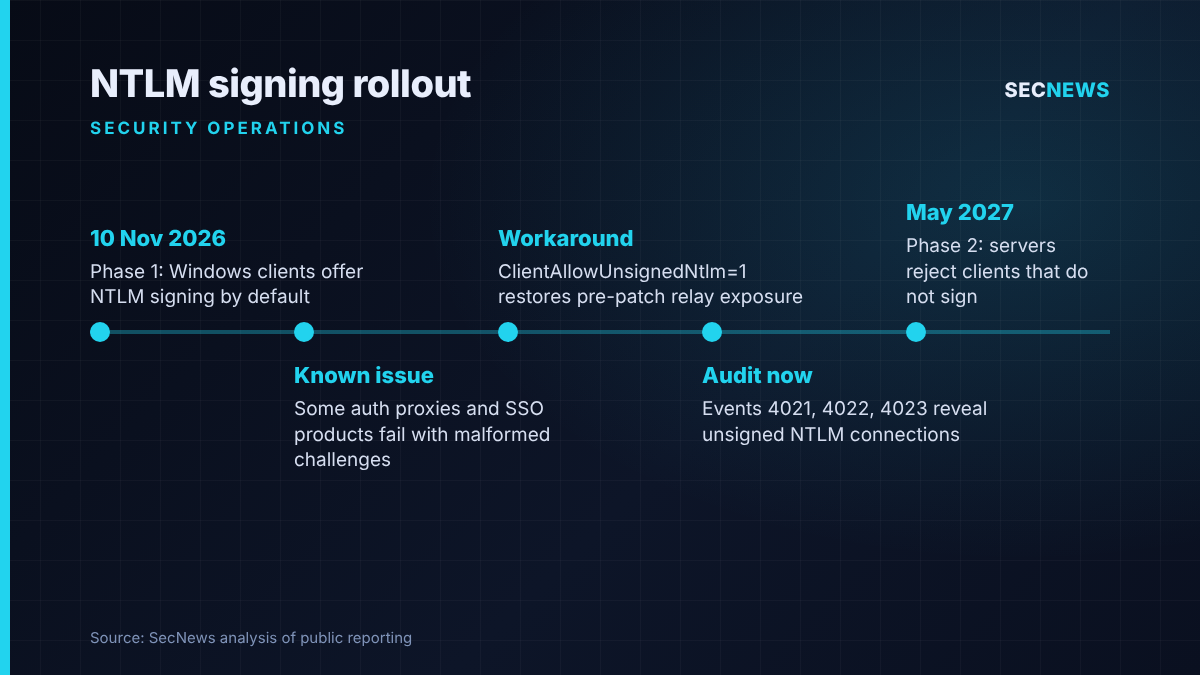
- Phase 1 (10 November 2026): Windows clients offer signing on every non-anonymous NTLM connection by default. Servers still accept both signed and unsigned clients, and auditing events record which clients are not signing.
- Phase 2 (May 2027): servers insist on signing out of the box, and non-signing clients are refused with SEC_E_UNSUPPORTED_FUNCTION (0x80090302), and the server logs event 4023.
Kerberos is not affected. Anonymous null sessions and guest connections are exempt in both phases.
The breakage comes from products that implement NTLM incorrectly. When NTLMv2 is used with signing or sealing, Windows requires the server’s challenge message to include the NetBIOS computer name and NetBIOS domain name in its target information list. Some proxies set the flag saying target information is present but then send an empty or incomplete list. Windows now rejects such attempts with STATUS_LOGON_FAILURE, exactly as section 3.1.5.1.2 of the MS-NLMP specification requires.
Microsoft’s stopgap, setting ClientAllowUnsignedNtlm to 1 under the LSA MSV1_0 registry key, stops the client offering signing, returning that machine to its pre-patch exposure.
Why it matters for UK organisations
Most UK organisations of any size still run hybrid Active Directory, and NTLM survives in more places than most asset registers show: web proxies that challenge browsers for credentials, legacy line-of-business apps, application virtualisation and packaging platforms, and print or scan appliances. Those are the categories Microsoft names.
The operational risk is easy to predict. Users lose the proxy, the service desk finds the workaround, and someone pushes the registry value to every endpoint through Group Policy “to be safe”. A targeted compatibility exception then becomes an estate-wide downgrade that quietly undoes a relay fix. Nothing alerts on it.
There is also a deadline. When Phase 2 arrives in May 2027, any kit that cannot sign will stop working against hardened servers anyway. Find it now and it is a planned change; leave it and it is an outage.
Expert view
NTLM relay comes up in almost every internal infrastructure test we run. Coercing a machine to authenticate and relaying it to a service that does not insist on signing is still one of the quickest paths from an ordinary domain account to privileged access.
In my experience, the danger with fixes like this is rarely the patch. It is the rollback. Registry workarounds applied under pressure almost never get removed, because once the help desk tickets stop, nobody owns the exception. If you apply ClientAllowUnsignedNtlm, treat it as a security exception: scope it to the specific machines that need it, record a named owner and an expiry date, and tell the SOC so they can watch for relay activity against those hosts.
The more useful part of Microsoft’s guidance is the audit data. Events 4022 (client) and 4023 (server) in the Microsoft-Windows-NTLM/Operational log record the negotiated flags for each NTLM authentication. A session is ready for Phase 2 only when both the SIGN bit (0x10) and the key exchange bit (0x40000000) are set and the session key status shows as present. Microsoft warns that signed and unsigned connections are both logged at Warning level, so filtering on severity will not separate them. You have to check the flags. Event 4021 on the client, with a target information value of “Not Found”, points to a device sending the malformed challenge. Microsoft notes that events 4022 and 4023 need Windows Server 2019 or later with NTLM enhanced auditing.
For a SOC, that list of unsigned NTLM users doubles as a list of relay targets and forgotten dependencies.
What to do now
- Do not uninstall the November updates or roll back signing across the estate. Keeping patches applied falls under Cyber Essentials security update management, and that includes not reversing them by policy.
- Collect NTLM operational logs centrally. Forward events 4021, 4022 and 4023 to your SIEM and build a report of connections where the SIGN bit is missing, grouped by client, server and process.
- Confirm the cause before applying the workaround. If authentication through a proxy or SSO product fails, take a network trace and check for an empty target information list in the challenge, or event 4021 showing “Not Found”.
- If you must use ClientAllowUnsignedNtlm, scope it tightly. Apply it only to the affected machines, with an owner and an expiry date. Record it as a deviation under Cyber Essentials secure configuration.
- Push vendors for fixed builds. Ask whether the product supports Kerberos or has firmware or software that meets MS-NLMP 3.1.5.1.2, and log the answers against the May 2027 deadline.
- Enforce early where you can. Once auditing shows no unsigned clients reaching a server, set ServerRequireNtlmSign to 1. Microsoft says no restart is needed. Start with domain controllers and high-value file servers.
- Hunt for relay activity. While exceptions exist, watch for authentication coercion and unusual NTLM logons to sensitive servers.
Bottom line
Microsoft is closing one of the oldest lateral movement routes in Windows, and products that never followed the NTLM specification are failing as a result. The workaround is a stopgap, not a policy. Use the new audit events to find every unsigned NTLM dependency, get the vendors to fix them, and aim to enforce signing on your own timetable well before Microsoft does it for you in May 2027.