1Password says an intruder used one employee’s corporate GitHub account to plant code in its backend and copy account records belonging to some of its customers. Vaults were not touched, but names, sign-in addresses and recovery tokens have been stolen, which hands phishers an ideal target list.
What happened
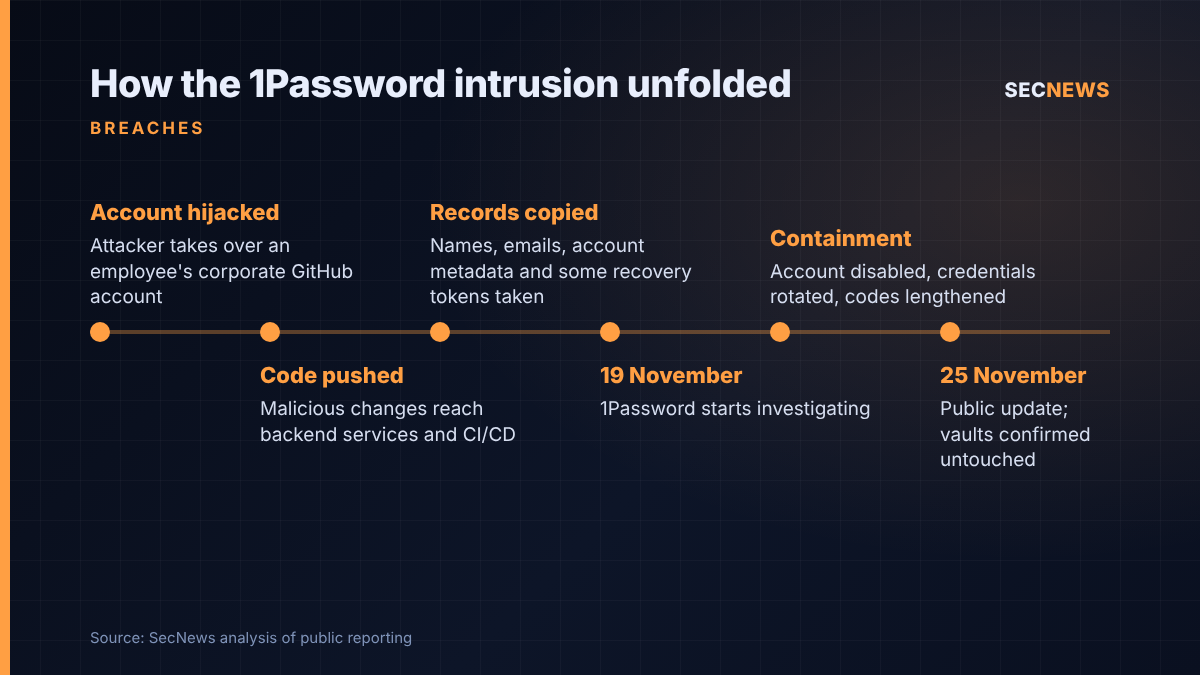
On 25 November 2026, 1Password published an incident update confirming that an attacker had reached parts of its backend infrastructure. The company says its investigation began on 19 November, when it spotted signs that someone had taken control of a staff member’s corporate GitHub account.
From that foothold, the intruder was able to read source code and push malicious changes to backend services. Those changes then pulled administrative records for a subset of 1Password’s user base. The company has not said how many customers are affected, how long the attacker had access, or how the GitHub account was compromised in the first place.
The records taken include customer names and the email addresses used to sign in, account and user identifiers, when each account was created and last used, public keys, Secure Remote Password (SRP) parameters and assorted internal metadata. Some records also contained tokens embedded in emailed links for invitations, SCIM Bridge or hosted provisioning, and account recovery.
Separately, the attacker copied code from private repositories and got into the firm’s CI/CD system, which holds secrets for its infrastructure. 1Password says it has rotated every credential that might have been exposed.
The company is emphatic about what was not exposed: vault contents, the keys protecting them, account recovery keys, and the apps and browser extensions. It does not hold customers’ account passwords or Secret Keys, so neither could be stolen. In its words, vault contents were never “accessed by, or available to, the attacker”.
The technical picture
This is a supply chain style intrusion against the vendor’s own engineering pipeline rather than an attack on its encryption. The chain is short: compromise a developer identity, use it to change code that runs in production, then let that code do the data collection.
The most interesting exposed items are the provisioning and recovery tokens. According to 1Password, a token on its own cannot open an account. Completing an invitation or recovery also needs an SSO sign-in or a short code sent to the registered email address. That second factor was a six-digit number, which in principle could be guessed at scale. The company has now lengthened it to ten alphanumeric characters, which it says makes brute force guessing practically impossible. Only a small number of users were mid-provisioning or mid-recovery during the incident, and those people have been contacted directly. 1Password reports no internal evidence of account takeovers using the exposed tokens.
The company says the SRP values cannot be used to access an account, and the public keys are public by design. The CI/CD access is the part I would watch most closely. Build systems hold signing material and cloud credentials, and the reassurance here rests on the completeness of the rotation and on the independent experts 1Password says it has brought in to check its containment.
According to 1Password, the compromised GitHub account has been shut off, the stolen token is no longer valid, clean versions of the affected services are back in place and fresh detection rules are running.
Why it matters for UK organisations
1Password is widely used across UK businesses, from small firms on its Teams tier to large enterprises provisioning staff through SCIM and SSO. For most of them, the immediate risk is not to stored secrets but to people. An attacker now holds a verified list showing who uses 1Password, at which email address, and roughly when they last signed in. That is exactly the context needed to write a convincing fake “account recovery” or “invitation” email.
The incident also matters as a pattern. The weak point was not the vault design, which held up, but a single engineer’s code hosting account with enough reach to alter production. If a security vendor can be reached this way, so can a UK fintech, retailer or council supplier.
There is a data protection angle too. Names and work email addresses are personal data under UK GDPR. Organisations using 1Password Business should review the vendor’s notice against their own records of processing and contracts, decide whether any internal or regulatory notification is warranted, and document that decision. In most cases the answer will be monitoring and user awareness rather than a report to the ICO, but the reasoning should be written down.
Expert view
When we test organisations, developer identities are consistently among the most powerful and least protected accounts in the estate. A personal access token on a laptop, a GitHub session without phishing-resistant MFA, or a CI runner with broad cloud permissions can each give an attacker more than domain admin would. This incident is a clean example of that risk playing out against a company whose whole business is security.
Credit where it is due: the architecture did what it was meant to do. End-to-end encryption with keys only the user holds meant that backend access did not translate into vault access. I would not advise anyone to abandon 1Password over this.
But “no action required” is only half the story. The attacker’s prize is credibility. In my experience, the phishing that follows a breach like this is far more effective than generic campaigns, because it references real services and arrives at the right inbox. I would also like to see 1Password disclose how the GitHub account fell, whether through phishing, token theft or a malicious package, because that detail is what other engineering teams need to defend themselves.
What to do now
- Warn users today. Tell staff that 1Password will never ask for their account password or Secret Key, and that they should only enter them in the official app or a site address they have typed themselves. Treat any unexpected invitation or recovery email as suspicious and report it.
- Review recovery and provisioning activity. Admins should check the 1Password activity log for recovery requests, new invitations and provisioning events they did not start, particularly since 19 November.
- Tighten mail filtering. Add rules or banners for messages impersonating 1Password and check that DMARC, SPF and DKIM enforcement are in place for your own domains.
- Audit your own developer access. Enforce phishing-resistant MFA on GitHub and other code platforms, shorten token lifetimes, remove unused tokens and limit who can push to production branches. This maps directly to the Cyber Essentials user access control requirement.
- Harden CI/CD. Require reviewed merges for production code, keep secrets in a vault with scoped, short-lived credentials, and alert on unusual pipeline runs. Secure configuration and malware protection controls in Cyber Essentials apply here.
- Record your assessment. Note the vendor notice, your risk decision and any user communications for UK GDPR accountability and supplier risk files.
Bottom line
1Password’s encryption kept customer secrets safe, and its response appears thorough. The real damage is a high-quality phishing list and a reminder that developer accounts are a direct route into production. UK organisations should brief users now and apply the same scrutiny to their own engineering pipelines.
Sources
- 1Password: Update on a security incident involving 1Password’s backend systems
- Cyber Security News: 1Password Hacked – Attackers Breach Backend Systems and Steal Customer Data
- SQ Magazine: 1Password Says Hijacked Employee GitHub Account Exposed Customer Emails
- Android Central: 1Password confirms backend data breach, here’s what hackers actually stole