Two infostealer operations have stopped relying on stolen passwords alone and are now quietly taking control of victims’ web browsers to read their email. For security operations teams, the useful evidence is not in the inbox but in browser policy, profile files and extension inventories that few SOCs routinely watch.
What happened
On 26 November 2026 Bitdefender Labs published research on a campaign it calls SYS010, which it assesses as the second major generation of the SYS01 infostealer it documented in 2024. The first malicious advert in the new wave appeared on 16 October. Victims are lured through Meta adverts offering free animated desktop wallpapers, with the lures impersonating Wallpaper Engine and similar tools. One advert alone reached more than 6,000 people. The download installs a working wallpaper app while malicious components load in the background.
Separately, BleepingComputer reported on research by Gen Threat Labs into Remus, a commercial infostealer whose developers began advertising a Gmail “zero-day” on underground forums on 8 November. They claimed it gave persistent mailbox access even after the victim changed their password and revoked sessions. Gen’s reverse engineering found no Gmail flaw at all: the module simply plants a malicious Chrome extension in the victim’s profile.
Neither report names UK victims. Bitdefender’s telemetry shows connections from across Europe, Asia, the Americas and Africa. But the target set, namely Gmail, Outlook and Meta Business accounts, maps directly onto the way many UK small businesses and marketing teams work.
The technical picture
SYS010’s chain is built to look legitimate at every stage. Bitdefender found the visible executable is a genuinely signed build of an Electron desktop app, abused because its old Electron version does not check the integrity of its resource files, so it loads a malicious replacement. A bundled PHP runtime then runs encoded scripts, kept alive by two scheduled tasks: one at logon and one every three minutes. The loader itself steals nothing. It checks in with command-and-control servers and runs whatever further PHP tasks the operators choose to send, with fallback server addresses hidden in Telegram bot descriptions and Google Docs pages.
The browser takeover is the part defenders should study. Rather than dropping an extension directly, the installer task changes browser policy. For Chrome it writes a CloudManagementEnrollmentToken registry value, enrolling the browser in a Google admin console the attackers control, which then pushes mandatory extensions. For Firefox it writes an ExtensionSettings policy that force-installs an add-on from an attacker-chosen URL and switches off Developer Tools and abuse reporting. For Edge, which on unmanaged machines only force-installs from its own store, it enrols the whole PC in an attacker-run mobile device management server. To get the administrator rights it needs, it raises a PowerShell UAC prompt and, if refused, repeats it every three seconds, up to 99 times.
The resulting extensions, named Docs Helper in Chrome and Document Hub in Firefox (the latter carrying a valid Mozilla signature), steal session cookies and query Meta’s Graph API for ad accounts, Business Managers, Pages and payment details. The Chrome build goes further: it pulls the 50 newest Gmail and Outlook messages per request through the existing browser session, sends them to the operators and permanently deletes messages the server selects. Bitdefender suggests the aim is to erase login alerts and codes that would reveal an account takeover.
Remus takes a different route to a similar end. Because Chrome 137 and later dropped the command-line switch malware once used to load extensions, Gen found that Remus edits the Chrome profile’s Preferences or Secure Preferences file directly, recalculating its integrity values with a technique public since 2015, and turns on Developer Mode so the unpacked extension runs. Disguised as “Google Sheets”, it checks every minute for unread mail across up to ten signed-in Gmail accounts and posts subjects, bodies and senders to its server. Gen is clear that this survives a password reset only in the sense that nobody removes the extension: once the user signs back in, collection resumes.
Why it matters for UK organisations
Many UK small firms run their entire business through a browser: Google Workspace or Microsoft 365 for mail, Meta Business Suite for marketing and a card attached to the ad account. A compromise of that browser gives an attacker mail, ad spend and a trusted brand from which to run further malicious adverts, which is exactly how SYS01 has spread before.
The bigger lesson for SOCs is that standard incident response steps can fail quietly. Resetting the password and revoking sessions, the first actions in most account-takeover playbooks, do not remove a force-installed or profile-planted extension. If the endpoint is not examined, the attacker is back in the moment the user logs in again. And because SYS010 deletes alert emails, the user may never see the warning that would normally trigger a ticket.
Expert view
When we assess endpoint estates, browser configuration is one of the least monitored areas I come across. These two campaigns show attackers deliberately working inside that blind spot, using the same management features enterprises rely on to deploy extensions at scale.
Be sceptical of criminal marketing, too. The Remus “zero-day” was a sales pitch; the risk is real, but the fix is ordinary hygiene rather than an emergency vendor patch.
In my experience the organisations that cope best with this class of threat are those that treat the browser as managed infrastructure: a defined extension allowlist, policy set centrally, and alerts when local policy diverges from it.
What to do now
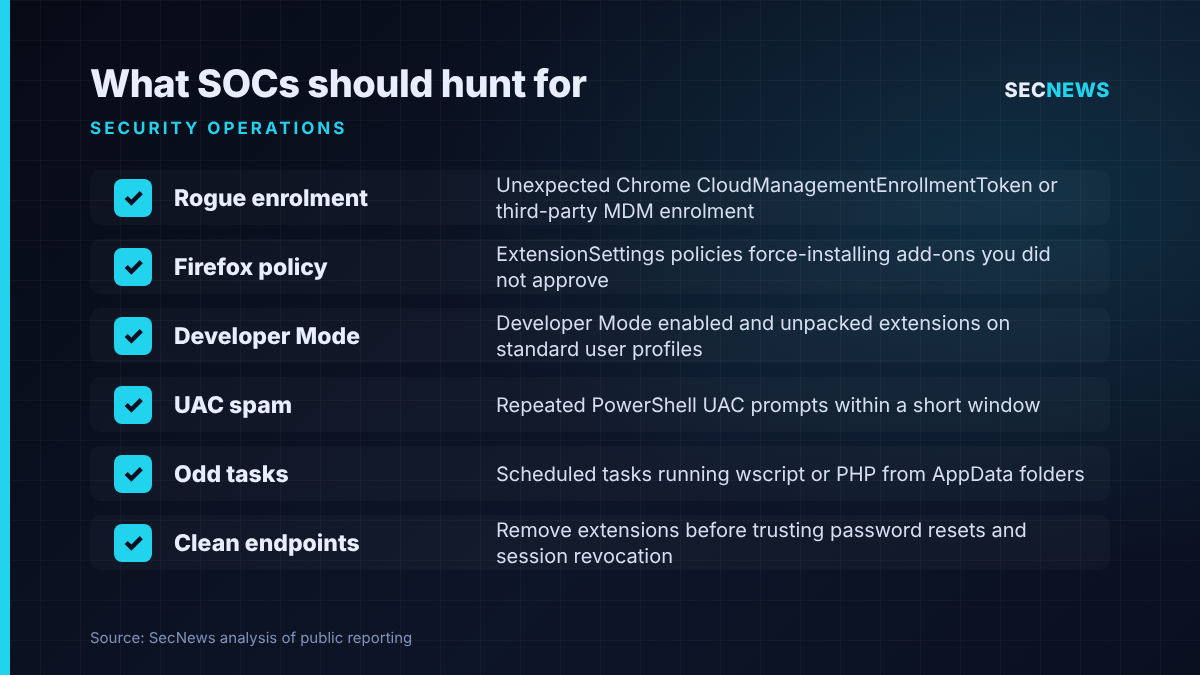
- Hunt for rogue browser enrolment. Search registry and configuration telemetry for Chrome CloudManagementEnrollmentToken values your organisation did not set, unexpected Firefox ExtensionSettings policies, and Windows MDM enrolments to servers you do not own. Bitdefender lists schools-account[.]com and svc.workplace-local[.]com among the indicators.
- Inventory extensions. Compare installed extension IDs against an allowlist and against the IDs published by Bitdefender and Gen. Flag any unpacked extension and any profile with Developer Mode switched on outside developer groups.
- Watch the precursors. Alert on repeated UAC prompts from PowerShell in a short window, scheduled tasks launching wscript.exe or a PHP interpreter from user AppData folders, and processes writing to Chrome’s Preferences or Secure Preferences files other than Chrome itself.
- Fix the playbook. For any account takeover, examine and clean the endpoint and browser profile before or alongside credential resets and session revocation. Check mailbox audit logs for permanent deletions of security alerts.
- Enforce policy centrally. Manage Chrome, Edge and Firefox through your own console with an extension allowlist and Developer Mode disabled for standard users. This aligns with the Cyber Essentials secure configuration and malware protection controls, and removing local admin rights (user access control) blunts the UAC-spamming tactic.
- Protect Meta Business accounts. Limit admin roles, review payment methods and ad activity, and put strong MFA on the email address linked to the account.
Bottom line
SYS010 and Remus show infostealers moving from grabbing cookies to living inside the browser, where password resets do not reach. SOCs that monitor browser policy, extensions and Developer Mode will catch this; those that stop at the identity provider will keep evicting the same attacker.
Sources
- Bitdefender Labs: SYS010 Reloaded: The new malvertising campaign targeting Meta Business Accounts
- BleepingComputer: SYS010 malware abuses browser management to spy on Gmail, Outlook
- BleepingComputer: Remus malware steals Gmail messages via fake Google Sheets extension
- Gen: Exposing the Gmail “Zero-Day” Behind Remus Stealer’s Email Interception Feature