Todoist maker Doist has published an unusually detailed, timestamped account of how one stolen developer credential became production database access in under a day. For security operations teams, the timeline is a ready-made tabletop exercise on CI/CD secrets, identity provider abuse and how quickly a rogue admin account must be spotted.
What happened
On 24 November 2026, Doist, the company behind the Todoist task manager, disclosed that an attacker had reached its production systems the previous day and taken customer information. The firm’s notice, updated again early on 25 November, opens with an apology, stating plainly that it “fell short” in protecting users.
According to Doist, the intrusion began at 14:04 UTC on 22 November, when a stolen credential tied to its version control system was first used. With it, the attacker altered automated workflows in three repositories to harvest further credentials, and was able to read source code along the way. Doist says its investigation found no changes to application code.
The largest exposure involves roughly 6% of users: email addresses, account creation dates and password hashes created with an old salted SHA-1 scheme the company abandoned more than ten years ago but never fully retired. Smaller groups were hit harder. About 0.003% of users had Todoist API and Slack integration tokens taken, around 0.001% had task, comment or attachment content matching credential-like search patterns returned, and a similar fraction had connected Outlook mailboxes queried through the Todoist for Outlook add-in. The Express, which puts Todoist’s user base at around 50 million, reported that affected users could not sign in as normal on Wednesday after Doist reset their passwords.
The technical picture
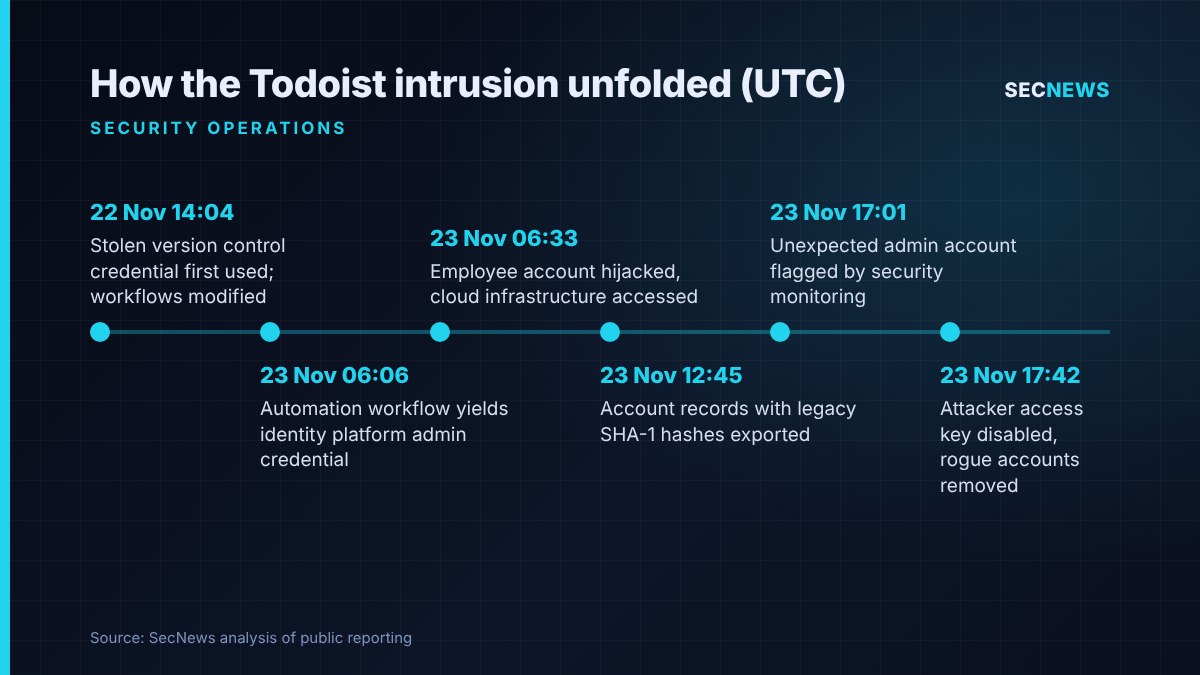
What makes this disclosure valuable is the timeline. All times below are UTC and come from Doist’s own notice.
- 22 November, 14:04: first known use of the stolen development credential; workflow tampering begins.
- 23 November, 06:06: an infrastructure automation workflow hands the attacker an administrative credential for the employee sign-in system.
- 06:33 to 06:54: the attacker changes one employee’s authentication settings, then signs in to cloud infrastructure as that person.
- 08:20 to 08:22: additional accounts are created for persistence.
- 09:08 onwards: production databases are accessed and commands run inside production.
- 12:45 to 12:51: account records with legacy hashes are exported and downloaded.
- 13:05 to 17:12: token queries, Outlook mailbox access and keyword searches of customer content for secrets.
- 17:01: security monitoring flags an unexpected administrator account and investigation starts.
- 17:10 to 17:42: an attacker-created access key is disabled, rogue accounts removed and remote command execution restricted.
Three points stand out. First, the pivot from source control to identity was achieved through automation: a pipeline that held, or could mint, an admin credential for the workforce identity platform. Second, the attacker did not need to phish anyone. Modifying a single employee’s authentication settings was enough to walk in as them. Third, the persistence accounts created at 08:20 sat in the environment for almost nine hours before a monitoring alert on an unexpected administrator fired, and by then the data was gone. Once the alert landed, containment took about 40 minutes, which is respectable.
The Outlook element deserves attention too. The attacker used credentials belonging to the add-in itself to read mailbox data that customers had already authorised, searching for terms linked to developer tools, credentials, cryptocurrency and file sharing. That is OAuth consent working exactly as designed, for the wrong person.
Why it matters for UK organisations
Todoist is a consumer brand, but it is also widely used inside businesses, often without IT ever approving it. If your staff connect it to corporate Microsoft 365 mailboxes or Slack workspaces, your data may have been in scope for the 0.001% and 0.003% groups. Doist notes that reconnecting the Outlook add-in now requires approving a new app that may show as unverified, and that some work or school tenants may block it until Microsoft’s verification completes. That is a moment where tenant admins should decide deliberately rather than let users click through.
The bigger lesson is architectural. Many UK SaaS providers, fintechs and public sector digital teams run exactly this pattern: GitHub or GitLab pipelines with broad cloud and identity permissions. Build systems are often treated as developer tooling rather than as privileged infrastructure, and Doist’s experience shows why that framing is dangerous. Any UK organisation holding customer credentials should also note the cost of legacy password hashing left in place for a decade: UK GDPR expects security measures to keep pace with the state of the art, and “we stopped using it years ago” is a weak defence if old hashes remain.
Expert view
In my experience, when we test CI/CD environments, the most damaging finding is rarely an exotic vulnerability. It is a pipeline token that can do far more than the job it runs needs, sitting one repository commit away from anyone with write access. Doist’s description of an automation workflow yielding an identity platform admin credential is a textbook example, and I would expect many organisations to find something similar if they looked honestly.
The detection story cuts both ways. Doist caught the attacker through monitoring for an unexpected privileged account, which is precisely the sort of high-fidelity alert every SOC should have. But the attacker had been active for over a day, and the first warning signs, modified workflows and changed authentication settings on an employee account, do not appear to have triggered a response. Those are the events I would want a SOC to treat as near-certain compromise indicators, not routine noise.
Credit where it is due: the disclosure is candid, specific and fast, published roughly 23 hours after detection. Plenty of larger firms manage far less. Its precision makes it a gift for anyone building detection use cases.
What to do now
- Check exposure: ask staff whether they received a Todoist notification. Rotate any API keys, tokens or recovery phrases that were ever pasted into Todoist tasks or comments; deleting the comment does not invalidate a copied secret.
- Review OAuth grants: in Entra ID and Slack, audit third-party app consents, including Todoist, and require admin approval for new mailbox-reading apps (Cyber Essentials: user access control).
- Constrain pipelines: scope CI/CD tokens to the minimum, prefer short-lived federated credentials over stored secrets, and require review before changes to workflows that touch infrastructure or identity (secure configuration).
- Alert on the early signals: workflow file modifications, MFA or authentication method changes on staff accounts, new cloud IAM users or access keys, and new privileged accounts should all page someone.
- Retire legacy hashing: force rehashing or resets for any accounts still on outdated password storage rather than waiting for users to log in.
- Prepare for phishing: warn users that Doist’s genuine notice comes only from no-reply@notify.todoist.com and will not ask for passwords or software installs.
Bottom line
Doist’s breach is not unusual in its cause: a stolen developer credential, an over-privileged pipeline and an identity platform that trusted it. What is unusual is how clearly the company has shown the sequence. SOC leads should take the timeline, overlay their own logging and ask at which step they would have caught it. If the honest answer is “only when the admin account appeared”, there is work to do.